State Management Flow
State management flow describes the path that data takes from user interaction through business logic to UI update in a frontend application, typically following a unidirectional data flow pattern.
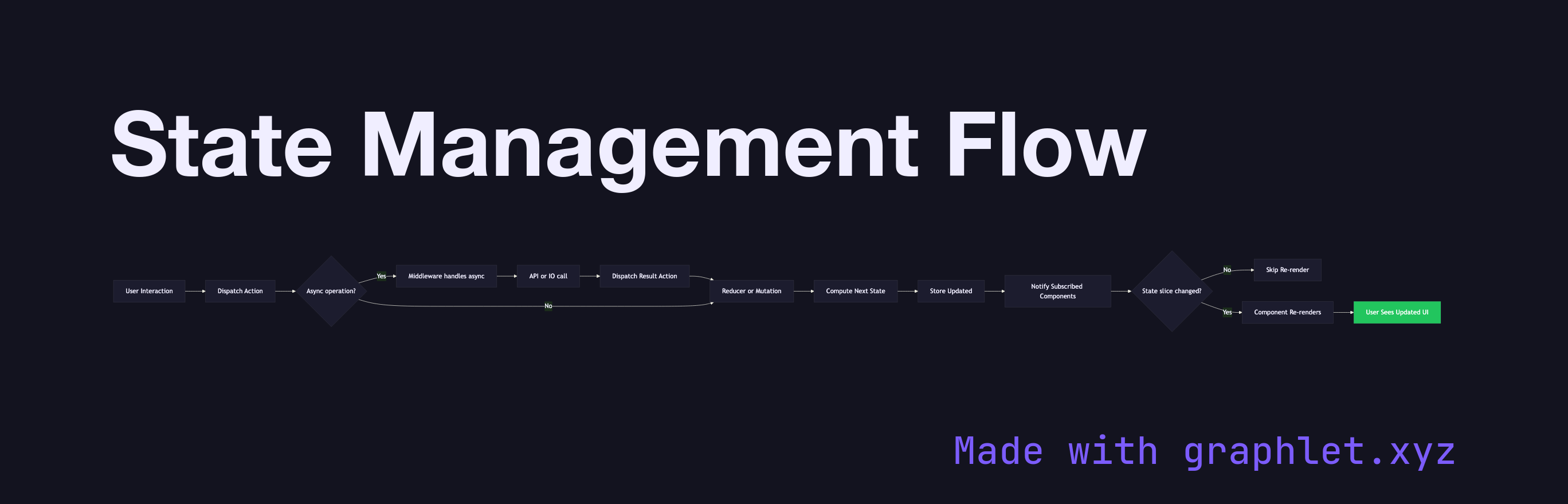
State management flow describes the path that data takes from user interaction through business logic to UI update in a frontend application, typically following a unidirectional data flow pattern.
Unidirectional data flow — popularized by Flux and adopted by Redux, Vuex, Pinia, and Zustand — was designed to solve a specific problem: in two-way data binding systems, it becomes difficult to trace which component changed which piece of state, leading to cascading updates and hard-to-debug bugs. By enforcing that data flows in one direction, every state change has a predictable, traceable path.
The canonical flow starts with a user interaction (a button click, form input, or timer event). The component dispatches an action — a plain object describing what happened ({ type: 'ADD_ITEM', payload: { id: 1 } }). Actions are processed by a reducer (in Redux-style stores) or a mutation (in Vuex/Pinia), a pure function that takes the current state and the action and returns the next state. The store holds this computed state and notifies all subscribed components.
Components that read from the store via selectors or computed properties receive the new state and re-render only if their specific slice changed. This subscription model is what makes fine-grained reactivity possible: a cart component re-renders when cart items change, but a navigation component does not. See Vue Reactivity System for how Vue implements this tracking automatically, and React Rendering Lifecycle for how React handles re-render scheduling.
Async operations — API calls, timers, WebSocket messages — are handled in middleware (Redux Thunk, Redux Saga) or actions (Pinia, Vuex) before dispatching to the reducer. The result of the async call becomes an action payload, re-entering the synchronous flow.
For developers, understanding this flow explains why direct state mutation (outside the store) breaks change detection and why immutability is central to Redux's design.