SPA Navigation Flow
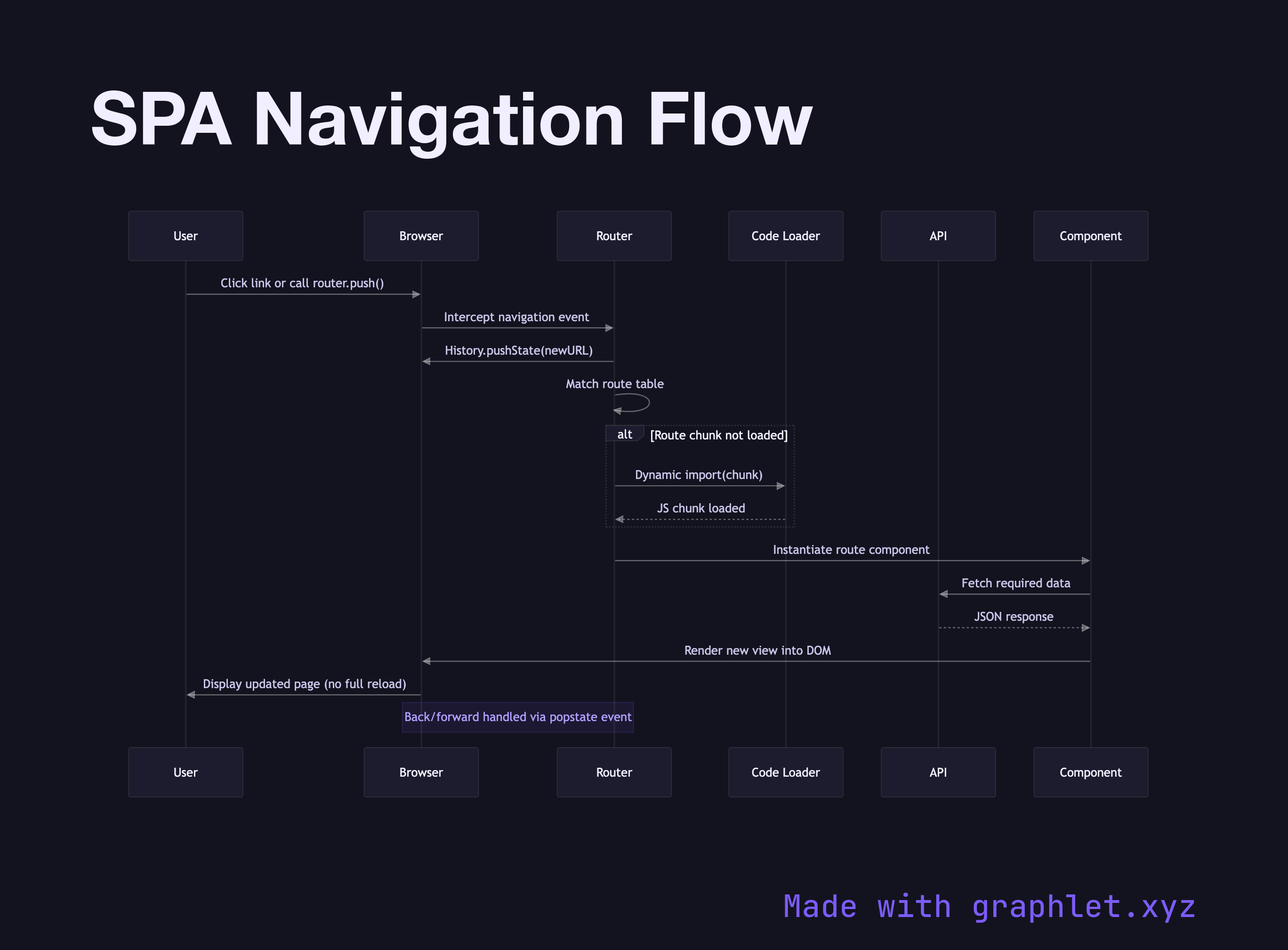
SPA navigation flow describes how a single-page application responds to a URL change without performing a full browser page load — fetching only the data and code needed for the new view instead of an entirely new HTML document.
SPA navigation flow describes how a single-page application responds to a URL change without performing a full browser page load — fetching only the data and code needed for the new view instead of an entirely new HTML document.
In a traditional multi-page application, clicking a link triggers the browser to issue a full HTTP GET, the server returns a complete HTML document, and the browser discards the current DOM and starts fresh. This round-trip typically takes hundreds of milliseconds and causes a visible flash. SPAs eliminate this cost by intercepting link clicks and URL changes, managing navigation entirely in JavaScript, and updating only the portion of the DOM that corresponds to the new route.
When a user clicks a link or calls router.push(), the router library (React Router, Vue Router, Angular Router) intercepts the event and calls the browser's History.pushState() API to update the URL bar without triggering a page load. The router then matches the new pathname against its route table to determine which component or module should render. If the route is code-split (see Code Splitting Architecture), the router dynamically imports the relevant JavaScript chunk. While the chunk loads, the app can display a loading indicator or skeleton screen.
Once the component code is available, the router may dispatch a data-fetching action to the application's data layer — an API call, a store selector, or a query client fetch. The data arrives asynchronously, the component renders with it, and the URL-based navigation is complete. Scroll position management and browser history stack maintenance (popstate event handling for back/forward) are handled by the router to preserve expected browser behavior. See Client Side Routing for the route-matching decision tree in detail.
The SPA model trades initial bundle size for subsequent navigation speed. After the first load, most navigations require only small JSON API responses rather than full HTML documents, making interactions feel nearly instant. This is why Lazy Loading Components and code splitting are essential companions to the SPA pattern.