diagram.mmd — sequence
SSE Event Stream sequence diagram

Server-Sent Events (SSE) is a server-push technology built on plain HTTP that enables a server to stream a sequence of events to a client over a single long-lived connection, using the text/event-stream content type.
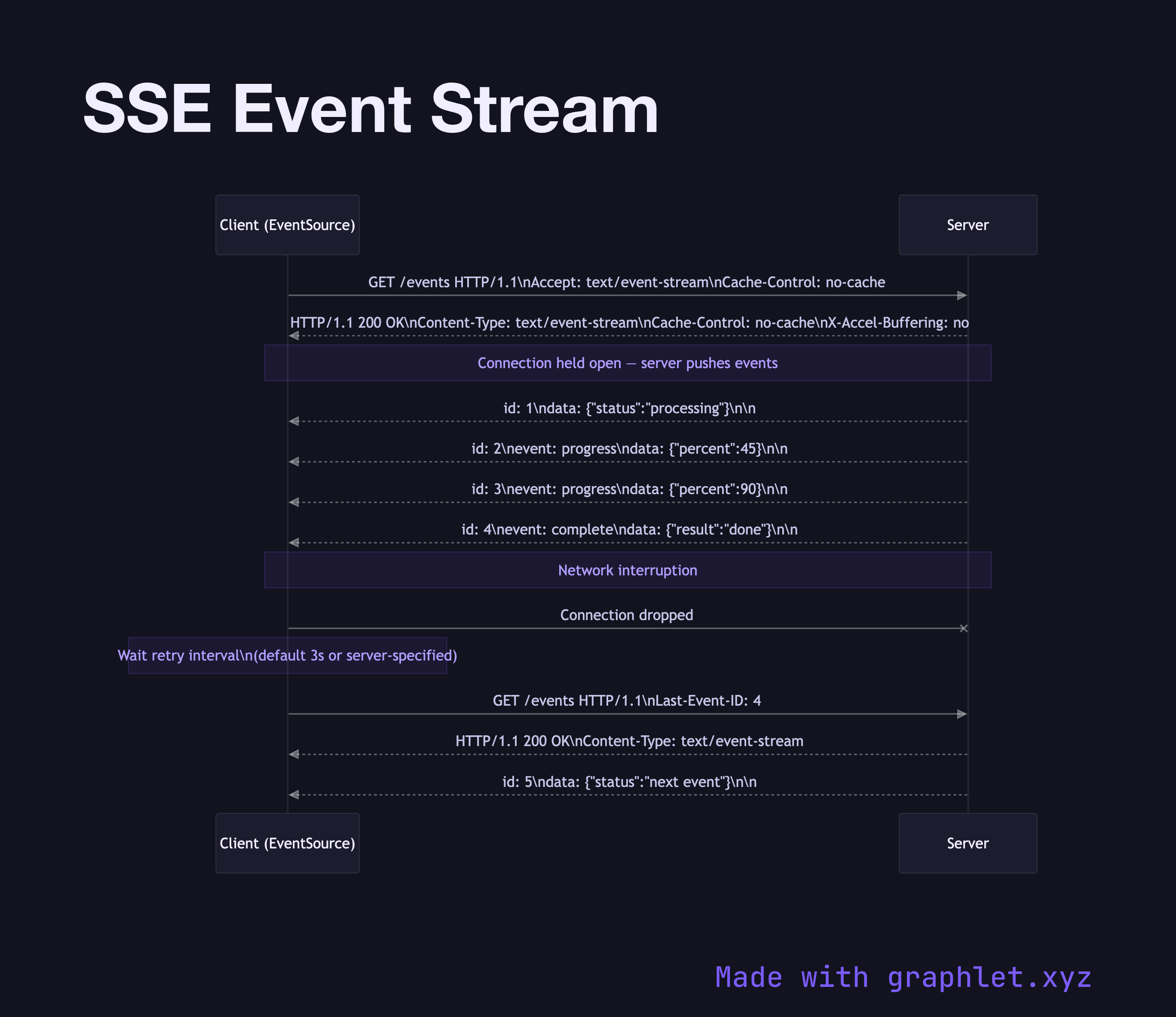
SSE occupies a different niche than WebSockets. WebSockets provide full-duplex communication; SSE is strictly server-to-client. This constraint makes SSE simpler to implement, works over standard HTTP/2 without upgrade negotiation, and is compatible with HTTP caching proxies and firewalls that might block WebSocket upgrades.

Connection Setup: The client makes a standard HTTP GET request with Accept: text/event-stream. The server responds with Content-Type: text/event-stream and Cache-Control: no-cache, keeping the connection open indefinitely.

Event Format: Events are plain text, separated by blank lines. Each event can have an optional id: field (used for reconnection), an optional event: field (custom event type), a data: field (the payload, can be multi-line), and an optional retry: field (reconnection interval in ms).

Automatic Reconnection: The browser's EventSource API automatically reconnects if the connection drops. On reconnect, it sends the Last-Event-ID header with the ID of the last received event, allowing the server to resume the stream from the correct position.

HTTP/2 Multiplexing: Unlike WebSockets (which require their own connection), SSE streams can be multiplexed over an HTTP/2 connection alongside normal requests. This allows many SSE streams with lower overhead per stream.

SSE is ideal for one-directional real-time updates: live dashboards, build status feeds, AI chat token streaming, stock tickers, and notification feeds. For bidirectional communication, prefer WebSockets.

Free online editor
Edit this diagram in Graphlet
Fork, modify, and export to SVG or PNG. No sign-up required.
Open in Graphlet →

Frequently asked questions

Server-Sent Events (SSE) is a server-push technology built on plain HTTP that allows a server to stream a continuous sequence of events to a client over a single long-lived connection using the `text/event-stream` content type. The client opens one standard HTTP request, and the server keeps the response open, sending events as they occur.
The browser's `EventSource` API automatically reconnects if the connection drops. On reconnect, it includes a `Last-Event-ID` header with the ID of the last successfully received event. The server uses this ID to resume the stream from the correct position, ensuring no events are missed. The reconnection interval can be configured by the server using the `retry:` field.
Use SSE when communication is strictly one-directional — server pushing updates to the client (live dashboards, build status, AI response streaming, notification feeds). SSE is simpler to implement, works over standard HTTP/2 without upgrade negotiation, and is compatible with HTTP caching proxies and firewalls that might block WebSocket upgrades. Use WebSockets only when the client also needs to push data to the server.
Over HTTP/1.1, each SSE connection occupies one of the browser's limited TCP connections per origin. Over HTTP/2, SSE streams are multiplexed as individual HTTP/2 streams on a single connection, allowing many concurrent SSE event streams with much lower overhead. This makes SSE over HTTP/2 highly scalable for applications with many simultaneous streams per user.
mermaid
sequenceDiagram participant Client as Client (EventSource) participant Server Client->>Server: GET /events HTTP/1.1\nAccept: text/event-stream\nCache-Control: no-cache Server-->>Client: HTTP/1.1 200 OK\nContent-Type: text/event-stream\nCache-Control: no-cache\nX-Accel-Buffering: no note">Note over Client,Server: Connection held open — server pushes events Server-->>Client: id: 1\ndata: {"status":"processing"}\n\n Server-->>Client: id: 2\nevent: progress\ndata: {"percent":45}\n\n Server-->>Client: id: 3\nevent: progress\ndata: {"percent":90}\n\n Server-->>Client: id: 4\nevent: complete\ndata: {"result":"done"}\n\n note">Note over Client,Server: Network interruption Client-xServer: Connection dropped note">Note over Client: Wait retry interval\n(default 3s or server-specified) Client->>Server: GET /events HTTP/1.1\nLast-Event-ID: 4 Server-->>Client: HTTP/1.1 200 OK\nContent-Type: text/event-stream Server-->>Client: id: 5\ndata: {"status":"next event"}\n\n
Copied to clipboard