diagram.mmd — flowchart
Cloud IAM Permission Model flowchart diagram

Cloud Identity and Access Management (IAM) is the system that controls which principals (users, service accounts, roles) are authorized to perform which actions on which resources — enforcing the principle of least privilege across cloud infrastructure.
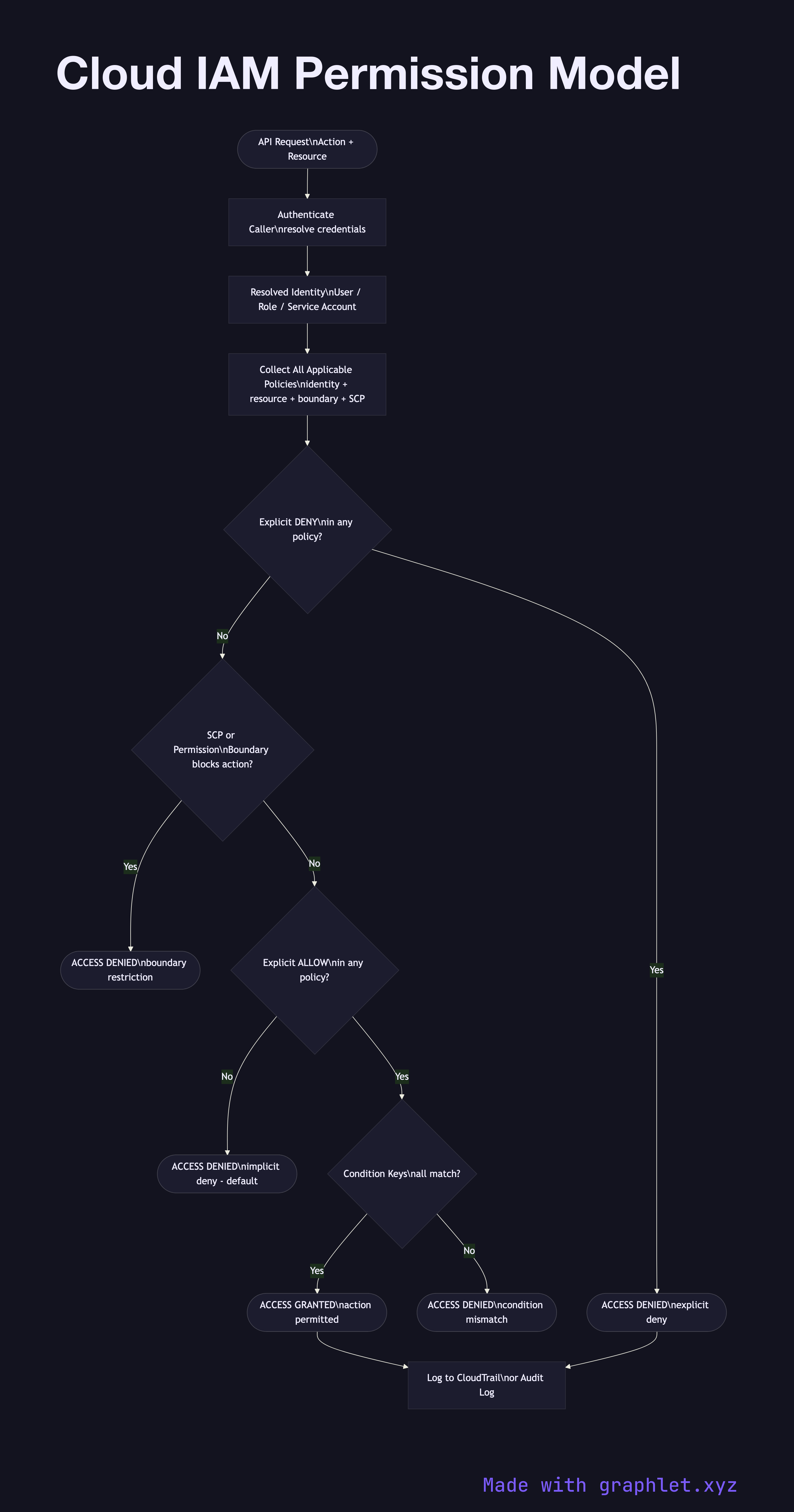
IAM in major cloud providers (AWS IAM, Google Cloud IAM, Azure RBAC) follows a consistent request evaluation model:

1. Identity resolution: The caller presents credentials (access key, OAuth token, instance metadata token). The IAM system resolves these to an identity — an IAM user, role, service account, or federated identity.

2. Policy collection: All policies attached to or applicable to that identity are gathered: identity-based policies (attached to the user/role), resource-based policies (attached to the target resource, e.g., S3 bucket policy), permission boundaries, session policies (for assumed roles), and organization SCPs (Service Control Policies).

3. Evaluation logic: AWS follows the IAM policy evaluation order: explicit Deny always wins over any Allow. If no explicit Deny exists, an explicit Allow in any applicable policy grants access. If neither Deny nor Allow applies, the default is implicit Deny — access is denied.

4. Condition evaluation: Policies may include condition keys (e.g., aws:SourceIp, aws:RequestedRegion, s3:prefix) that must match for the policy statement to apply.

Understanding IAM evaluation order is critical for debugging "access denied" errors. See Cloud Secret Management for how secrets rotate and are scoped to IAM roles, and Serverless Architecture for how Lambda execution roles are granted IAM permissions.

Free online editor
Edit this diagram in Graphlet
Fork, modify, and export to SVG or PNG. No sign-up required.
Open in Graphlet →

Frequently asked questions

Cloud Identity and Access Management (IAM) is the system that controls which principals — users, service accounts, and roles — are authorized to perform which actions on which resources. It enforces the principle of least privilege across cloud infrastructure by evaluating identity, attached policies, and conditions on every API call.
AWS evaluates IAM in a strict order: an explicit Deny in any policy always overrides any Allow. If no Deny exists, an explicit Allow in an identity-based policy, resource-based policy, permission boundary, or SCP grants access. If neither a Deny nor an Allow applies to the request, the default implicit Deny blocks access. Condition keys are evaluated within each matching policy statement.
Use identity-based policies (attached to users or roles) when controlling what a principal can do across multiple resources. Use resource-based policies (attached to S3 buckets, SQS queues, KMS keys) when granting cross-account access or when the resource needs to define its own access controls independently of the caller's identity.
The most frequent mistakes are using wildcard actions (`"Action": "*"`) or wildcard resources in production policies, granting IAM users long-lived access keys instead of using roles, not applying permission boundaries to limit blast radius for developer roles, and failing to audit unused permissions — which can be identified with IAM Access Analyzer.
IAM users have long-lived credentials (passwords and access keys) associated with a specific human identity. IAM roles are assumable identities with temporary credentials, used by services, applications, or federated identities. Best practice is to use roles for all workloads and federated access for humans, retiring static IAM user credentials entirely.
mermaid
flowchart TD Request([API Request\nAction + Resource]) --> Auth[Authenticate Caller\nresolve credentials] Auth --> Identity[Resolved Identity\nUser / Role / Service Account] Identity --> Collect[Collect All Applicable Policies\nidentity + resource + boundary + SCP] Collect --> ExplicitDeny{Explicit DENY\nin any policy?} ExplicitDeny -->|Yes| Denied([ACCESS DENIED\nexplicit deny]) ExplicitDeny -->|No| SCP{SCP or Permission\nBoundary blocks action?} SCP -->|Yes| Denied2([ACCESS DENIED\nboundary restriction]) SCP -->|No| ExplicitAllow{Explicit ALLOW\nin any policy?} ExplicitAllow -->|No| ImplicitDeny([ACCESS DENIED\nimplicit deny - default]) ExplicitAllow -->|Yes| Conditions{Condition Keys\nall match?} Conditions -->|No| CondDenied([ACCESS DENIED\ncondition mismatch]) Conditions -->|Yes| Granted([ACCESS GRANTED\naction permitted]) Granted --> Audit[Log to CloudTrail\nor Audit Log] Denied --> Audit
Copied to clipboard