diagram.mmd — flowchart
Container Deployment Pipeline flowchart diagram

A container deployment pipeline is the automated sequence of steps that takes application source code from a developer's commit and produces a running, verified container workload in a cloud environment — typically a Kubernetes cluster or container orchestration service.
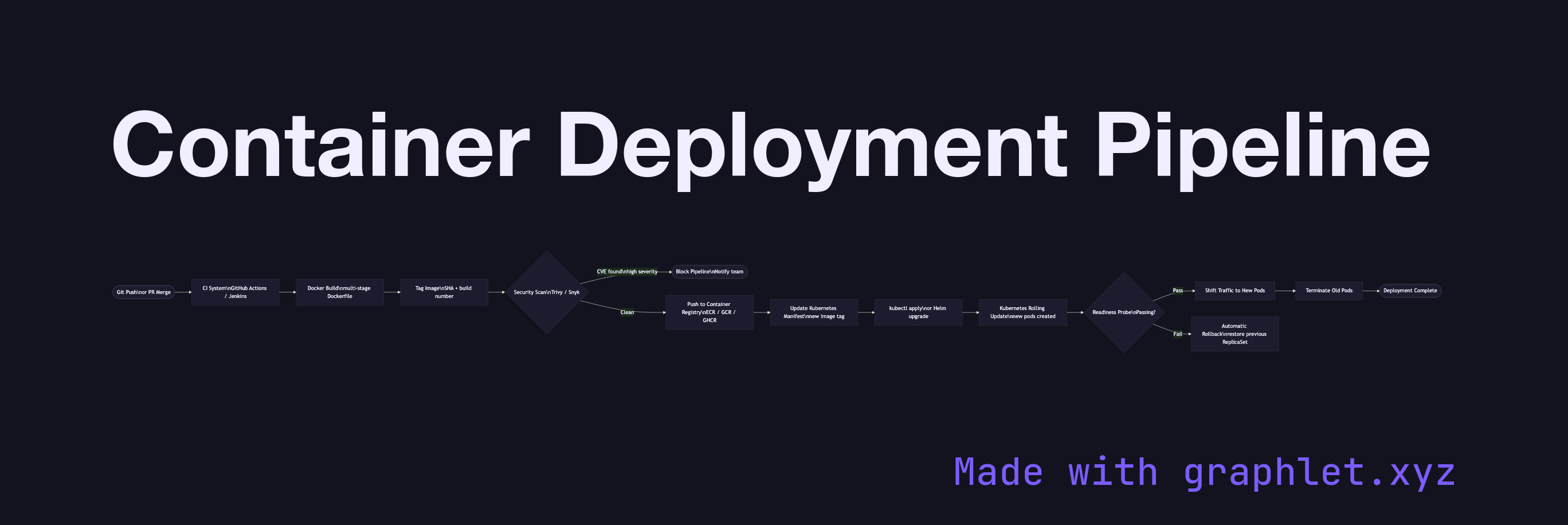
The pipeline begins with a source trigger: a push to the main branch or a merged pull request fires a webhook to the CI/CD system. The build stage pulls the code and runs the Dockerfile to produce an image. Best-practice Dockerfiles use multi-stage builds — compiling in a builder image and copying only the final binary into a minimal runtime image, reducing final image size from hundreds of megabytes to tens.

The built image is tagged with a unique identifier — typically the Git commit SHA plus the pipeline run number — ensuring every deployed artifact is traceable to its source commit. The image is then pushed to a container registry (Docker Hub, AWS ECR, Google Artifact Registry, GitHub Container Registry).

Before deployment, the pipeline runs security scanning (e.g., Trivy, Snyk) to detect known CVEs in base image layers and application dependencies. A failed scan blocks promotion to production.

Deployment updates the Kubernetes manifests (or Helm chart values) with the new image tag and applies them to the cluster. Kubernetes performs a rolling update — spinning up new pods with the new image, waiting for readiness probes to pass, then terminating old pods — ensuring zero-downtime deployments. A failed readiness check triggers an automatic rollback.

See Kubernetes Pod Lifecycle for the pod state transitions during rollout, Kubernetes Service Routing for how traffic shifts to new pods, and DevOps CD Pipeline for the broader continuous delivery context.

Free online editor
Edit this diagram in Graphlet
Fork, modify, and export to SVG or PNG. No sign-up required.
Open in Graphlet →

Frequently asked questions

A container deployment pipeline is the automated sequence of steps that takes application source code from a developer's commit and produces a running, verified container workload in a cloud environment. It covers image building, tagging, security scanning, registry push, and orchestrated deployment to a Kubernetes cluster or equivalent service.
Kubernetes rolling updates replace pods incrementally: new pods with the updated image are created, their readiness probes must pass before they receive traffic, and only then are old pods terminated. This ensures there is always a minimum number of healthy pods serving traffic throughout the rollout. A failed readiness probe halts the rollout and can trigger an automatic rollback.
Use rolling updates for most services — they are resource-efficient and require no duplicate environment. Use blue-green deployments when you need instant rollback capability, are deploying schema migrations that cannot be rolled back incrementally, or need to run acceptance tests against the new version before any production traffic hits it.
Using `latest` as the image tag makes deployments non-reproducible and untraceable. Skipping security scanning lets known CVEs reach production. Not setting readiness and liveness probes means Kubernetes cannot detect unhealthy pods and will route traffic to them. Storing secrets in environment variables baked into the image rather than fetching them from a secrets manager at runtime is a critical security failure.
mermaid
flowchart LR Commit([Git Push\nor PR Merge]) --> CI[CI System\nGitHub Actions / Jenkins] CI --> Build[Docker Build\nmulti-stage Dockerfile] Build --> Tag[Tag Image\nSHA + build number] Tag --> Scan{Security Scan\nTrivy / Snyk} Scan -->|CVE found\nhigh severity| Block([Block Pipeline\nNotify team]) Scan -->|Clean| Registry[Push to Container Registry\nECR / GCR / GHCR] Registry --> UpdateManifest[Update Kubernetes Manifest\nnew image tag] UpdateManifest --> Apply[kubectl apply\nor Helm upgrade] Apply --> RollingUpdate[Kubernetes Rolling Update\nnew pods created] RollingUpdate --> ReadinessProbe{Readiness Probe\nPassing?} ReadinessProbe -->|Pass| ShiftTraffic[Shift Traffic to New Pods] ReadinessProbe -->|Fail| Rollback[Automatic Rollback\nrestore previous ReplicaSet] ShiftTraffic --> TerminateOld[Terminate Old Pods] TerminateOld --> Done([Deployment Complete])
Copied to clipboard