Cloud Storage Upload Flow
A cloud storage upload flow describes the sequence of interactions between a client, an application backend, and an object storage service when transferring a file to the cloud — typically using a presigned URL pattern to avoid routing large payloads through the application tier.
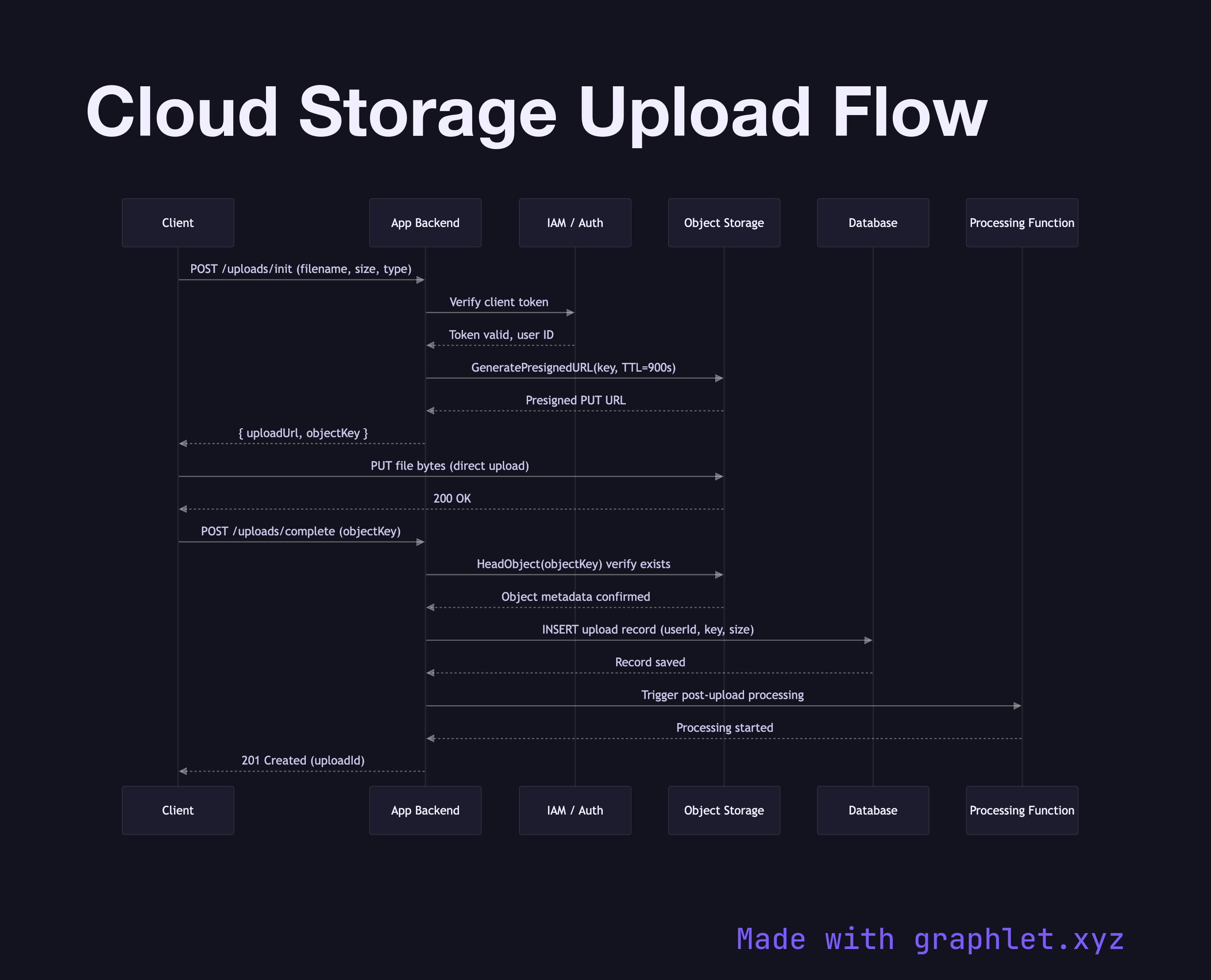
A cloud storage upload flow describes the sequence of interactions between a client, an application backend, and an object storage service when transferring a file to the cloud — typically using a presigned URL pattern to avoid routing large payloads through the application tier.
The presigned URL approach is the industry standard for uploading directly to object storage (AWS S3, Google Cloud Storage, Azure Blob). Instead of the client sending file bytes to the app server, the backend generates a short-lived signed URL that grants the client temporary write permission to a specific storage path. The client then uploads directly to the storage service, bypassing the application tier entirely. This reduces backend bandwidth costs, eliminates file size limits imposed by application servers, and distributes upload load.
The sequence proceeds as follows:
1. The client requests an upload URL from the backend, providing file metadata (name, size, content type). 2. The backend validates the request — checking authentication, file type allowlists, and size limits — then calls the storage API to generate a presigned PUT URL scoped to a specific object key and expiry window (often 15 minutes). 3. The client receives the URL and PUTs the file bytes directly to the storage endpoint. 4. On completion, the storage service emits an object-created event (or the client notifies the backend directly). 5. The backend records the upload in its database and may trigger downstream processing such as virus scanning, thumbnail generation, or CDN invalidation.
See Object Storage Lifecycle for how objects age through storage tiers after upload, and Cloud IAM Permission Model for the permission grants that make presigned URLs work.