diagram.mmd — flowchart
Object Storage Lifecycle flowchart diagram

Object storage lifecycle management is a policy-driven system that automatically transitions objects between storage tiers and eventually deletes them based on age, access patterns, or explicit rules — reducing storage costs without manual intervention.
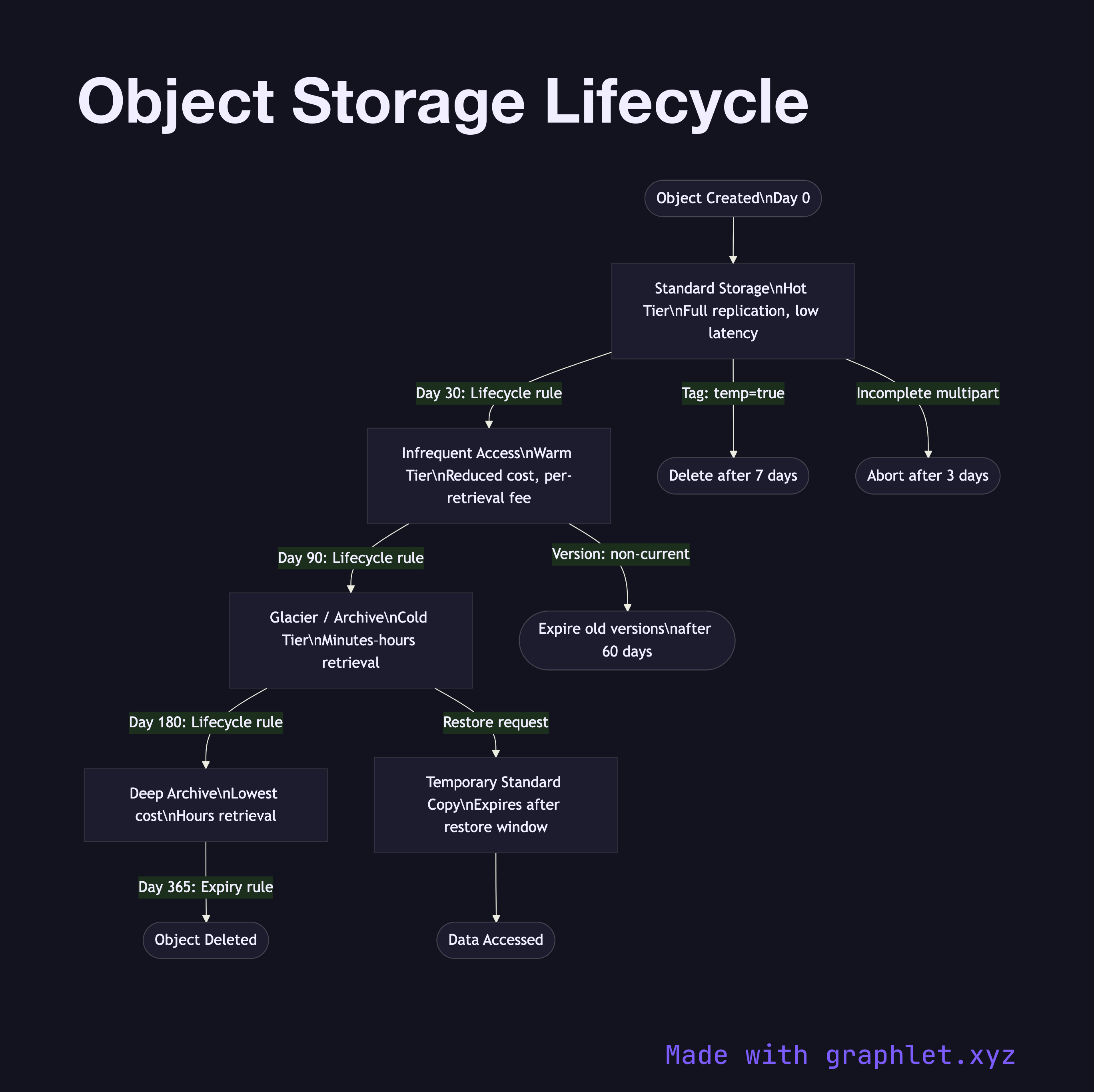
Cloud object storage services (AWS S3, Google Cloud Storage, Azure Blob Storage) offer multiple storage classes designed for different access frequencies. Standard (hot) storage provides low latency at the highest per-GB cost, suitable for frequently accessed objects. Infrequent Access (warm) reduces cost by 40–60% for objects retrieved rarely, with a minimum storage duration (typically 30 days) and per-retrieval fee. Glacier / Archive (cold) tiers cut costs dramatically — sometimes 90% — but impose retrieval delays ranging from minutes to hours.

Lifecycle rules are JSON or YAML policies attached to a bucket. A typical policy chain looks like:

- Day 0: Object created → Standard storage - Day 30: Transition to Infrequent Access - Day 90: Transition to Glacier / Archive - Day 365: Expire (permanently delete) or move to Deep Archive

Rules can also apply to versioned objects — for example, keeping only the 3 most recent versions of a file and expiring older ones after 60 days. Multipart upload cleanup rules handle incomplete uploads that consume storage without being accessible. Lifecycle filters let rules target specific key prefixes (e.g., logs/) or object tags (e.g., env=staging).

For the upload process that produces objects entering this lifecycle, see Cloud Storage Upload Flow. For cost implications of lifecycle decisions, see Cloud Cost Monitoring Pipeline.

Free online editor
Edit this diagram in Graphlet
Fork, modify, and export to SVG or PNG. No sign-up required.
Open in Graphlet →

Frequently asked questions

Object storage lifecycle management is a policy-driven system that automatically transitions objects between storage tiers and eventually deletes them based on age, access patterns, or explicit rules. It reduces storage costs by moving rarely accessed data to cheaper tiers without requiring manual intervention.
Lifecycle rules are JSON policies attached to a bucket that define transition actions (move to a cheaper class after N days) and expiration actions (delete after N days). Rules can filter by key prefix or object tags. Transitions flow in one direction — from hot to cold tiers — and each tier has a minimum storage duration that is billed regardless of early deletion.
Use Infrequent Access for data you retrieve occasionally (monthly) and need within milliseconds — backup restore tests, compliance audits. Use Glacier for data you almost never access and where a retrieval delay of minutes to hours is acceptable — long-term regulatory archives, raw log backups. Glacier Deep Archive offers the lowest cost for data accessed less than once a year.
Not adding multipart upload abort rules causes incomplete uploads to accumulate and incur storage charges indefinitely. Forgetting minimum storage duration charges when transitioning objects too early to Infrequent Access (30-day minimum) or Glacier (90-day minimum) results in unexpected costs. Not applying lifecycle rules to versioned objects causes old versions to accumulate and consume significant storage.
mermaid
flowchart TD Upload([Object Created\nDay 0]) --> Standard[Standard Storage\nHot Tier\nFull replication, low latency] Standard -->|Day 30: Lifecycle rule| IA[Infrequent Access\nWarm Tier\nReduced cost, per-retrieval fee] IA -->|Day 90: Lifecycle rule| Glacier[Glacier / Archive\nCold Tier\nMinutes–hours retrieval] Glacier -->|Day 180: Lifecycle rule| Deep[Deep Archive\nLowest cost\nHours retrieval] Deep -->|Day 365: Expiry rule| Delete([Object Deleted]) Standard -->|Tag: temp=true| EarlyDelete([Delete after 7 days]) IA -->|Version: non-current| VersionExpire([Expire old versions\nafter 60 days]) Standard -->|Incomplete multipart| CleanUp([Abort after 3 days]) Glacier -->|Restore request| Restore[Temporary Standard Copy\nExpires after restore window] Restore --> AccessData([Data Accessed])
Copied to clipboard