Browser Rendering Pipeline
The browser rendering pipeline is the sequence of steps a browser performs to convert HTML, CSS, and JavaScript source files into the visible pixels displayed on screen.
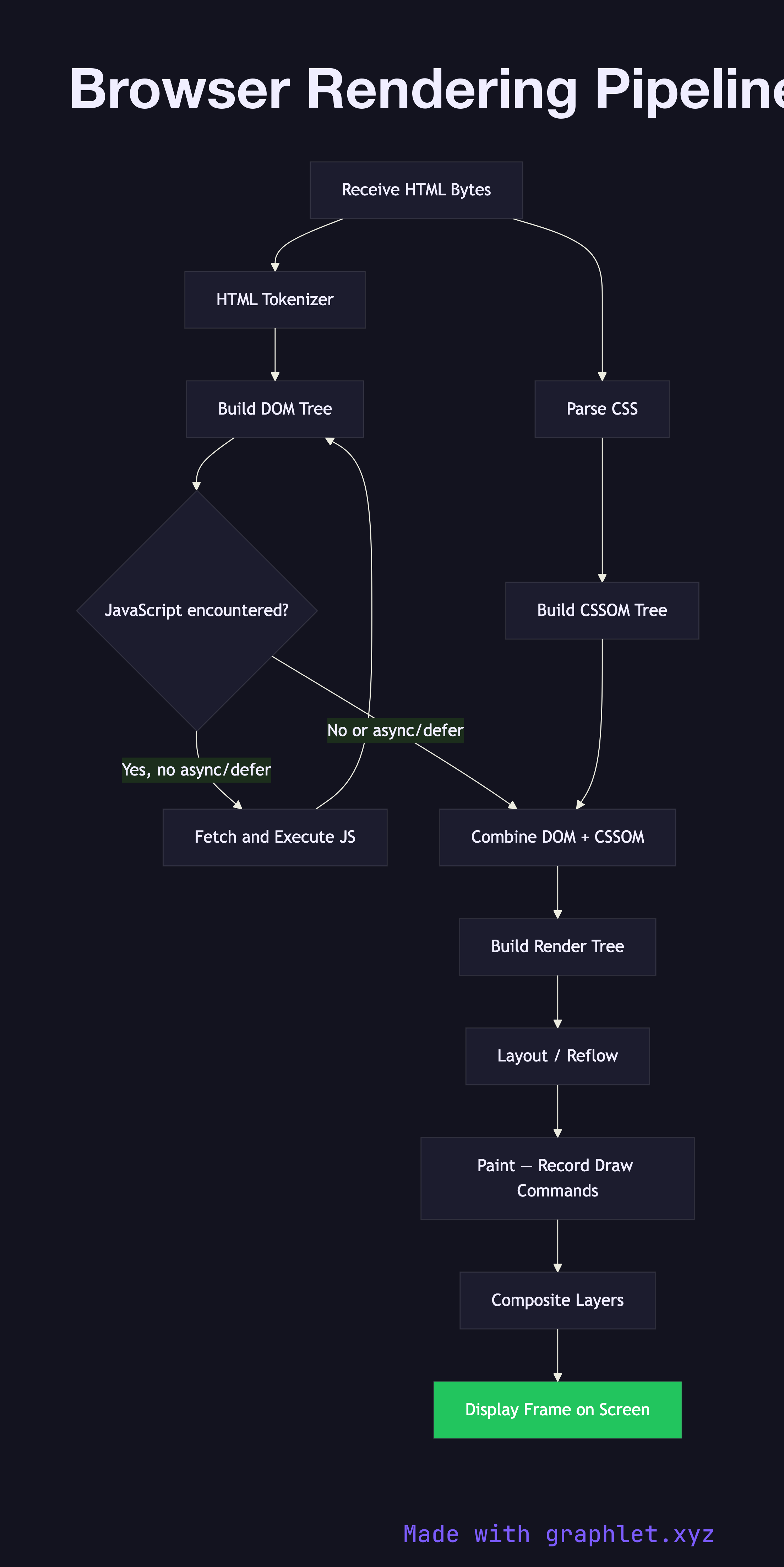
When a browser receives an HTML document, it begins by parsing the HTML byte-by-byte into a token stream, then constructing the DOM (Document Object Model) — a tree representation of every element and text node on the page. In parallel, any CSS encountered (inline, embedded, or from linked stylesheets) is parsed into the CSSOM (CSS Object Model), a parallel tree that maps selectors to computed style rules. JavaScript can block both of these steps: a tag without async or defer halts HTML parsing entirely until the script is fetched and executed, which is why script placement and loading strategy matter so much for performance. See Web Performance Optimization for the full set of techniques.
Once both trees are available, the browser merges them into the render tree — a pruned version of the DOM that excludes display: none elements and attaches computed style to every visible node. The render tree is the input to the layout phase (sometimes called reflow), where the browser calculates the exact size and position of every element in the viewport. Layout is expensive because it is a constraint-satisfaction problem: changing the width of a parent can cascade to reflow dozens of child nodes. This is the cost that DOM Update Lifecycle and Virtual DOM Diffing aim to minimize in JavaScript frameworks.
After layout, painting records draw commands (fill rectangle, stroke path, render text) for each layer into a display list. The browser then composites those layers — potentially using the GPU — to produce the final frame. Some CSS properties (like transform and opacity) can be animated entirely on the compositor thread without triggering layout or paint, which is why they are preferred for smooth 60 fps animations.
For developers building performant UIs, understanding this pipeline explains why CSS selector complexity affects render time, why will-change can promote elements to their own compositing layer, and why server-side rendering (see SSR Rendering Process) can shorten the time to first meaningful paint by delivering a pre-built DOM. Profiling tools like Chrome DevTools' Performance panel expose each stage of this pipeline by name, making it possible to attribute frame budget overruns to specific layout or paint causes.