DOM Update Lifecycle
The DOM update lifecycle describes the chain of events that occurs in the browser from the moment JavaScript mutates the DOM or CSS to the moment the updated frame is visible on screen.
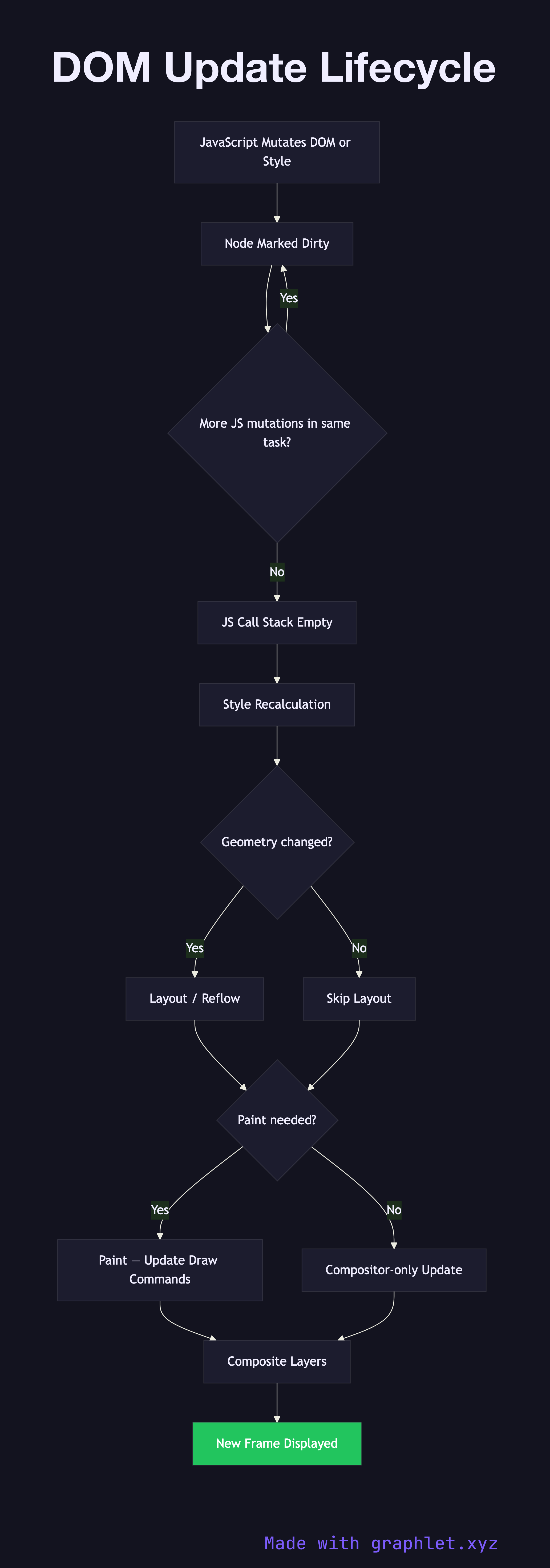
The DOM update lifecycle describes the chain of events that occurs in the browser from the moment JavaScript mutates the DOM or CSS to the moment the updated frame is visible on screen.
Every mutation — setting element.textContent, toggling a class, adjusting an inline style — marks affected nodes as dirty in the browser's internal rendering state. The browser does not repaint immediately; instead, it batches changes and processes them synchronously at the end of the current JavaScript task, before yielding control back to the event loop. This batching is intentional: multiple mutations to the same element in a single task result in only one reflow, not one per mutation.
Once the JavaScript call stack is empty, the browser enters the style recalculation phase, re-evaluating which CSS rules apply to each dirty node. If geometry is affected (width, height, margin, padding, position), a layout / reflow pass recalculates the size and position of affected nodes and potentially their ancestors and descendants. The scope of a reflow depends on which CSS properties changed — modifying font-size on the can trigger a full-page reflow, while changing color on a leaf node is much cheaper.
After layout, painting records the updated draw commands for dirty layers, and compositing merges all layers into the final frame. The total time from mutation to painted frame must fit within 16.67 ms (one frame at 60 fps) to avoid jank. Understanding this lifecycle motivates patterns like batching DOM writes, avoiding forced synchronous layout (reading offsetWidth after a write forces the browser to flush the pending layout immediately), and preferring CSS transform and opacity for animations since they bypass the layout and paint stages entirely and run on the compositor thread.
For framework-level optimizations that reduce the number of raw DOM mutations, see Virtual DOM Diffing and React Rendering Lifecycle. For the full browser pipeline context, see Browser Rendering Pipeline.