diagram.mmd — flowchart
Kafka Consumer Group flowchart diagram

A Kafka consumer group is a set of consumer instances that collectively read from a topic, with each partition assigned to exactly one consumer in the group at any given time.
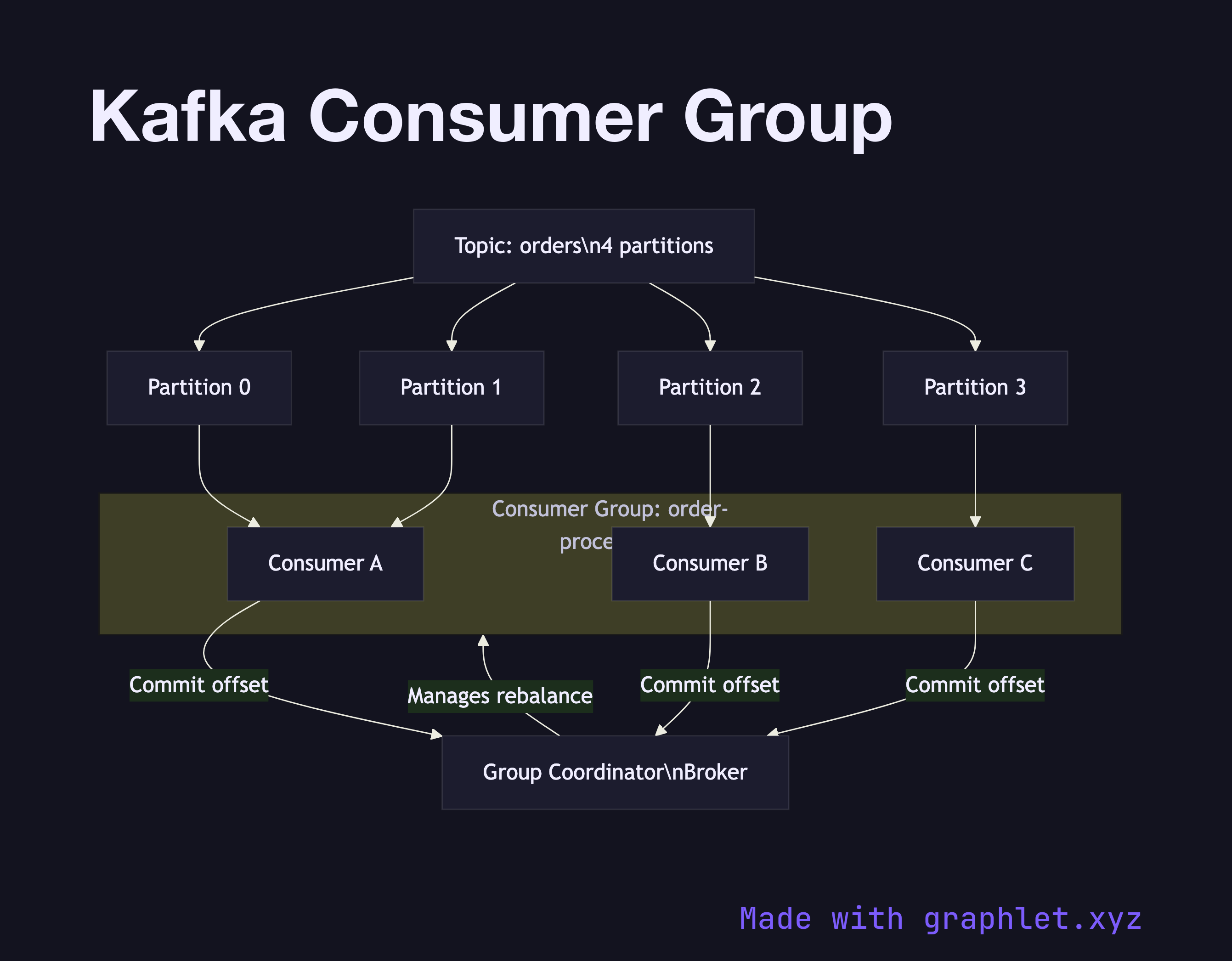
Consumer groups are Kafka's built-in mechanism for parallel, fault-tolerant message processing. When a topic has multiple partitions, Kafka distributes those partitions across the active consumers in a group, enabling horizontal scaling without duplicating messages. The key constraint is that a single partition can only be owned by one consumer within a group — this is what guarantees that messages within a partition are processed in order.

The assignment is managed by a Group Coordinator (a designated broker) and a Group Leader (the first consumer to join). When a consumer joins or leaves, Kafka triggers a rebalance: the group leader collects the current partition list and membership, computes a new assignment using the configured partition.assignor strategy (range, round-robin, sticky, or cooperative sticky), and distributes it via the coordinator. During a rebalance, consumption pauses — so minimizing rebalances (by using sticky assignors and heartbeat tuning) matters for latency-sensitive workloads.

This diagram shows a topic with four partitions assigned to three consumers. Consumer A handles two partitions while B and C each handle one. If Consumer A crashes, a rebalance redistributes its partitions to the remaining healthy consumers. This is why the Kafka Producer Consumer Flow includes offset commits — they allow a replacement consumer to resume exactly where the failed one left off.

Multiple independent consumer groups can read the same topic simultaneously without interfering with each other, since each group maintains its own set of offsets. This is how Fan Out Messaging patterns are commonly implemented in Kafka-based architectures.

Free online editor
Edit this diagram in Graphlet
Fork, modify, and export to SVG or PNG. No sign-up required.
Open in Graphlet →

Frequently asked questions

A Kafka consumer group is a set of consumer instances that collectively read from a topic, with each partition assigned to exactly one consumer in the group at any given time. Consumer groups are Kafka's built-in mechanism for parallel, fault-tolerant message processing — distributing partitions across consumers to enable horizontal scaling without duplicating messages.
A Group Coordinator (a designated broker) manages membership and triggers rebalances when consumers join or leave. A Group Leader (the first consumer to join) computes the partition assignment using the configured assignor strategy — range, round-robin, sticky, or cooperative sticky — and distributes it via the coordinator. During a rebalance, consumption pauses, so minimising rebalances through sticky assignors and heartbeat tuning matters for latency-sensitive workloads.
Use a consumer group whenever you need to distribute processing of a Kafka topic across multiple instances. For horizontal scaling, add more consumers to the group up to the number of partitions. To implement fan-out — where multiple independent services each receive all messages — use separate consumer groups per service, each maintaining its own offsets.
The most common mistake is having more consumers in a group than partitions — excess consumers sit idle because each partition can only be assigned to one consumer. Another pitfall is configuring too-short heartbeat or session timeouts, causing spurious rebalances that pause consumption. Teams also underestimate the impact of slow consumers triggering group rebalances when session timeouts are exceeded during long processing operations.
mermaid
flowchart TD T[Topic: orders\n4 partitions] --> P0[Partition 0] T --> P1[Partition 1] T --> P2[Partition 2] T --> P3[Partition 3] subgraph CG[Consumer Group: order-processors] CA[Consumer A] CB[Consumer B] CC[Consumer C] end P0 --> CA P1 --> CA P2 --> CB P3 --> CC GC[Group Coordinator\nBroker] -->|Manages rebalance| CG CA -->|Commit offset| GC CB -->|Commit offset| GC CC -->|Commit offset| GC
Copied to clipboard