diagram.mmd — sequence
Push Notification Flow sequence diagram

A push notification flow describes the end-to-end path a message takes from your application server to a user's device screen, routing through Apple Push Notification service (APNs) on iOS or Firebase Cloud Messaging (FCM) on Android.
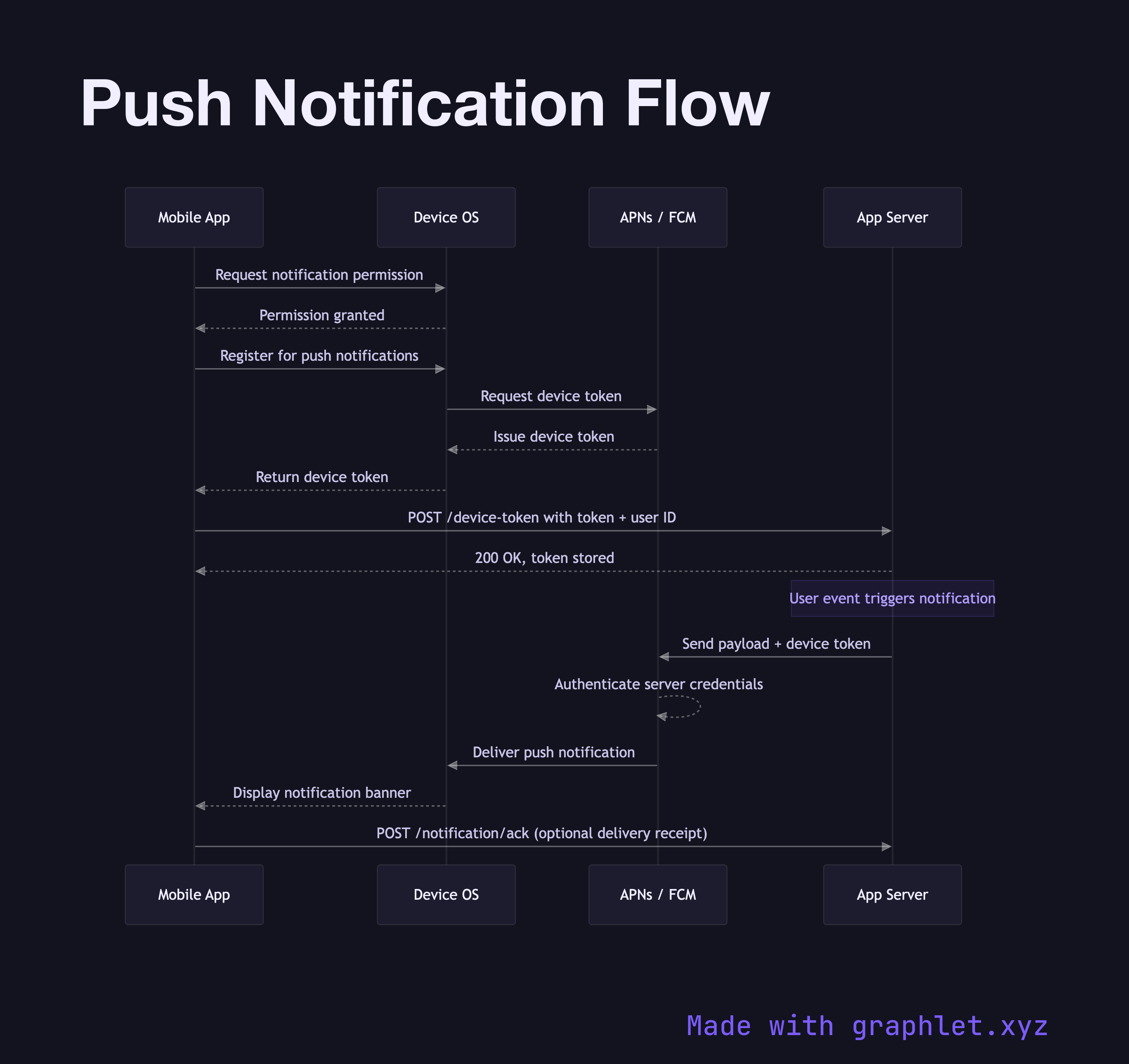
The process begins at first launch: the mobile app requests notification permission from the device OS. If the user grants permission, the OS contacts the platform gateway — APNs or FCM — and receives a unique device token. This token identifies the specific app installation on that specific device. The app then sends this token to your backend, which stores it associated with the user account.

When a server-side event warrants a notification — a new message, a status change, a promotional alert — your backend constructs a notification payload (title, body, optional data dictionary) and sends it to APNs or FCM along with the stored device token. The gateway authenticates the request, looks up the device, and delivers the notification to the device OS. The OS displays the notification in the system tray. If the user taps it, the OS launches the app and passes along any data payload from the notification.

Key failure modes to handle: device tokens rotate when an app is reinstalled or a user transfers to a new device, so your server must refresh tokens and handle BadDeviceToken rejections from APNs. FCM handles token invalidation similarly. For time-sensitive notifications where delivery latency matters, compare this polling-free push model against Realtime Messaging App Flow which uses persistent WebSocket connections, or the Mobile API Sync pull pattern for less latency-sensitive data updates.

An optional delivery acknowledgement step — where the app pings your backend on notification receipt — lets you track open rates and build retry logic for critical alerts.

Free online editor
Edit this diagram in Graphlet
Fork, modify, and export to SVG or PNG. No sign-up required.
Open in Graphlet →

Frequently asked questions

A push notification flow is the end-to-end path a message takes from your application server to a user's device screen, passing through Apple Push Notification service (APNs) on iOS or Firebase Cloud Messaging (FCM) on Android, which act as the delivery gateways between your backend and the device OS.
Your backend sends a notification payload and the stored device token to the respective gateway over an authenticated HTTP/2 (APNs) or HTTPS (FCM) connection. The gateway routes the notification to the correct device, the OS receives it and displays it in the system tray, and if the user taps it the OS forwards the payload to the app on launch.
Use push notifications for events that need to reach the user regardless of whether the app is open — new messages, order status changes, or time-sensitive alerts. For data that only matters while the app is active, in-app WebSocket or polling patterns are simpler and avoid the overhead of token management.
Not refreshing device tokens after reinstallation leads to `BadDeviceToken` rejections accumulating in your backend. Sending large payloads (above the 4 KB APNs limit) causes silent delivery failures. Not handling the case where a user denies notification permission on first launch means you never have a token to store.
APNs is Apple's proprietary gateway used exclusively for iOS, iPadOS, macOS, and watchOS devices; it requires a certificate or token-based authentication and enforces a strict 4 KB payload limit. FCM is Google's gateway for Android (and cross-platform via the FCM SDK on iOS), supports higher payload limits, and provides additional features like topic-based fan-out and delivery analytics out of the box.
mermaid
sequenceDiagram participant App as Mobile App participant OS as Device OS participant Gateway as APNs / FCM participant Server as App Server App->>OS: Request notification permission OS-->>App: Permission granted App->>OS: Register for push notifications OS->>Gateway: Request device token Gateway-->>OS: Issue device token OS-->>App: Return device token App->>Server: POST /device-token with token + user ID Server-->>App: 200 OK, token stored note">Note over Server: User event triggers notification Server->>Gateway: Send payload + device token Gateway-->>Gateway: Authenticate server credentials Gateway->>OS: Deliver push notification OS-->>App: Display notification banner App->>Server: POST /notification/ack (optional delivery receipt)
Copied to clipboard