diagram.mmd — flowchart
DNS Caching Flow flowchart diagram

DNS caching is the multi-layer mechanism that stores resolved DNS records at various points in the resolution chain to avoid redundant upstream queries and reduce latency for repeated lookups.
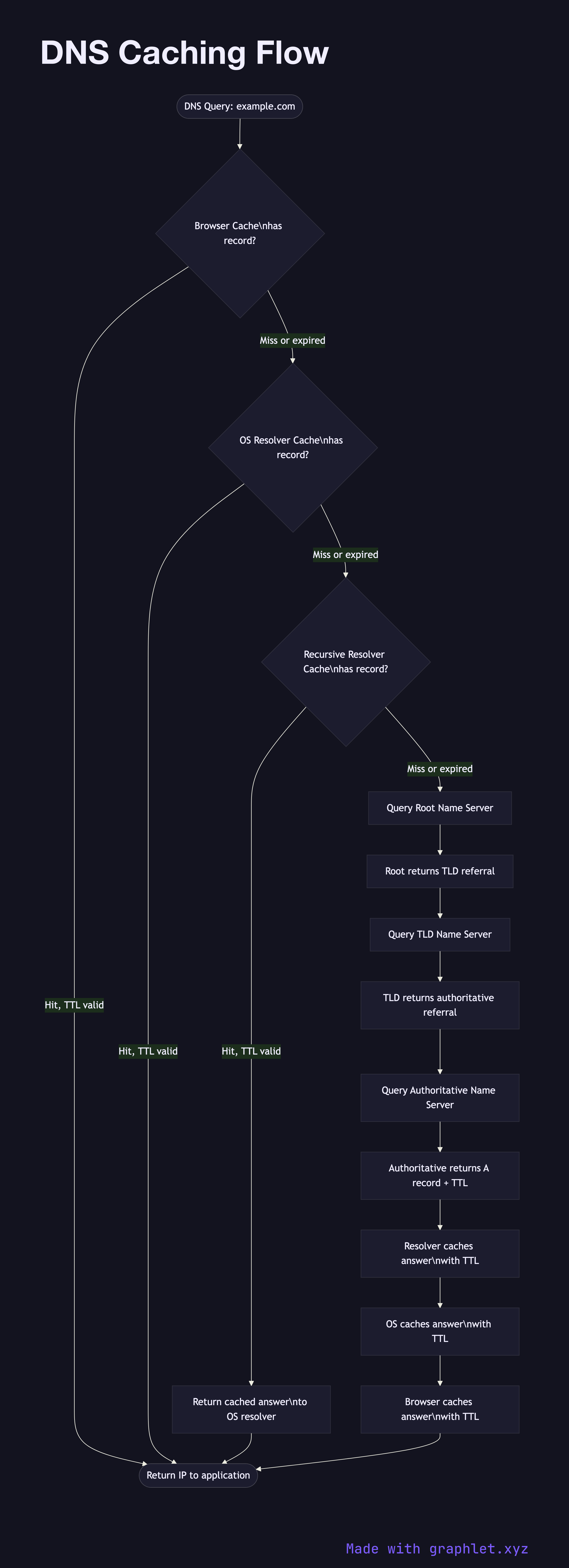
Every DNS record has a TTL (Time to Live) value set by the domain owner. This integer (in seconds) tells each caching layer how long it may serve the cached record before discarding it and re-querying. A TTL of 300 means any cache must re-validate after 5 minutes; a TTL of 86400 allows caching for 24 hours.

The caching hierarchy operates from closest to farthest:

Browser cache is the first stop. Modern browsers like Chrome and Firefox maintain their own DNS cache in memory. Chrome exposes this at chrome://net-internals/#dns. These caches respect the TTL but may impose their own caps (Chrome caps positive entries at 1 minute by default).

Operating system cache (the OS stub resolver) is next. On macOS this is handled by mDNSResponder; on Linux by systemd-resolved or nscd. Applications that bypass the browser use this layer directly via getaddrinfo().

Recursive resolver cache is maintained by your ISP's resolver or a public resolver (Google 8.8.8.8, Cloudflare 1.1.1.1). This is shared across all users of that resolver, so popular domains are almost always served from cache at this layer — dramatically reducing load on authoritative servers.

Authoritative server is only reached on a true cache miss at every layer. The response resets TTL timers throughout the chain.

For developers, this layered caching explains why DNS changes seem "slow" — you must wait for TTLs to expire at every layer independently. Lowering TTL before a planned DNS migration (e.g., from 3600 to 60 seconds) is a standard pre-migration practice. See How DNS Works for the full lookup flow and DNS Recursive Resolution for the resolver's role.

Free online editor
Edit this diagram in Graphlet
Fork, modify, and export to SVG or PNG. No sign-up required.
Open in Graphlet →

Frequently asked questions

DNS caching stores resolved DNS records at multiple points in the resolution chain — the browser, operating system, and recursive resolver — to avoid repeating expensive upstream queries for the same hostname. Each cached record is held for the duration of its TTL (Time to Live), set by the domain owner.
The hierarchy from fastest to slowest is: (1) browser in-memory cache, (2) operating system stub resolver cache, (3) recursive resolver cache shared by many users, and (4) authoritative name server — only consulted on a full cache miss at every layer. Chrome caps its cache at around one minute even if the TTL is longer.
Each caching layer independently holds the old record until its TTL expires. If your previous TTL was 3600 seconds (one hour), every resolver that cached the old record may serve it for up to an hour after you make the change. The standard mitigation is to lower TTL to 60 seconds well before a planned migration, then raise it again afterwards.
Setting TTLs too high (hours or days) is the most common mistake — it turns a simple IP change into an hours-long propagation event. Not pre-lowering TTLs before a migration is a close second. Developers also sometimes forget that browser and OS caches are independent, so clearing one doesn't clear all layers.
mermaid
flowchart TD A([DNS Query: example.com]) --> B{Browser Cache\nhas record?} B -->|Hit, TTL valid| Z([Return IP to application]) B -->|Miss or expired| C{OS Resolver Cache\nhas record?} C -->|Hit, TTL valid| Z C -->|Miss or expired| D{Recursive Resolver Cache\nhas record?} D -->|Hit, TTL valid| E[Return cached answer\nto OS resolver] E --> Z D -->|Miss or expired| F[Query Root Name Server] F --> G[Root returns TLD referral] G --> H[Query TLD Name Server] H --> I[TLD returns authoritative referral] I --> J[Query Authoritative Name Server] J --> K[Authoritative returns A record + TTL] K --> L[Resolver caches answer\nwith TTL] L --> M[OS caches answer\nwith TTL] M --> N[Browser caches answer\nwith TTL] N --> Z
Copied to clipboard