How DNS Works
DNS (Domain Name System) is the distributed naming system that translates human-readable hostnames like example.com into the IP addresses computers use to route network traffic.
DNS (Domain Name System) is the distributed naming system that translates human-readable hostnames like example.com into the IP addresses computers use to route network traffic.
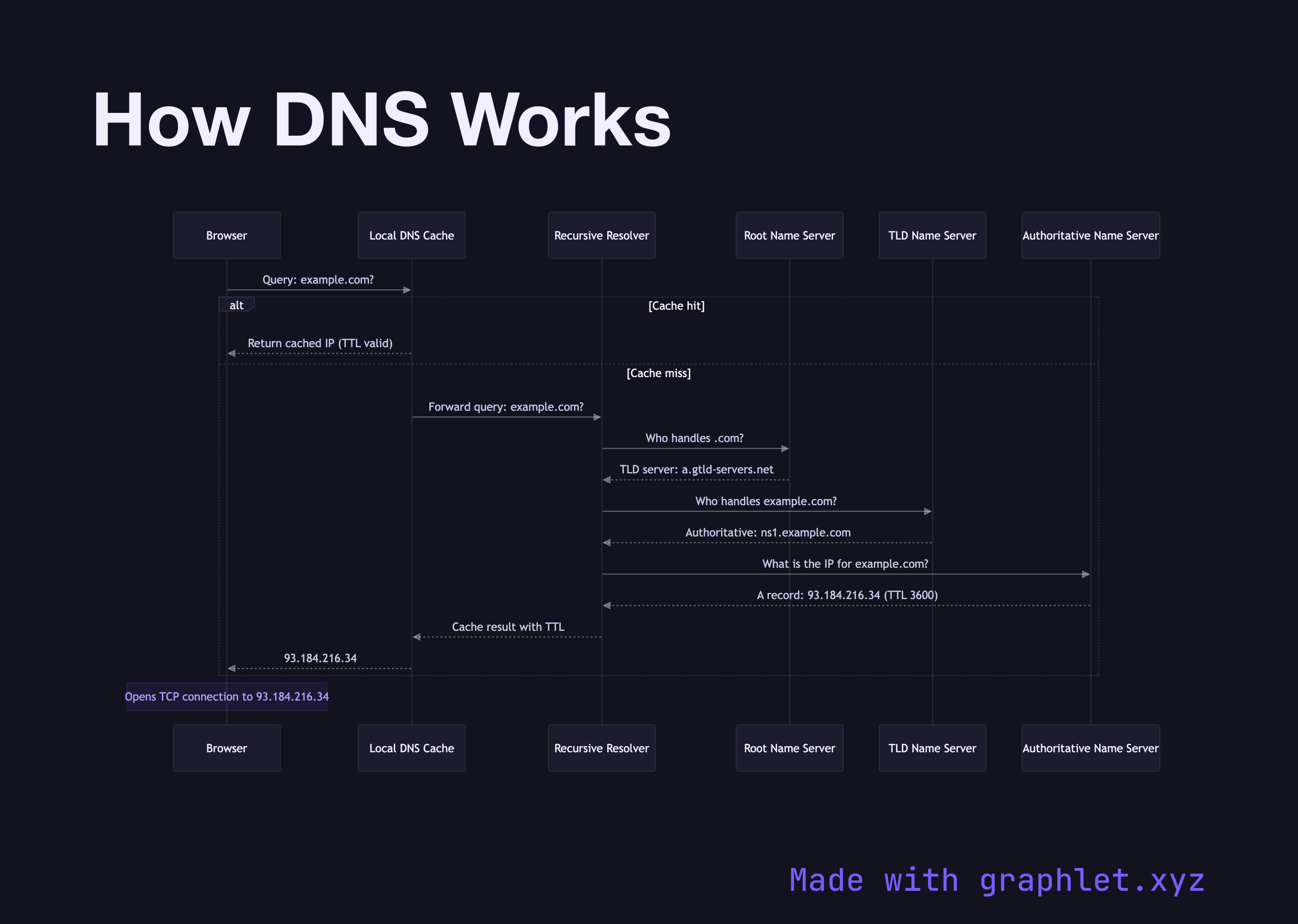
When you type a URL into your browser, a DNS resolution process begins before a single byte of HTTP traffic is exchanged. This diagram traces that process from the initial browser query through each layer of the DNS hierarchy.
The process starts with the browser checking its local DNS cache — a short-lived in-memory store keyed by hostname. If the entry exists and the TTL (Time to Live) hasn't expired, the IP is returned immediately, skipping the entire recursive lookup. This is why DNS caching matters so much for perceived performance; see DNS Caching Flow for a deeper look at the caching layers involved.
When there's a cache miss, the query is forwarded to a recursive resolver — typically provided by your ISP or a public resolver like 8.8.8.8. The resolver acts on the client's behalf, working up the DNS hierarchy. It first contacts a root name server, one of 13 logical server clusters that know only which TLD servers handle each top-level domain (.com, .org, .io, etc.).
The root server returns the address of the appropriate TLD name server. For example.com, that means the .com TLD servers operated by Verisign. The TLD server doesn't know the final IP — it knows which authoritative name server is responsible for the specific domain. The resolver queries that authoritative server and finally receives the actual A or AAAA record.
The resolver caches the result (respecting the record's TTL), forwards it to the local cache, and the browser gets the IP it needs to open a TCP connection. The full round-trip — hitting multiple geographically distributed servers — typically completes in 20–120ms for a cold lookup.
For developers, understanding this flow explains why DNS propagation delays occur after changing records (old TTLs must expire across resolvers), why low TTLs increase resolver load, and why DNS over HTTPS improves privacy by encrypting this query chain. DNS resolution also feeds directly into the HTTP Request Lifecycle and HTTPS Handshake that follow.