Invoice Generation Flow
Invoice generation is the process of creating a formal billing document that records what a customer owes, collecting payment, and delivering a receipt. In subscription systems, this process is automated and triggered on each billing cycle; in usage-based billing it may occur monthly after metering data is aggregated.
Invoice generation is the process of creating a formal billing document that records what a customer owes, collecting payment, and delivering a receipt. In subscription systems, this process is automated and triggered on each billing cycle; in usage-based billing it may occur monthly after metering data is aggregated.
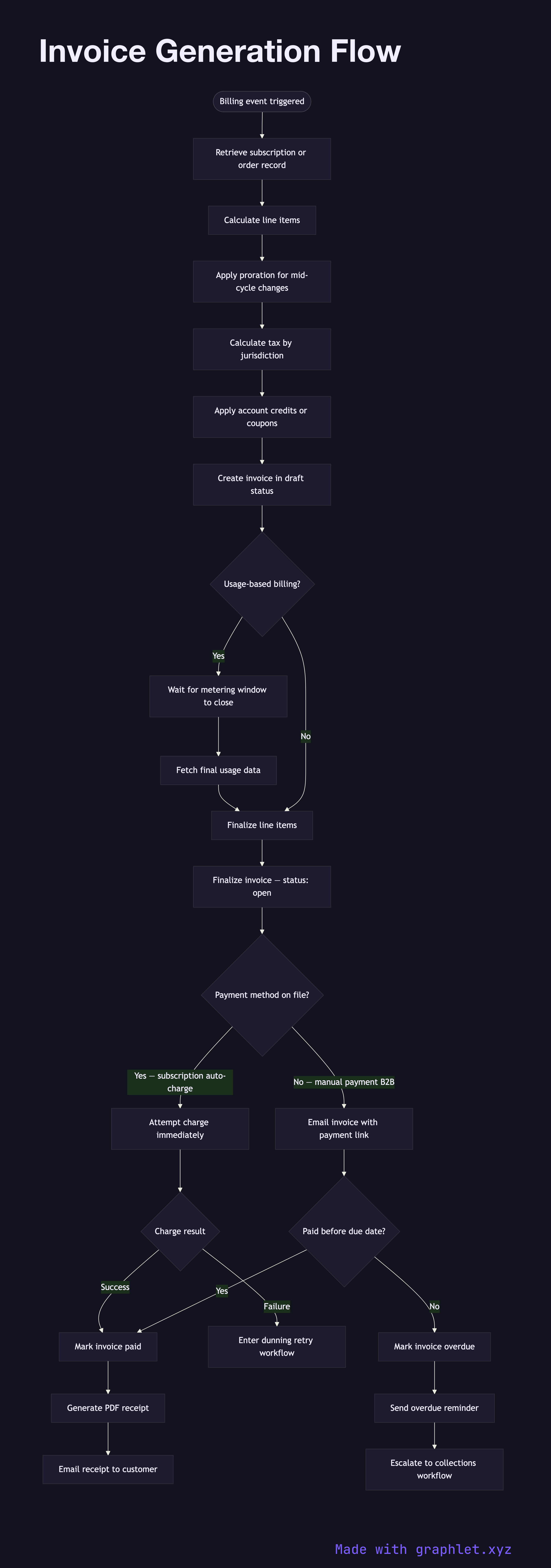
The flow begins when a billing event is triggered — either a scheduled renewal date, a one-time purchase, or a usage threshold being crossed. The billing system retrieves the subscription or order record to determine the line items: base price, prorated adjustments (for mid-cycle upgrades or downgrades), applicable taxes (which may vary by jurisdiction and require a tax calculation service), and any credits from the customer's account balance.
The invoice is created with a status of draft and assigned a sequential invoice number. In draft state, the line items can still be modified — for example, final usage counts may not be available until the metering window closes. When finalized, the invoice status transitions to open, indicating it is ready for payment.
For subscription invoices where a payment method is already on file, the billing system immediately attempts to charge the stored method. If the charge succeeds, the invoice status moves to paid and a PDF receipt is generated and emailed to the customer. If the charge fails, the invoice remains in open status and enters the retry/dunning workflow described in Subscription Billing Workflow.
For invoices sent to customers for manual payment (common in B2B billing), the invoice includes a payment link or banking details and is emailed directly. These invoices track their own due date and send automatic reminders as the due date approaches. Unpaid invoices after the due date transition to overdue status, triggering escalation workflows. All invoice activity feeds into Payment Reconciliation to verify that every invoice maps to a corresponding transaction record.