diagram.mmd — flowchart
Subscription Billing Workflow flowchart diagram

A subscription billing workflow manages the full lifecycle of a recurring charge: from the initial sign-up through renewals, payment failures, dunning, and eventual cancellation or recovery.
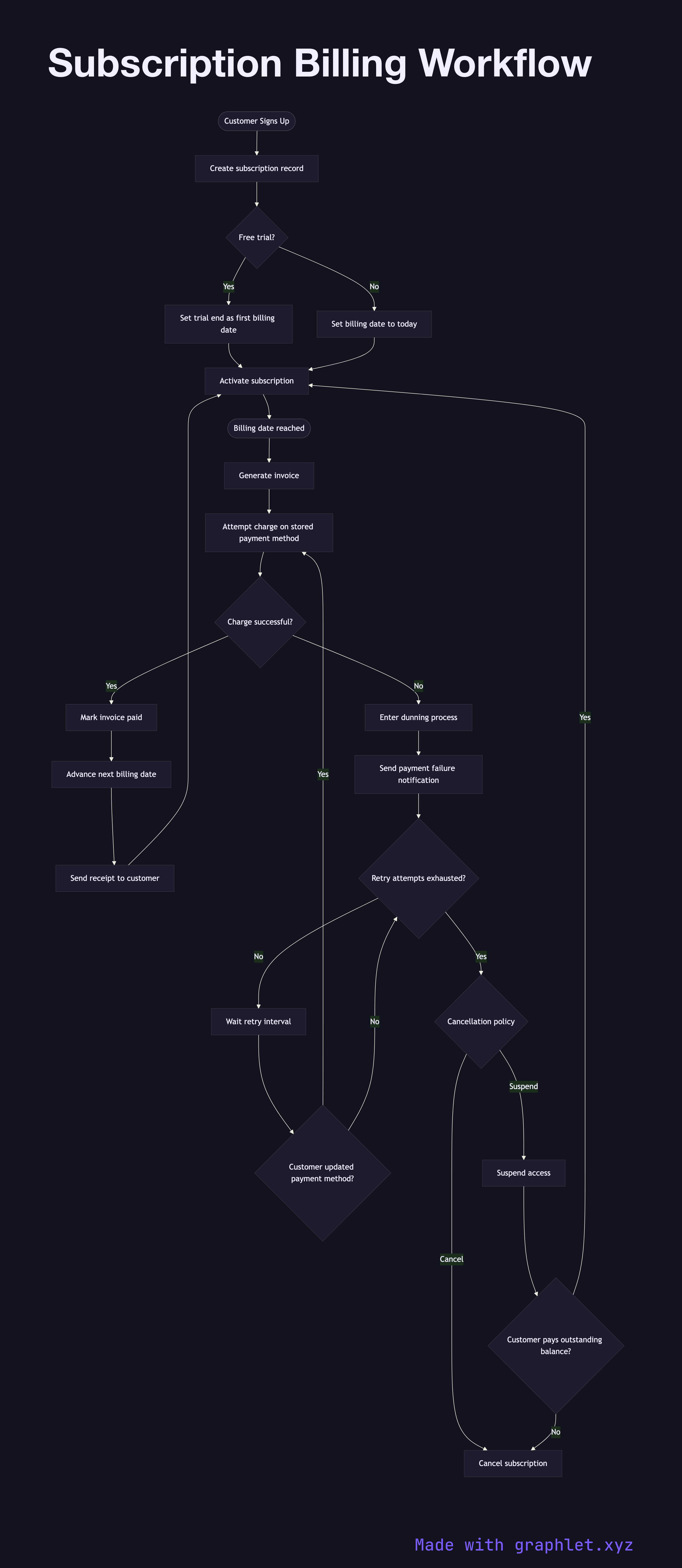
The workflow begins when a customer signs up and provides a payment method. The billing system creates a subscription record with a billing interval (monthly, annual), the next billing date, and the payment method token. If the plan includes a free trial, the subscription is activated immediately but the billing date is pushed forward by the trial length — no charge is attempted until the trial ends.

On each billing date, the system generates an invoice for the subscription period and attempts to charge the stored payment method. If the charge succeeds, the subscription renews, the next billing date advances, and a receipt is sent to the customer. If the charge fails — due to an expired card, insufficient funds, or a soft decline — the system does not immediately cancel the subscription. Instead, it enters a dunning process: a scheduled series of retry attempts (often at 3, 7, and 14 days) accompanied by email notifications asking the customer to update their payment method.

If all retry attempts fail within the dunning window, the subscription is suspended or cancelled depending on business rules. If the customer updates their payment method during the dunning window, the pending invoice is retried immediately. Successfully recovering a failed subscription avoids churn, so well-designed dunning flows significantly impact revenue retention.

Cancellation can also be customer-initiated at any time. Depending on the policy, access may continue until the end of the current paid period (access-until-end-of-period) or be revoked immediately. The Payment Retry Logic diagram focuses specifically on the retry and backoff mechanics. See Invoice Generation Flow for how invoices are structured and delivered.

Free online editor
Edit this diagram in Graphlet
Fork, modify, and export to SVG or PNG. No sign-up required.
Open in Graphlet →

Frequently asked questions

A subscription billing workflow manages the full recurring-charge lifecycle: from initial sign-up (with optional free trial) through periodic renewals, failed-payment dunning, and eventual cancellation or recovery. It combines invoice generation, payment processing, and customer communications.
When a charge fails, the billing system enters a dunning phase: it schedules retry attempts at intervals (e.g., 3, 7, 14 days), sends email notifications asking the customer to update their payment method, and sets the subscription to `past_due` without revoking access. If all retries fail, the subscription is suspended or cancelled per business rules.
Most SaaS products retain access during dunning to minimise churn friction — suspending access immediately on the first failure creates unnecessary urgency and drives cancellations. Only revoke access when the dunning window is exhausted and recovery attempts have failed.
Common mistakes include cancelling the subscription on the very first payment failure, not triggering an immediate retry when a customer updates their payment method, applying the same dunning schedule to all plan tiers, and not tracking dunning metrics (recovery rate, time-to-payment) to optimise retry timing.
The subscription billing workflow is the high-level lifecycle — sign-up, trial, renewal policy, dunning, and cancellation logic. The recurring payment cycle is the lower-level mechanical loop — the scheduler that identifies due subscriptions, submits charges, and advances billing dates on each renewal interval.
mermaid
flowchart TD A([Customer Signs Up]) --> B[Create subscription record] B --> C{Free trial?} C -->|Yes| D[Set trial end as first billing date] C -->|No| E[Set billing date to today] D --> F[Activate subscription] E --> F F --> G([Billing date reached]) G --> H[Generate invoice] H --> I[Attempt charge on stored payment method] I --> J{Charge successful?} J -->|Yes| K[Mark invoice paid] K --> L[Advance next billing date] L --> M[Send receipt to customer] M --> F J -->|No| N[Enter dunning process] N --> O[Send payment failure notification] O --> P{Retry attempts exhausted?} P -->|No| Q[Wait retry interval] Q --> R{Customer updated payment method?} R -->|Yes| I R -->|No| P P -->|Yes| S{Cancellation policy} S -->|Suspend| T[Suspend access] S -->|Cancel| U[Cancel subscription] T --> V{Customer pays outstanding balance?} V -->|Yes| F V -->|No| U
Copied to clipboard