Merchant Onboarding Flow
Merchant onboarding is the process a payment platform uses to verify a new merchant's identity, assess risk, and configure them to accept payments. For platforms acting as payment facilitators (PayFacs) — like Stripe Connect or Square — this process is governed by card network rules and financial regulations, particularly KYB (Know Your Business) requirements from anti-money-laundering (AML) regulations.
Merchant onboarding is the process a payment platform uses to verify a new merchant's identity, assess risk, and configure them to accept payments. For platforms acting as payment facilitators (PayFacs) — like Stripe Connect or Square — this process is governed by card network rules and financial regulations, particularly KYB (Know Your Business) requirements from anti-money-laundering (AML) regulations.
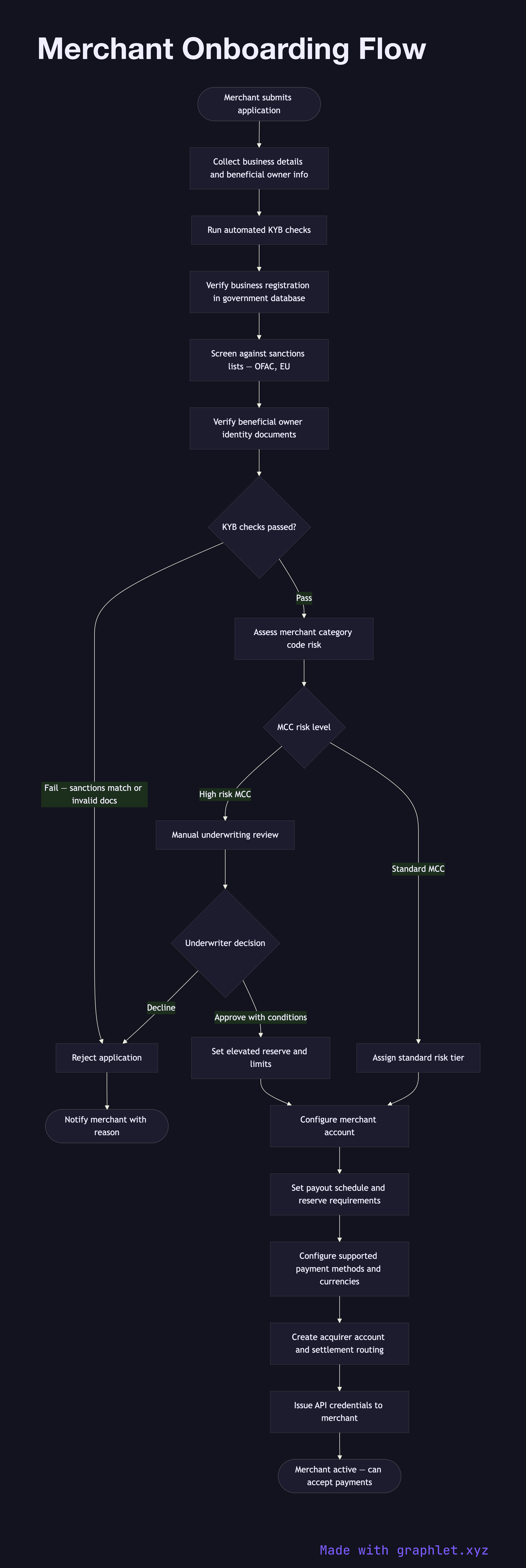
The onboarding flow begins when a business applies to accept payments. The merchant provides business information: legal entity name, registration number, business address, merchant category code (MCC), expected transaction volumes, and beneficial owner details (typically any individual owning more than 25%). This information is required by regulations in most jurisdictions.
The platform runs automated KYB checks: it verifies the business registration against government databases, checks the business and principals against sanctions lists (OFAC, EU sanctions), verifies that the stated MCC aligns with the business description, and runs adverse media screening. The beneficial owner's identity documents (passport, driver's license) are verified through a document verification service.
Based on the risk score from KYB checks and the business type, the platform assigns a risk tier that determines: payout schedule (instant, daily, weekly), rolling reserve requirements (a percentage of volume held as a buffer against chargebacks), and transaction velocity limits. High-risk MCCs (gambling, adult content, firearms) require additional manual review and may be declined entirely based on the platform's acceptable use policy.
Once approved, the merchant's payment configuration is created: acquirer account, settlement bank account, MCC, supported payment methods, and currency settings. For platforms supporting multiple currencies, see Multi Currency Processing. The merchant receives API credentials and can begin accepting live transactions.