REST API Request Lifecycle
A REST API request lifecycle describes the complete journey a client request takes from the moment it leaves the browser or application through authentication, business logic, data persistence, and back as a structured HTTP response.
A REST API request lifecycle describes the complete journey a client request takes from the moment it leaves the browser or application through authentication, business logic, data persistence, and back as a structured HTTP response.
What the diagram shows
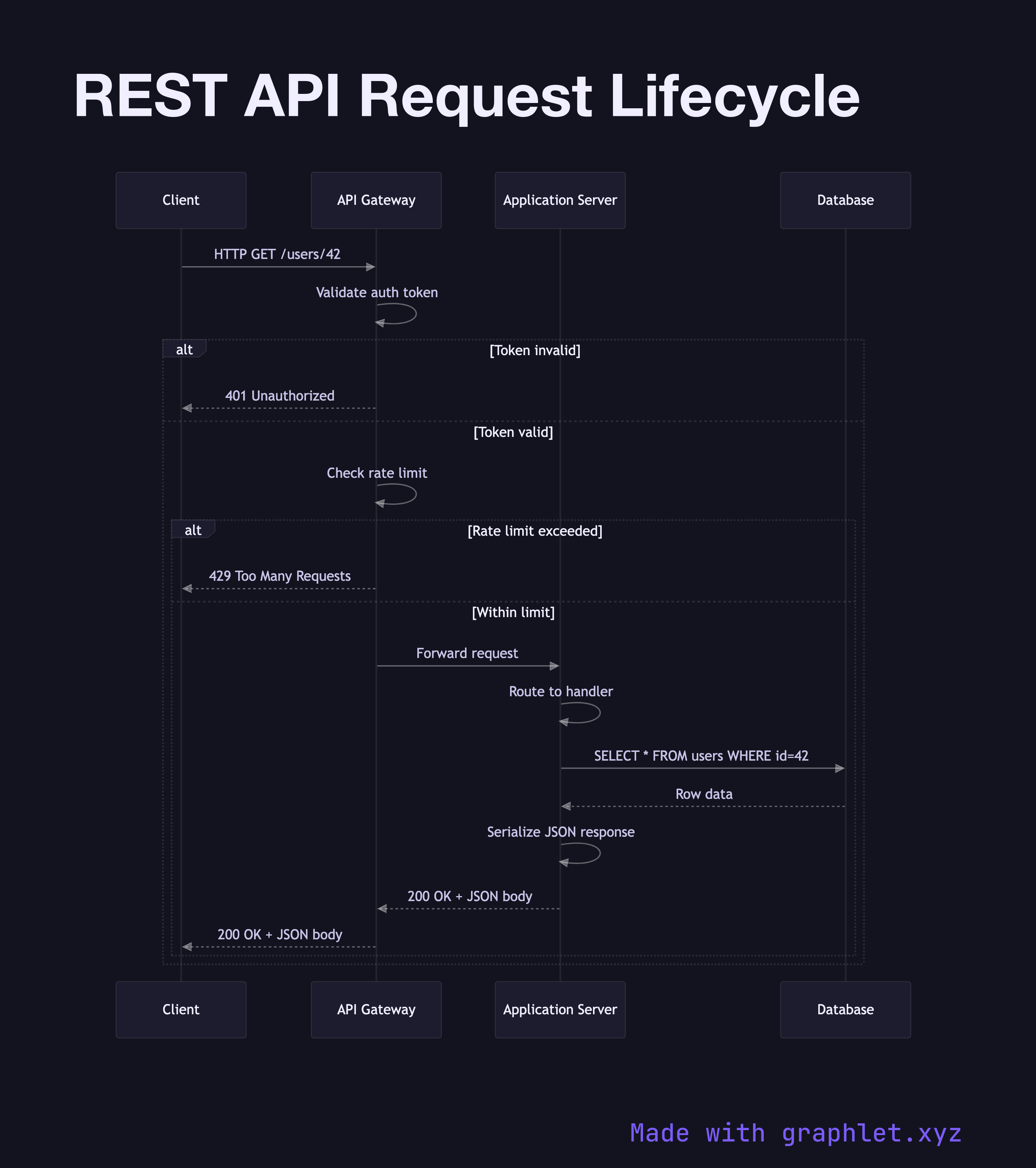
This sequence diagram traces a single REST API call across four participants: the Client, an API Gateway, the Application Server, and a Database. The flow begins when the client issues an HTTP request — for example, GET /users/42. The API Gateway intercepts the request first, validating the authentication token and checking whether the request should be rate-limited before proxying it upstream.
Once the request reaches the Application Server, it is routed to the correct handler, which constructs and executes a database query. The Database returns the result set, the server serializes the payload into JSON, and the response travels back through the gateway to the client — carrying the appropriate HTTP status code (200 for success, 4xx/5xx for errors).
The diagram also captures the error branch: if authentication fails at the gateway, the server never receives the request and the client immediately receives a 401 Unauthorized response. This short-circuit behavior is one of the key reasons API gateways exist.
Why this matters
Understanding the full request lifecycle helps developers:
- Debug latency: knowing that serialization, query execution, and network hops all contribute to total response time lets you profile the right layer. - Design error handling: each hop can fail independently. Modeling the lifecycle explicitly reveals where timeouts, retries, and circuit breakers need to live. - Secure the API: authentication and authorization checks at the gateway reduce the attack surface before business logic is ever reached.
For a deeper look at the gateway layer, see the API Gateway Request Flow. If your API sits behind multiple services, the Microservice Request Chain extends this pattern to distributed architectures. To understand how throttling is applied earlier in the pipeline, explore Rate Limiting Architecture.