diagram.mmd — flowchart
Cloud Backup Strategy flowchart diagram

A cloud backup strategy defines how data is copied, retained, and restored to meet Recovery Point Objectives (RPO) and Recovery Time Objectives (RTO) — the core SLAs that quantify how much data loss and downtime a business can tolerate.
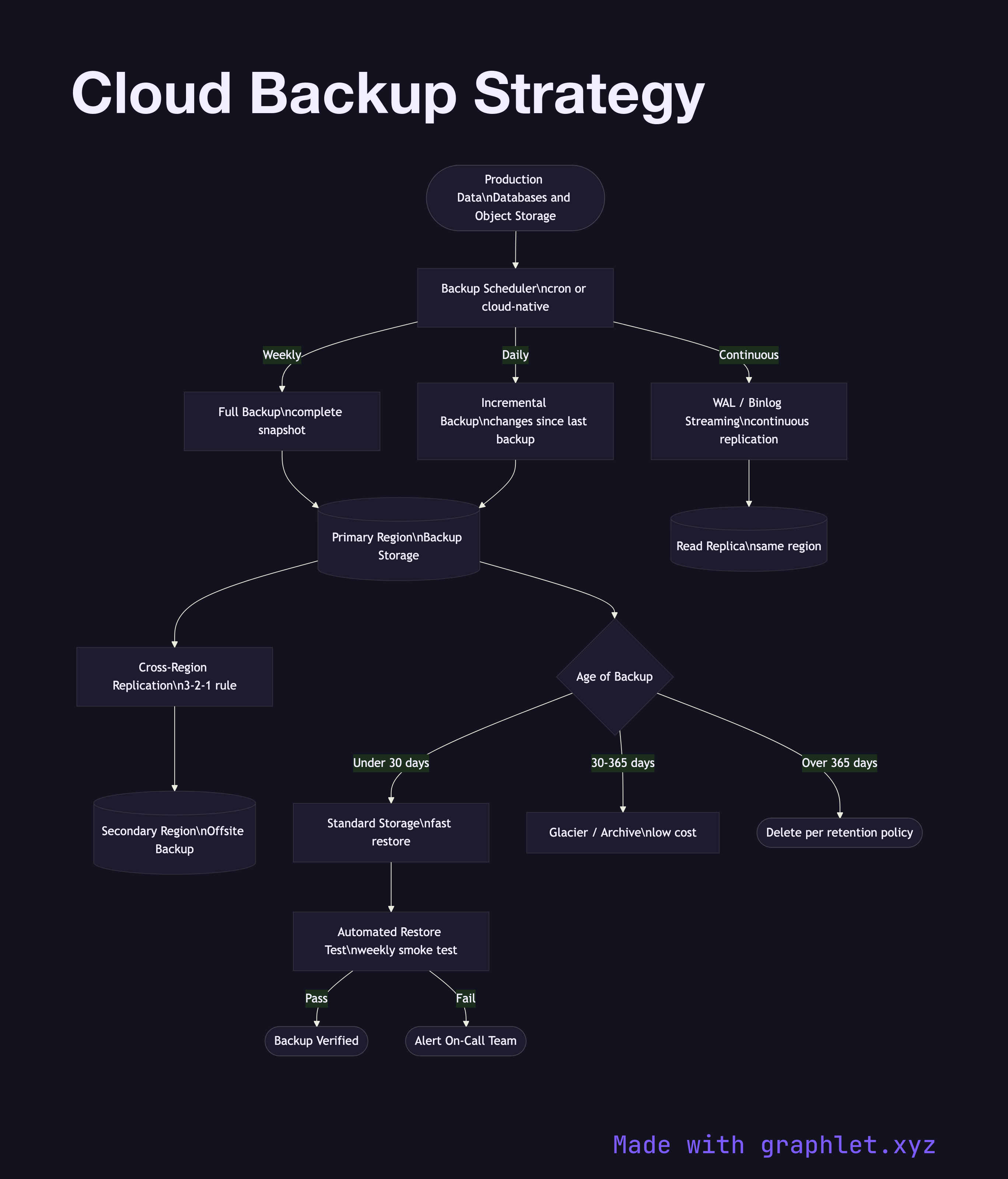
RPO is the maximum acceptable age of data that must be recovered after a failure. An RPO of 1 hour means backups must run at least hourly; 15 minutes may require continuous replication. RTO is the maximum acceptable time to restore a service after an outage. Low RTO demands fast restoration paths — warm standby databases, pre-provisioned infrastructure, and tested runbooks.

Cloud backup architectures commonly combine multiple backup types:

- Full backups: A complete snapshot of all data. Simplest to restore but most storage-intensive. Typically run weekly. - Incremental backups: Only changes since the last backup. Fast and storage-efficient. Must chain back to the last full backup for restore. - Differential backups: All changes since the last full backup. Restore requires only the full + one differential. A middle ground. - Continuous replication: Write-ahead logs streamed to a replica in near real-time (AWS RDS read replicas, CloudSQL). Minimal RPO but highest cost.

A 3-2-1 rule is standard: 3 copies of data, on 2 different media, with 1 off-site (cross-region). Lifecycle policies move older backups to cheaper tiers — Glacier after 30 days — controlled by Object Storage Lifecycle rules.

Backups are worthless without verified restores. Automated restore testing — periodically spinning up a restored environment and running smoke tests — is a key operational practice. See Cloud Monitoring Pipeline for monitoring backup job success metrics.

Free online editor
Edit this diagram in Graphlet
Fork, modify, and export to SVG or PNG. No sign-up required.
Open in Graphlet →

Frequently asked questions

A cloud backup strategy defines how data is copied, retained, and restored to meet RPO and RTO objectives. It specifies backup types (full, incremental, differential, or continuous replication), storage tiers for cost-efficient retention, cross-region redundancy per the 3-2-1 rule, and a tested restoration process.
RPO (Recovery Point Objective) is the maximum acceptable age of data that can be lost — it determines how frequently backups must run. RTO (Recovery Time Objective) is the maximum acceptable downtime after an outage — it determines how fast the restoration process must complete. Both are business-level SLAs that drive backup architecture decisions.
Use full backups weekly to provide a clean restore baseline, and incremental backups daily or more frequently to minimize storage cost and backup window duration. For databases requiring near-zero RPO, continuous replication using write-ahead logs is the appropriate complement.
mermaid
flowchart TD Data([Production Data\nDatabases and Object Storage]) --> BackupScheduler[Backup Scheduler\ncron or cloud-native] BackupScheduler -->|Weekly| FullBackup[Full Backup\ncomplete snapshot] BackupScheduler -->|Daily| IncrementalBackup[Incremental Backup\nchanges since last backup] BackupScheduler -->|Continuous| WALStream[WAL / Binlog Streaming\ncontinuous replication] FullBackup --> PrimaryRegion[(Primary Region\nBackup Storage)] IncrementalBackup --> PrimaryRegion WALStream --> Replica[(Read Replica\nsame region)] PrimaryRegion --> CrossRegion[Cross-Region Replication\n3-2-1 rule] CrossRegion --> SecondaryRegion[(Secondary Region\nOffsite Backup)] PrimaryRegion --> RetentionPolicy{Age of Backup} RetentionPolicy -->|Under 30 days| HotStorage[Standard Storage\nfast restore] RetentionPolicy -->|30-365 days| ColdStorage[Glacier / Archive\nlow cost] RetentionPolicy -->|Over 365 days| Expire([Delete per retention policy]) HotStorage --> RestoreTest[Automated Restore Test\nweekly smoke test] RestoreTest -->|Pass| Verified([Backup Verified]) RestoreTest -->|Fail| Alert([Alert On-Call Team])
Copied to clipboard