diagram.mmd — flowchart
Database Migration Workflow flowchart diagram

A database migration workflow is the controlled process of applying schema or data changes to a production database — adding columns, creating indexes, renaming tables, backfilling data — in a way that is safe, reversible, and minimally disruptive to running applications.
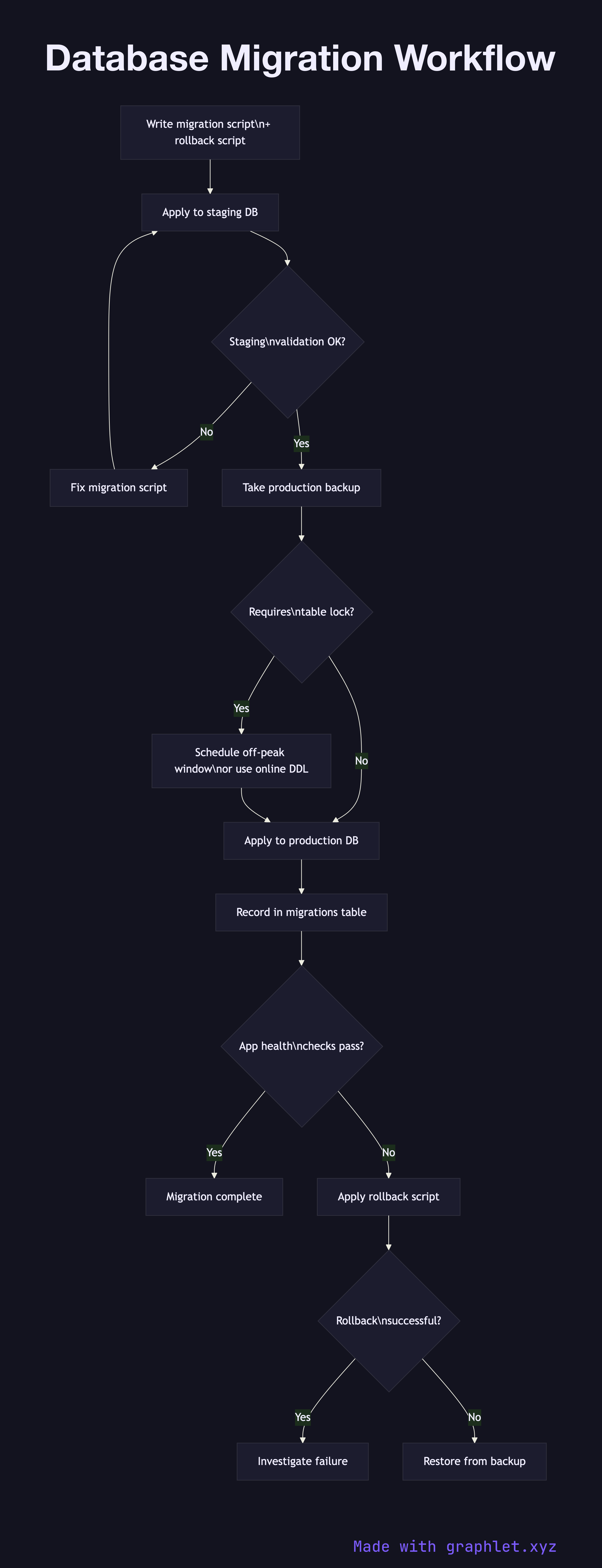
This diagram shows the recommended migration workflow used in production environments. The process begins with writing the migration script and its corresponding rollback script, then running it against a staging environment that mirrors production data size and schema as closely as possible. A staging validation step checks that the migration completes in an acceptable time window, produces the correct schema diff, and does not break any application queries.

Before touching production, a backup is taken to ensure a recovery point exists. The backup step is non-negotiable: even well-tested migrations can have unexpected effects on large tables. See Backup and Restore Flow for the mechanics of that process.

In production, large schema changes (adding a non-null column, building an index on a multi-million row table) must be executed in a way that does not hold a full table lock for minutes. PostgreSQL's CREATE INDEX CONCURRENTLY and MySQL's online DDL are designed for this. The migration tool (Flyway, Liquibase, Alembic, or custom scripts) records each applied migration in a migrations table, preventing double-application.

After the migration runs, a health check validates that application metrics, query latencies, and error rates are normal. If any anomaly is detected, the rollback script is applied. The workflow enforces the principle that every migration must be forward and backward compatible with the currently deployed application code — which is why the expand-contract pattern (add new column, migrate data, drop old column across separate deployments) is preferred over a single big-bang migration.

Free online editor
Edit this diagram in Graphlet
Fork, modify, and export to SVG or PNG. No sign-up required.
Open in Graphlet →

Frequently asked questions

A database migration workflow is the controlled process of applying schema or data changes — adding columns, creating indexes, renaming tables, backfilling data — to a production database in a way that is safe, reversible, and minimally disruptive to live applications.
Test against a staging environment that mirrors production first, then take a backup before touching production. Use database-native concurrency tools (PostgreSQL's `CREATE INDEX CONCURRENTLY`, MySQL's online DDL) to avoid full table locks. Apply the expand-contract pattern so each migration is compatible with both the current and next version of application code, enabling rolling deployments.
Use expand-contract whenever a schema change would break currently running application code if applied atomically — renaming a column, changing a type, or splitting a table. The pattern spreads the change across three deployments: add the new structure, migrate data and update application code, then drop the old structure. This eliminates the need for a maintenance window and keeps rollback straightforward.
Not having a tested rollback script is the most dangerous mistake. Running a large migration without a prior backup is a close second. Other common errors include migrating production directly without staging validation, using blocking DDL on large tables during peak traffic, and relying on migration tools to auto-generate rollbacks without reviewing them for correctness.
mermaid
flowchart TD Write[Write migration script\n+ rollback script] --> Staging[Apply to staging DB] Staging --> StagingValidate{Staging\nvalidation OK?} StagingValidate -->|No| FixScript[Fix migration script] FixScript --> Staging StagingValidate -->|Yes| Backup[Take production backup] Backup --> LockCheck{Requires\ntable lock?} LockCheck -->|Yes| OffPeak[Schedule off-peak window\nor use online DDL] LockCheck -->|No| ApplyProd[Apply to production DB] OffPeak --> ApplyProd ApplyProd --> RecordMigration[Record in migrations table] RecordMigration --> HealthCheck{App health\nchecks pass?} HealthCheck -->|Yes| Done[Migration complete] HealthCheck -->|No| Rollback[Apply rollback script] Rollback --> RestoreCheck{Rollback\nsuccessful?} RestoreCheck -->|Yes| InvestigateFailure[Investigate failure] RestoreCheck -->|No| RestoreBackup[Restore from backup]
Copied to clipboard