Query Execution Plan
A query execution plan is the ordered set of operations a database engine will perform to satisfy a SQL query — chosen by the query planner from among multiple possible strategies based on cost estimates.
A query execution plan is the ordered set of operations a database engine will perform to satisfy a SQL query — chosen by the query planner from among multiple possible strategies based on cost estimates.
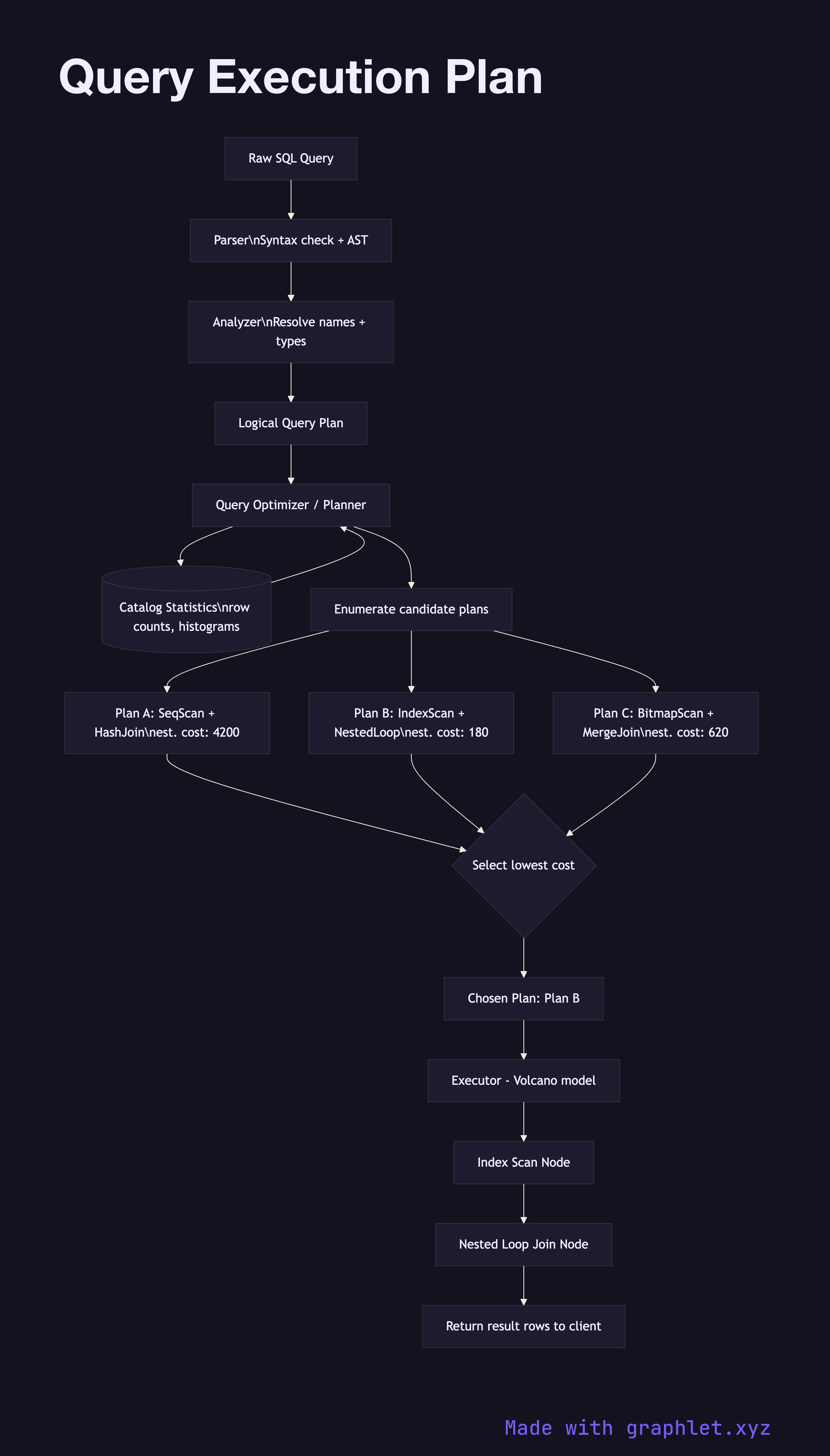
This diagram traces the pipeline from raw SQL to executed results. The query first passes through the parser, which checks syntax and produces an abstract syntax tree (AST). The analyzer then resolves table and column names against the catalog (system metadata), validates types, and expands wildcards. These two steps are purely structural and deterministic.
The resulting logical plan is handed to the optimizer (or planner). The optimizer enumerates possible execution strategies: for a table access, it considers sequential scan, index scan, bitmap index scan, and index-only scan. For joins, it considers nested loop, hash join, and merge join. Each strategy is assigned an estimated cost in arbitrary units based on statistics stored in the catalog (row counts, value distribution histograms, page counts). The optimizer picks the plan with the lowest estimated total cost.
The chosen plan is a tree of operator nodes — each node is an iterator that pulls rows from its children. For example, a hash join node pulls all rows from its inner child to build a hash table, then streams rows from its outer child to probe it. This iterator model is called the Volcano model and is used by PostgreSQL, SQL Server, and most traditional RDBMS engines.
When a plan is slow, the first diagnostic step is EXPLAIN ANALYZE (PostgreSQL) or EXPLAIN FORMAT=JSON (MySQL), which shows the actual plan, estimated vs. actual row counts, and execution time per node. Large discrepancies between estimated and actual rows indicate stale statistics — running ANALYZE (PostgreSQL) or OPTIMIZE TABLE (MySQL) refreshes them. The Database Index Lookup diagram explains how the planner chooses between scan strategies.