Client Side Routing
Client-side routing is the mechanism by which a JavaScript application matches the current URL to a component tree and renders it — all within the browser, without any server round-trip for each navigation.
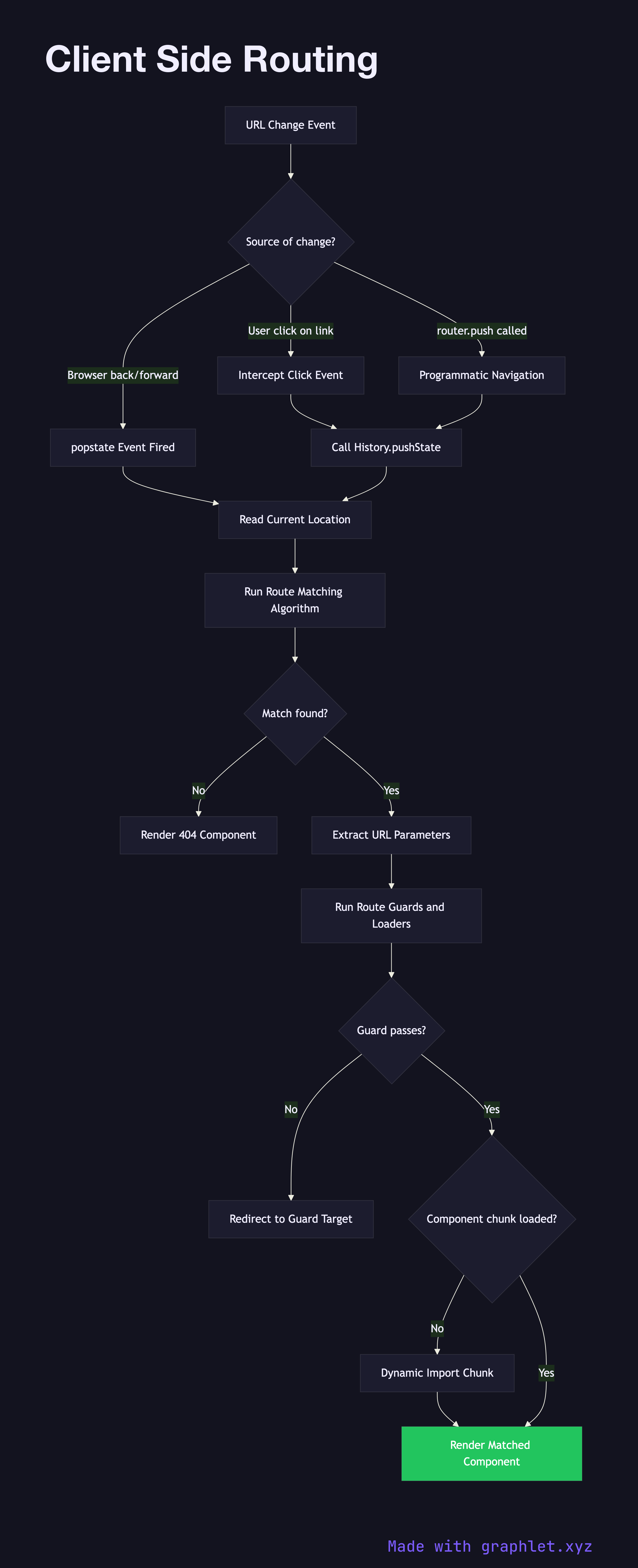
Client-side routing is the mechanism by which a JavaScript application matches the current URL to a component tree and renders it — all within the browser, without any server round-trip for each navigation.
The foundation of client-side routing is the browser's History API: pushState and replaceState update the URL bar and the session history stack without triggering a page reload, while the popstate event fires when the user navigates back or forward. Router libraries wrap these primitives and expose a declarative API for defining which component should render for each URL pattern.
When a navigation occurs, the router receives the new pathname and runs it through a route matching algorithm. Routes are typically defined as an ordered list of path patterns (e.g., /users/:id, /settings/*). The router tests each pattern in order and selects the first match. Named parameters like :id are extracted from the URL and passed as props or available via a hook. Nested routes allow layouts to be composed hierarchically — a shell layout renders at /app, and child routes render their content inside it without re-mounting the shell.
Once a match is found, the router checks whether the matched route's component is already loaded into the bundle or needs to be fetched (see Lazy Loading Components). Route guards — beforeEach, canActivate, or loader functions — run next to check authentication, fetch required data, or redirect. If the guard passes, the matched component is rendered into the router outlet. The SPA Navigation Flow shows this full sequence end-to-end.
For developers, client-side routing also requires careful handling of the initial load: the server must serve the same index.html for all URL paths so the SPA can boot and take control of routing, rather than receiving a 404 for deep-linked URLs.