Lazy Loading Components
Lazy loading components is the practice of deferring the download of a component's JavaScript bundle until the component is actually needed — typically when a user navigates to a route that uses it or when the component scrolls into the viewport.
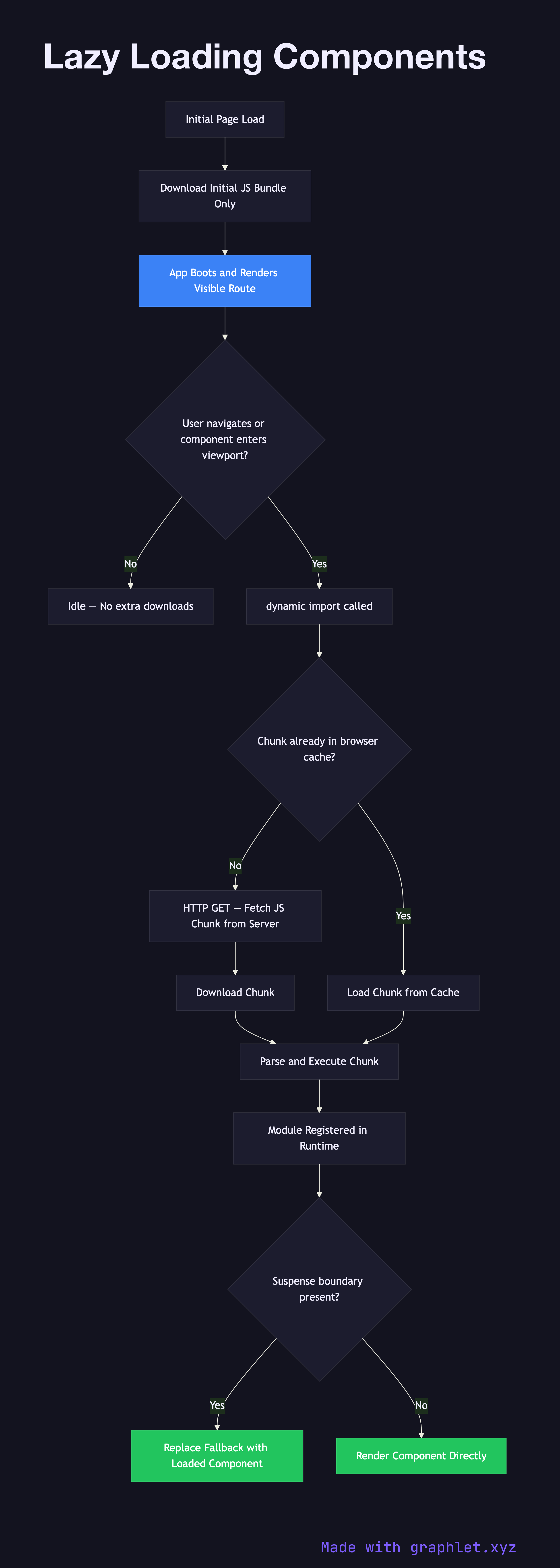
Lazy loading components is the practice of deferring the download of a component's JavaScript bundle until the component is actually needed — typically when a user navigates to a route that uses it or when the component scrolls into the viewport.
The browser can only parse and execute JavaScript after it has been downloaded. In a typical SPA built without lazy loading, the entire application's component tree is bundled into a single file downloaded on initial page load. For large applications this can mean 500 KB to several megabytes of JavaScript that the user must download before seeing any content, most of which belongs to routes they may never visit in a given session. Lazy loading solves this by splitting the bundle into smaller chunks that are downloaded on demand.
The JavaScript mechanism that enables lazy loading is the dynamic import() syntax. Unlike a static import statement at the top of a file (which the bundler includes in the initial chunk), import('./HeavyComponent') returns a Promise and signals the bundler (webpack, Vite, Rollup) to create a separate chunk for that module and all its dependencies. The chunk is downloaded over HTTP only when the import() is called at runtime.
React exposes this through React.lazy() paired with const Modal = React.lazy(() => import('./Modal')). When React first renders defineAsyncComponent(() => import('./Modal.vue')) with a similar pattern. Route-based lazy loading in frameworks like Next.js and Nuxt is often configured by convention at the file-system level rather than manually.
For images and off-screen content, the native loading="lazy" attribute and IntersectionObserver API handle lazy loading without JavaScript. See Code Splitting Architecture for how dynamic imports interact with the bundler's chunk graph, and Module Bundling Workflow for how the overall bundle is constructed.