diagram.mmd — sequence
IoT Firmware Update Flow sequence diagram

An IoT firmware update flow describes the over-the-air (OTA) sequence by which a cloud platform delivers a signed firmware binary to a remote device, and the device validates, applies, and confirms the update — including rollback handling when the new firmware fails to boot correctly.
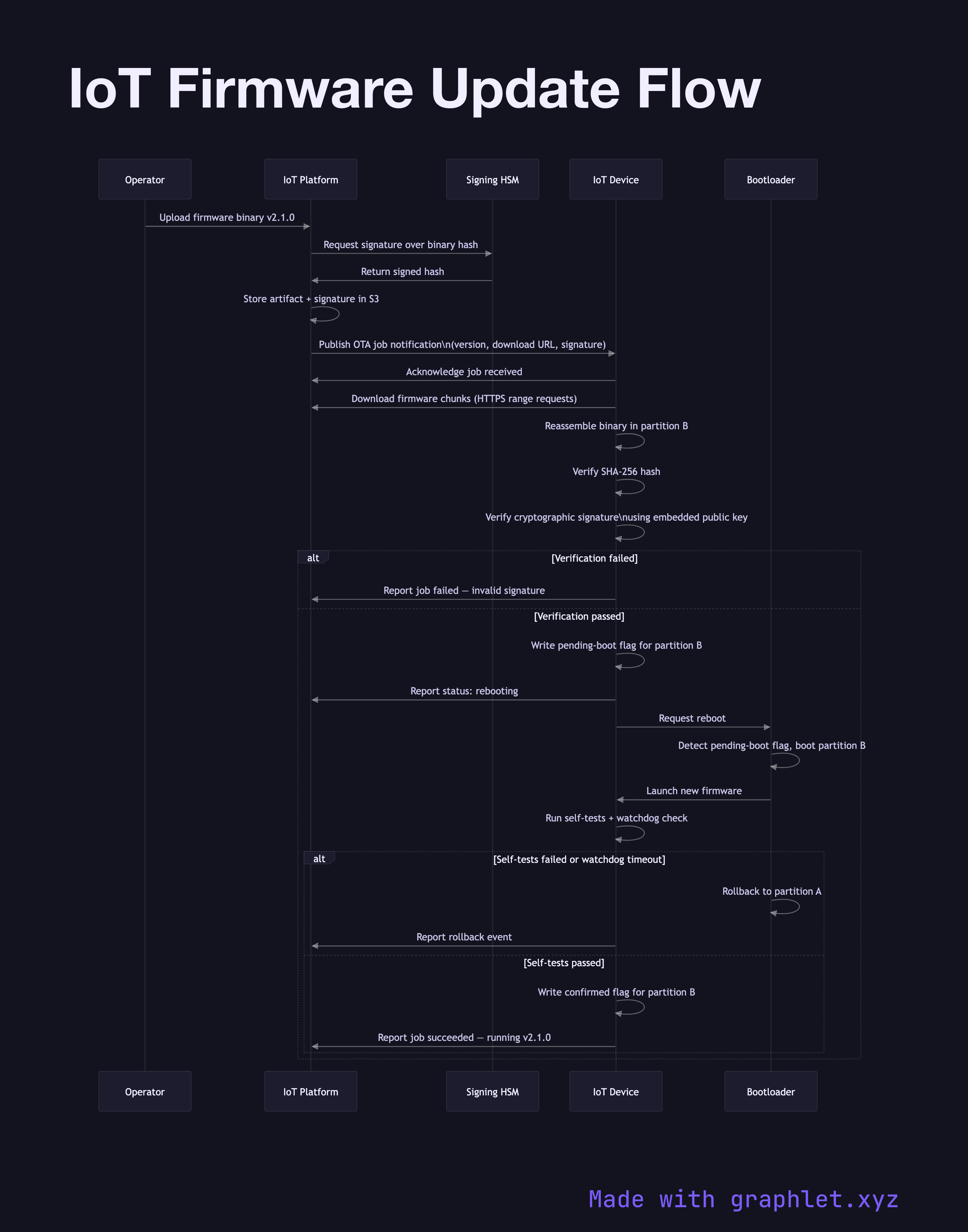
OTA firmware updates are one of the most operationally critical and risky operations in an IoT deployment. A failed update that bricks a device in a remote location can be extremely costly to remediate. Good OTA design therefore emphasises: signed binaries, incremental rollouts, staged verification, and automatic rollback.

The update campaign begins when an operator uploads a new firmware binary to the cloud platform's artifact store and signs it with a private key held in a hardware security module (HSM). The signature covers the binary hash; devices can verify authenticity using the corresponding public key burned into read-only memory.

The platform triggers the update by publishing a job notification to the device's shadow topic or command channel. The device acknowledges receipt, downloads the binary in chunks, and reassembles it in a staging partition (the device uses an A/B partition scheme with partition A running the current firmware and partition B used as the staging target). After download, the device independently verifies the hash and cryptographic signature before writing a "pending boot" flag and requesting a reboot.

On next boot, the bootloader reads the pending flag and jumps to the new firmware in partition B. The firmware performs a self-test — checking peripheral initialisation, memory integrity, and connectivity. If all checks pass within a watchdog timeout window, the firmware writes a "confirmed" flag and the update is committed. If self-tests fail, the bootloader falls back to partition A, and the device reports a rollback event to the cloud platform. For the authenticated channel this relies on, see IoT Device Authentication. For command delivery mechanics, see IoT Command Control Flow.

Free online editor
Edit this diagram in Graphlet
Fork, modify, and export to SVG or PNG. No sign-up required.
Open in Graphlet →

Frequently asked questions

An IoT OTA (over-the-air) firmware update is the process of remotely delivering a new firmware binary to a device over a network connection, without physical access. The cloud platform signs the binary, the device downloads and verifies it, applies it to a staging partition, reboots, self-tests, and confirms the update — or rolls back automatically if the new firmware fails to function correctly.
The update campaign starts when an operator uploads and signs a firmware binary in the cloud. The platform publishes a job notification to the device's command channel. The device downloads the binary in chunks into a staging partition, verifies the hash and cryptographic signature, sets a pending-boot flag, and reboots. The bootloader jumps to the new firmware; if self-tests pass within a watchdog window, the update is confirmed. If they fail, the bootloader reverts to the previous partition and reports the rollback.
OTA updates are essential for any deployed device fleet where physical access is expensive, infrequent, or impossible. They enable security patch delivery, feature additions, and bug fixes across thousands or millions of devices simultaneously. Staged rollouts — updating a small percentage of devices first — allow teams to validate the update in production conditions before completing the full deployment.
Common mistakes include not implementing an A/B partition scheme, which means a failed update leaves the device unbootable. Others are signing firmware with a key stored in software rather than an HSM, not verifying the signature on the device before applying, setting an insufficient watchdog timeout so a slow self-test triggers a false rollback, and failing to report rollback events to the cloud so the fleet appears healthy when it is not.
Manual firmware flashing requires physical access to the device via a USB or JTAG connection and is typically used during development and manufacturing. OTA updates operate entirely over the network in production deployments, enabling remote management at scale. OTA requires additional infrastructure — artifact storage, job scheduling, signature verification — but eliminates the operational cost and downtime associated with physical updates.
mermaid
sequenceDiagram participant Operator as Operator participant Platform as IoT Platform participant HSM as Signing HSM participant Device as IoT Device participant Bootloader as Bootloader Operator->>Platform: Upload firmware binary v2.1.0 Platform->>HSM: Request signature over binary hash HSM->>Platform: Return signed hash Platform->>Platform: Store artifact + signature in S3 Platform->>Device: Publish OTA job notification\n(version, download URL, signature) Device->>Platform: Acknowledge job received Device->>Platform: Download firmware chunks (HTTPS range requests) Device->>Device: Reassemble binary in partition B Device->>Device: Verify SHA-256 hash Device->>Device: Verify cryptographic signature\nusing embedded public key alt Verification failed Device->>Platform: Report job failed — invalid signature else Verification passed Device->>Device: Write pending-boot flag for partition B Device->>Platform: Report status: rebooting Device->>Bootloader: Request reboot Bootloader->>Bootloader: Detect pending-boot flag, boot partition B Bootloader->>Device: Launch new firmware Device->>Device: Run self-tests + watchdog check alt Self-tests failed or watchdog timeout Bootloader->>Bootloader: Rollback to partition A Device->>Platform: Report rollback event else Self-tests passed Device->>Device: Write confirmed flag for partition B Device->>Platform: Report job succeeded — running v2.1.0 end end
Copied to clipboard