Smart Home System Architecture
A smart home system architecture shows how consumer IoT devices — smart bulbs, thermostats, door locks, cameras, and sensors — connect through a local hub and cloud platform to end-user control surfaces including mobile apps, web dashboards, and voice assistants.
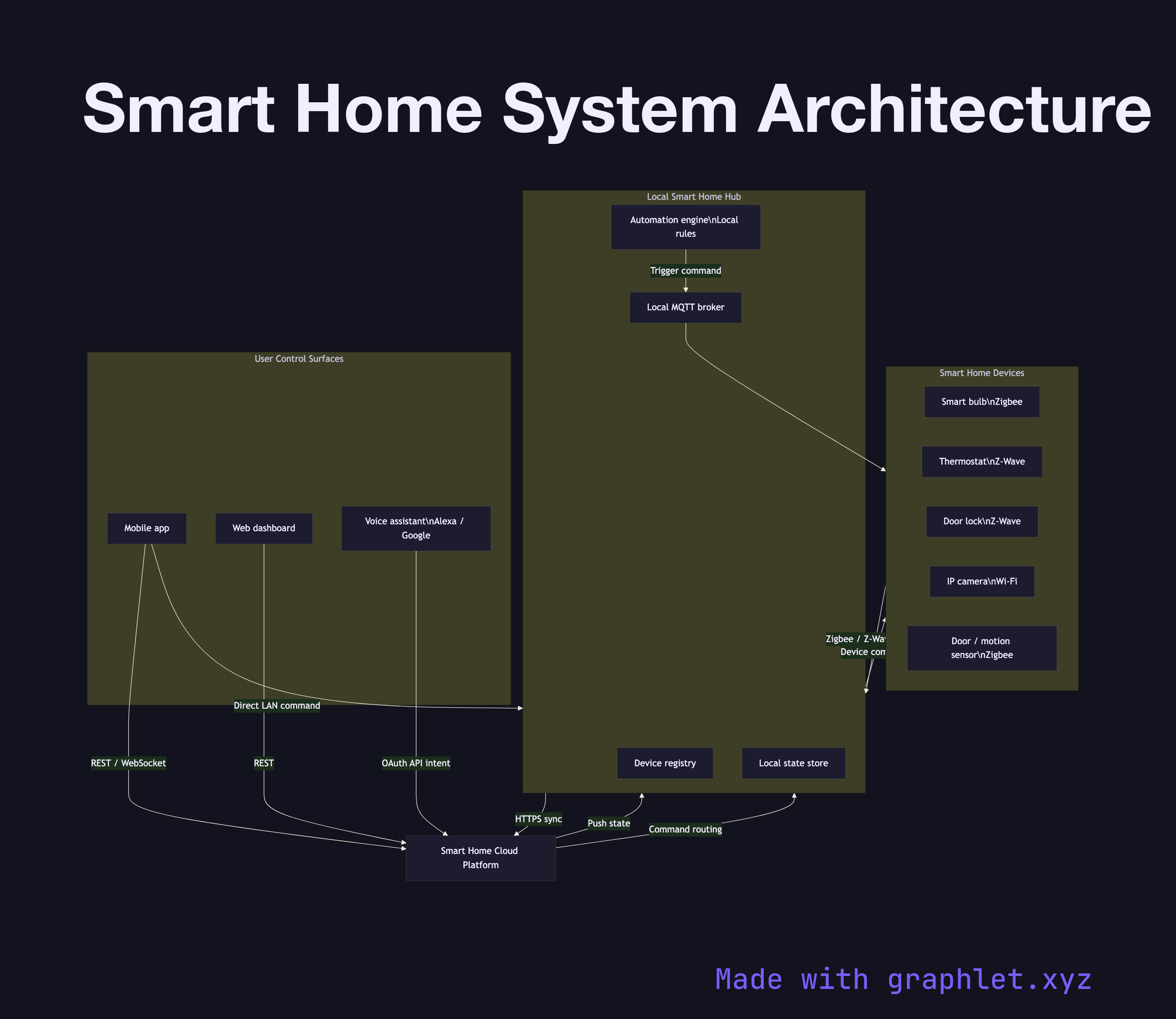
A smart home system architecture shows how consumer IoT devices — smart bulbs, thermostats, door locks, cameras, and sensors — connect through a local hub and cloud platform to end-user control surfaces including mobile apps, web dashboards, and voice assistants.
Smart home systems must simultaneously satisfy two competing requirements: low-latency local control (turning on a light should not require a round trip to the internet) and remote accessibility (controlling the same light from anywhere in the world). Good architecture achieves both by maintaining a local hub that handles device communication on the LAN, while replicating state to a cloud platform for remote access and third-party integrations.
Devices connect to the hub using short-range radio protocols: Zigbee and Z-Wave for battery-powered sensors and switches, Wi-Fi for cameras and smart plugs, and Matter (over Thread or Wi-Fi) for newer interoperable devices. The hub maintains a device registry mapping logical names to physical addresses, and a state store holding the last-known state of every device.
The hub syncs state to the cloud platform continuously. When a user opens a mobile app, it connects to the cloud via WebSocket or REST to read current state and send commands. Commands flow cloud → hub → device. If the hub is on the same LAN as the device and the mobile app is also on-LAN, the app can optionally issue commands directly to the hub, bypassing the cloud for sub-100 ms latency.
Voice assistants (Alexa, Google Home, Siri) integrate via OAuth-protected cloud APIs. The assistant platform sends an intent to the smart home cloud, which translates it into a device command and routes it through the hub. Automations — if door opens after 10 PM, turn on hallway light — run as rules on the hub (for reliability during cloud outages) or as cloud functions. For authentication patterns, see IoT Device Authentication. For command delivery mechanics, see IoT Command Control Flow. For the gateway layer, see IoT Gateway Architecture.