RabbitMQ message routing is the process by which a published message is matched against exchange bindings and delivered to one or more queues based on routing keys and exchange type.
RabbitMQ message routing is the process by which a published message is matched against exchange bindings and delivered to one or more queues based on routing keys and exchange type.
Unlike Kafka's log-based model, RabbitMQ is a message broker built on AMQP. Producers never publish directly to queues — they publish to an exchange, and the exchange applies routing logic to forward the message to zero or more bound queues. This indirection is what gives RabbitMQ its flexible routing model.
RabbitMQ ships with four built-in exchange types. A direct exchange routes a message to queues whose binding key exactly matches the message's routing key — ideal for task queues. A fanout exchange ignores routing keys entirely and broadcasts the message to all bound queues, powering Pub Sub Messaging scenarios. A topic exchange uses wildcard patterns (* matches one word, # matches zero or more) enabling flexible hierarchical routing like orders.europe.#. A headers exchange routes on message header attributes instead of routing keys.
Once a message lands in a queue, consumers subscribe and acknowledge. RabbitMQ tracks unacknowledged messages and re-queues them if a consumer disconnects without acking — providing at-least-once delivery by default. Combine this with a Dead Letter Queue for messages that exhaust their retry budget, and Message Queue Retry for controlled backoff between attempts.
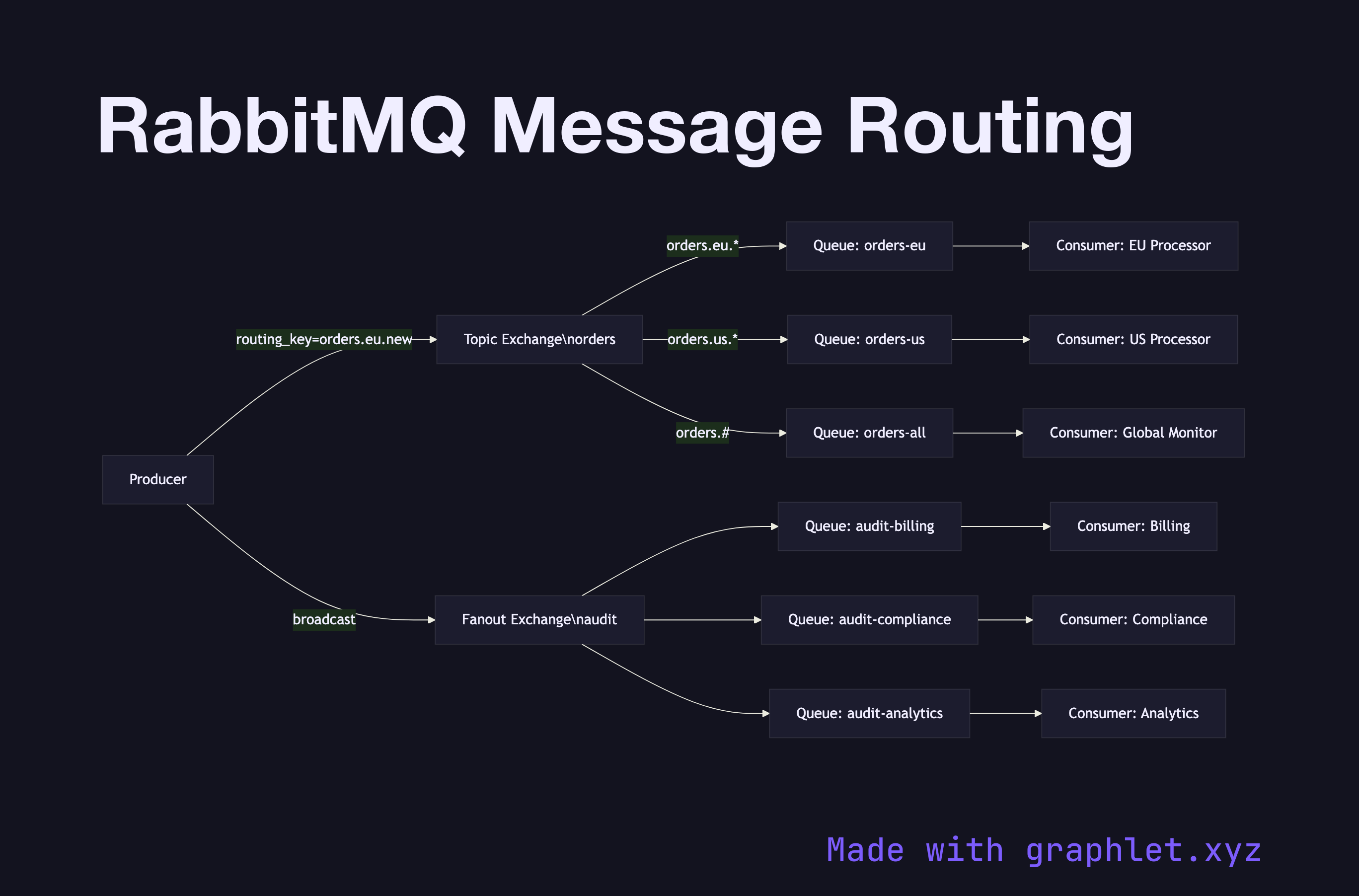
This diagram shows a topic exchange routing order events by region to region-specific queues, while a fanout exchange broadcasts audit events to all bound listeners simultaneously.
Free online editor
Edit this diagram in Graphlet
Fork, modify, and export to SVG or PNG. No sign-up required.
RabbitMQ message routing is the process by which a published message is matched against exchange bindings and delivered to one or more queues based on routing keys and exchange type. Producers publish to exchanges — never directly to queues — and the exchange applies its routing logic to forward the message to all matching bound queues.
RabbitMQ has four built-in exchange types: direct (exact routing key match), fanout (broadcast to all bound queues, ignoring routing keys), topic (wildcard pattern matching with `*` for one word and `#` for zero or more), and headers (routing on message header attributes). Bindings define the relationship between an exchange and a queue, with an optional binding key for direct and topic exchanges.
RabbitMQ's routing model is a strong fit when your messaging needs are varied: direct exchanges for task queues, fanout for broadcasts, and topic exchanges for hierarchical routing like `orders.europe.#`. It is well suited to workloads with moderate volume, complex routing logic, and where messages are consumed and acknowledged (not replayed from a log).
A frequent mistake is publishing to the default exchange and addressing queues by name directly, bypassing exchange routing entirely. This works at small scale but removes all routing flexibility. Another pitfall is forgetting to set up a dead-letter exchange on queues — without it, messages that exhaust retries are silently dropped. Teams also under-use topic exchange wildcards, creating many near-identical direct exchanges instead of one flexible topic exchange.
RabbitMQ routes messages through exchanges to queues using routing keys and bindings — messages are removed from the queue after acknowledgment. Kafka does not have an exchange routing layer; producers write to topic partitions directly, and messages are retained in the log for a configurable period regardless of consumer state. RabbitMQ excels at flexible per-message routing; Kafka excels at high-throughput durable streaming with replay.
mermaid
flowchartLR
P[Producer] -->|routing_key=orders.eu.new| TE[Topic Exchange\norders]
P -->|broadcast| FE[Fanout Exchange\naudit]
TE -->|orders.eu.*| QEU[Queue: orders-eu]
TE -->|orders.us.*| QUS[Queue: orders-us]
TE -->|orders.#| QALL[Queue: orders-all]
FE --> QA1[Queue: audit-billing]
FE --> QA2[Queue: audit-compliance]
FE --> QA3[Queue: audit-analytics]
QEU --> C1[Consumer: EU Processor]
QUS --> C2[Consumer: US Processor]
QALL --> C3[Consumer: Global Monitor]
QA1 --> CA1[Consumer: Billing]
QA2 --> CA2[Consumer: Compliance]
QA3 --> CA3[Consumer: Analytics]