diagram.mmd — flowchart
Dead Letter Queue flowchart diagram

A dead letter queue (DLQ) is a holding queue that receives messages that cannot be successfully processed after exhausting all configured retry attempts, preventing bad messages from blocking normal queue operations.
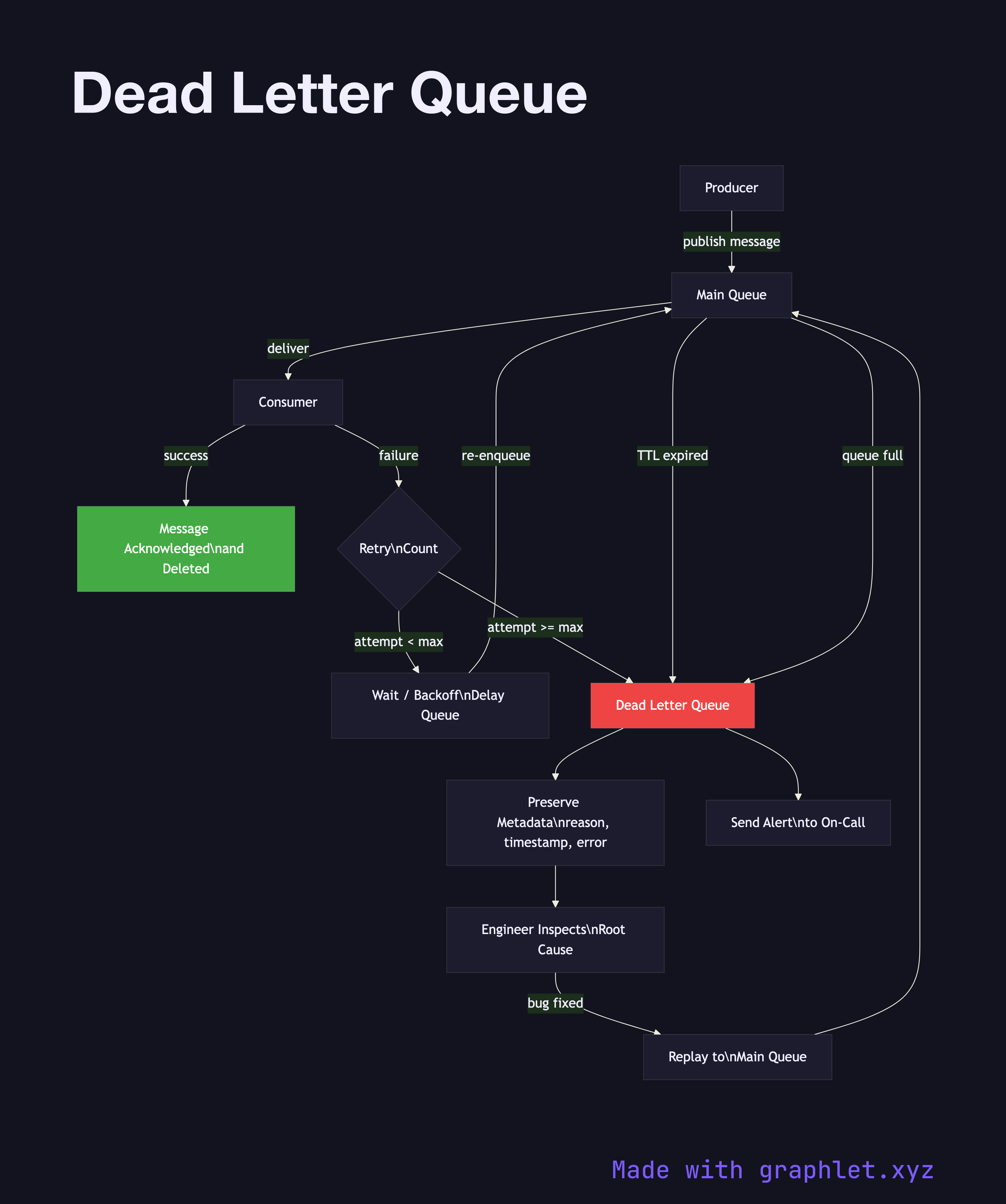
Every production messaging system needs a safety valve for messages that fail repeatedly. Without a DLQ, a "poison message" — one that consistently causes consumer errors, perhaps due to malformed data or a schema mismatch — will retry indefinitely, consuming resources and potentially starving the queue. The DLQ pattern moves these messages out of the hot path while preserving them for diagnosis and potential replay.

Messages arrive in a DLQ for several reasons: they exceed the maximum delivery count (the most common case, covered in detail in Message Queue Retry); they exceed the queue's message TTL without being consumed; or the destination queue is full and cannot accept new messages at time of routing (in RabbitMQ's x-dead-letter-exchange configuration).

Once in the DLQ, messages should trigger an alert to an on-call engineer. The message is preserved with its original payload plus metadata: the reason it was dead-lettered, the original queue it came from, the time of failure, and the last exception message. This metadata is invaluable for debugging.

After the root cause is fixed — a bug deployed, a downstream service recovered, or a schema migration applied — messages can be replayed from the DLQ back to the original queue. Most cloud-managed services (AWS SQS, Azure Service Bus, GCP Pub/Sub) provide native DLQ replay tooling. In homegrown systems, a replay script reads from the DLQ and republishes to the source queue. Replayed messages should be processed by an Idempotent Consumer to handle any duplicates from prior partial processing.

Free online editor
Edit this diagram in Graphlet
Fork, modify, and export to SVG or PNG. No sign-up required.
Open in Graphlet →

Frequently asked questions

A dead letter queue (DLQ) is a secondary queue that receives messages which have failed processing after exhausting all configured retry attempts. Rather than discarding poison messages or blocking the primary queue, the DLQ preserves them with failure metadata so engineers can diagnose root causes and replay messages once the underlying issue is fixed.
When a message fails processing, the broker increments its delivery count. Once that count exceeds the configured maximum, the broker routes the message to the DLQ instead of re-enqueuing it in the primary queue. The message is stored with its original payload plus metadata: the reason for dead-lettering, the originating queue, the failure timestamp, and the last exception message.
Every production message queue should have a DLQ configured. Without one, a poison message — malformed data, a schema mismatch, or a bug in consumer logic — retries indefinitely, consuming resources and potentially starving the queue of healthy messages. A DLQ is the minimum safety net for reliable asynchronous processing.
The most common mistake is setting up a DLQ but never alerting on it. Messages can accumulate silently for days. Always configure an alarm on DLQ depth. A second mistake is replaying messages without fixing the root cause first — the messages will simply fail again. A third mistake is not using an idempotent consumer when replaying, which risks double-processing messages that were partially handled before landing in the DLQ.
mermaid
flowchart TD P[Producer] -->|publish message| MQ[Main Queue] MQ -->|deliver| C[Consumer] C -->|success| ACK[Message Acknowledged\nand Deleted] C -->|failure| RC{Retry\nCount} RC -->|attempt < max| WQ[Wait / Backoff\nDelay Queue] WQ -->|re-enqueue| MQ RC -->|attempt >= max| DLQ[Dead Letter Queue] MQ -->|TTL expired| DLQ MQ -->|queue full| DLQ DLQ --> META[Preserve Metadata\nreason, timestamp, error] DLQ --> ALERT[Send Alert\nto On-Call] META --> INSPECT[Engineer Inspects\nRoot Cause] INSPECT -->|bug fixed| REPLAY[Replay to\nMain Queue] REPLAY --> MQ style DLQ fill:#e44,color:#fff style ACK fill:#4a4,color:#fff
Copied to clipboard