Mobile Cache Strategy
A mobile cache strategy defines the rules by which an app decides whether to serve data from a local store, fetch fresh data from the network, or do both simultaneously — balancing perceived performance, data freshness, and bandwidth consumption.
A mobile cache strategy defines the rules by which an app decides whether to serve data from a local store, fetch fresh data from the network, or do both simultaneously — balancing perceived performance, data freshness, and bandwidth consumption.
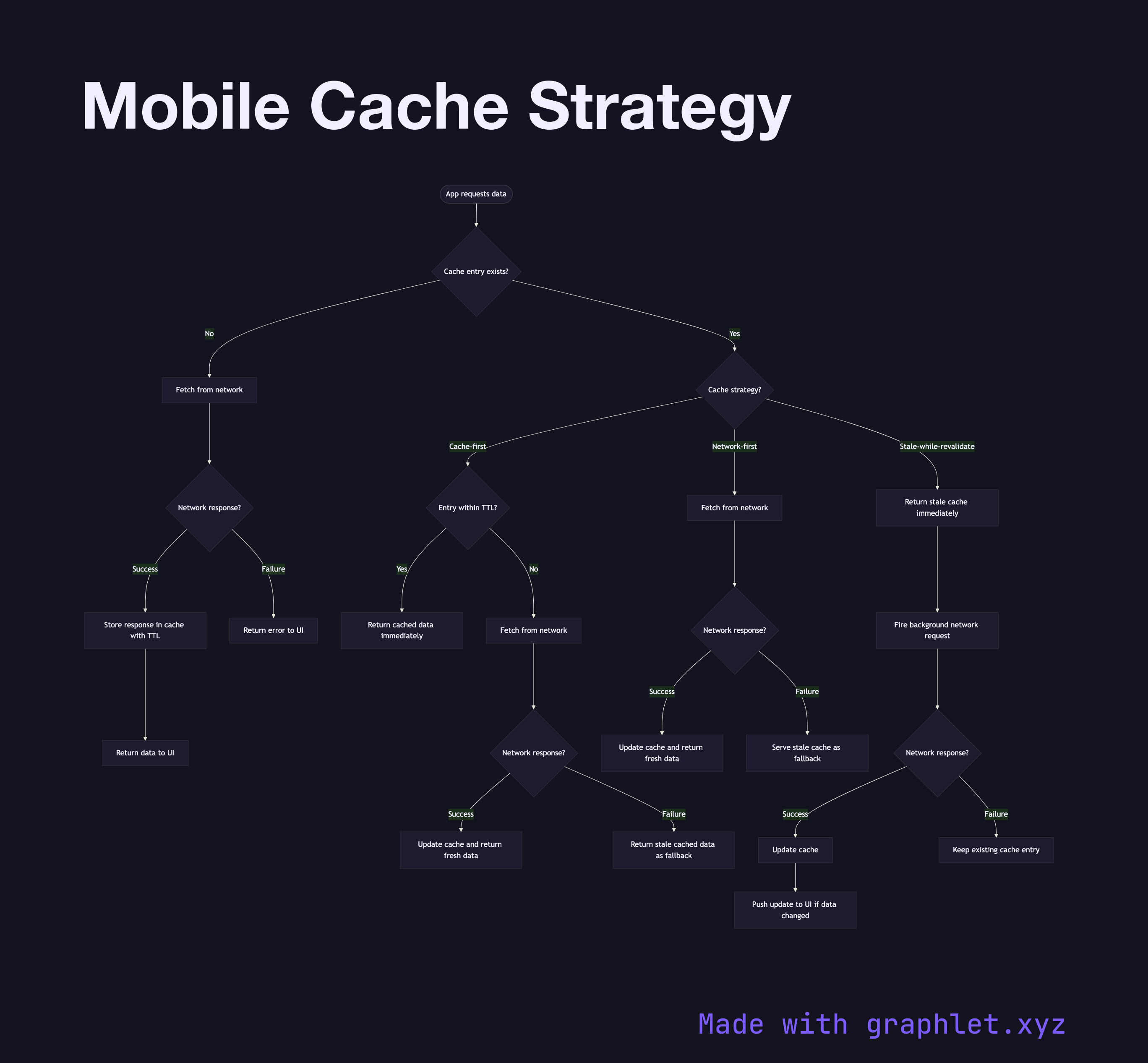
Mobile apps commonly implement one of three strategies, each appropriate for different data types:
Cache-first serves the cached value immediately if it exists, regardless of staleness, and only reaches the network if the cache is empty. This is ideal for truly static assets — app configuration, feature flags fetched at startup, country or category lists that rarely change. The risk is serving stale data for longer than intended.
Network-first always attempts a network request, falls back to the cache only on failure. This is appropriate for data where freshness is critical — user account details, order status, real-time inventory. The downside is that every request incurs network latency, and on slow connections the UI stalls.
Stale-while-revalidate serves the cached value immediately (fast perceived response) and simultaneously fires a network request in the background. When the fresh response arrives, the cache is updated and the UI is updated if the data changed. This is the most commonly used strategy for social feeds, dashboards, and content listings where users tolerate briefly stale data but expect fast loads.
Cache entries carry metadata: a TTL (time-to-live), a timestamp, and an ETag or content hash for conditional requests. When a TTL expires, the entry is considered stale but not deleted — it remains available as the fallback while a revalidation request is in flight. Periodic cache eviction removes entries that exceed a maximum age or when storage pressure requires it.
For how caching fits into the full API request lifecycle, see Mobile API Sync. For caching during offline periods, see Offline Sync Workflow.