diagram.mmd — flowchart
Background Job Execution flowchart diagram

Background job execution describes how a mobile operating system schedules, grants CPU time to, and enforces constraints on work that runs while an app is not in the foreground.
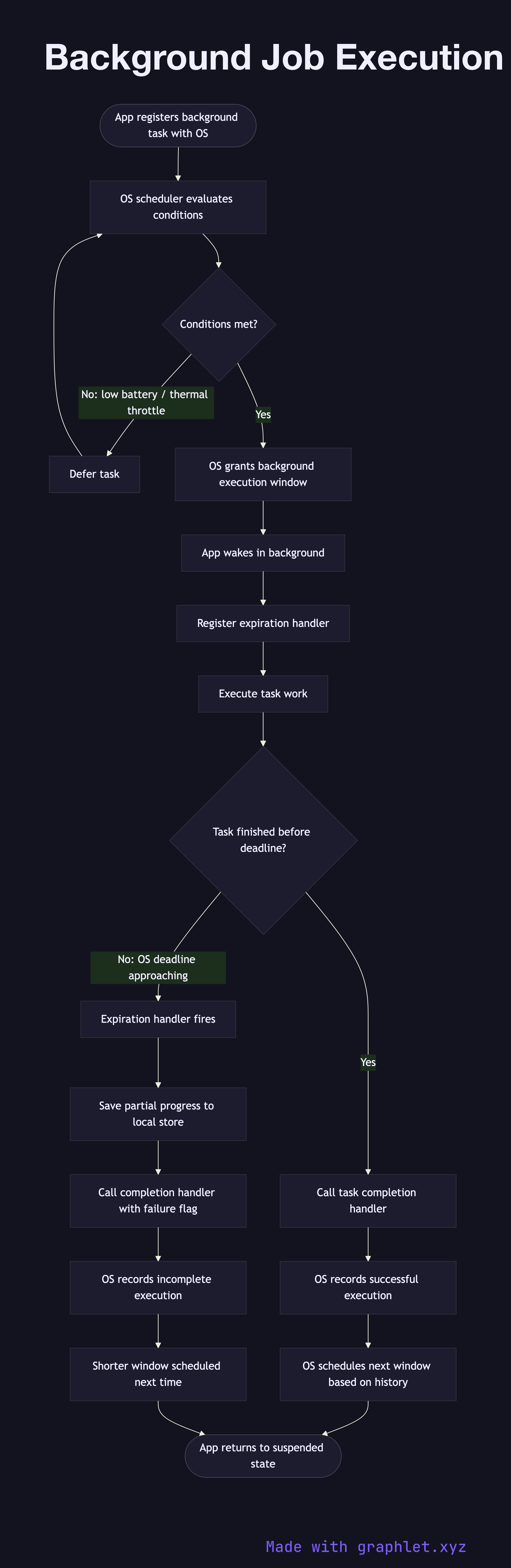
Both iOS and Android have tightened background execution rules substantially over the past several OS generations to protect battery life. Apps can no longer run arbitrary background threads indefinitely. Instead, they must register specific task types with the OS scheduler: periodic background fetch (refreshing data on a schedule), background processing tasks (longer-duration work like ML model updates or database migrations), and silent push-triggered background tasks (where an incoming notification wakes the app briefly to pre-fetch content).

The OS scheduler grants a background execution window based on device conditions: battery level, thermal state, whether the device is charging, and historical app usage patterns. On iOS, BGAppRefreshTask gets roughly 30 seconds; BGProcessingTask can run for several minutes but only when the device is charging and idle. Android's WorkManager uses similar heuristics through the JobScheduler and AlarmManager APIs.

When the app receives the background execution window, it must register an expiration handler immediately. This handler is called if the OS needs to reclaim resources before the task finishes. On expiration, the app must save partial progress and signal task completion. Failing to call the completion handler leaves the system unable to accurately schedule future background windows, degrading reliability.

For patterns that work with background sync, see Offline Sync Workflow and Mobile API Sync. For full app lifecycle context, see App Launch Lifecycle.

Free online editor
Edit this diagram in Graphlet
Fork, modify, and export to SVG or PNG. No sign-up required.
Open in Graphlet →

Frequently asked questions

Background job execution is the mechanism by which a mobile OS grants a suspended app a limited CPU window to perform work — such as data sync, content prefetch, or database maintenance — without the user actively using the app.
On iOS, apps register `BGAppRefreshTask` or `BGProcessingTask` tasks and the OS decides when to grant execution time based on battery level, thermal state, and historical usage patterns. On Android, `WorkManager` abstracts `JobScheduler` and `AlarmManager` to schedule deferrable background work under similar heuristics.
Use background tasks for work that does not need to complete before the user's next interaction — syncing queued mutations, refreshing cached data, or running ML model updates — so the foreground UI remains responsive and battery impact is deferred to opportune moments.
The most frequent error is failing to register an expiration handler, leaving the OS unable to reclaim resources gracefully. Other mistakes include scheduling too-frequent refresh intervals (which the OS will throttle), performing network-heavy work on a `BGAppRefreshTask` that should use `BGProcessingTask`, and not persisting partial progress before the window expires.
mermaid
flowchart TD A([App registers background task with OS]) --> B[OS scheduler evaluates conditions] B --> C{Conditions met?} C -- No: low battery / thermal throttle --> D[Defer task] D --> B C -- Yes --> E[OS grants background execution window] E --> F[App wakes in background] F --> G[Register expiration handler] G --> H[Execute task work] H --> I{Task finished before deadline?} I -- Yes --> J[Call task completion handler] J --> K[OS records successful execution] K --> L[OS schedules next window based on history] I -- No: OS deadline approaching --> M[Expiration handler fires] M --> N[Save partial progress to local store] N --> O[Call completion handler with failure flag] O --> P[OS records incomplete execution] P --> Q[Shorter window scheduled next time] L --> R([App returns to suspended state]) Q --> R
Copied to clipboard