App Launch Lifecycle
The app launch lifecycle describes the sequence of steps the operating system and application code execute from the moment a user taps an app icon — or a notification wakes the process — through to the first interactive screen being rendered on display.
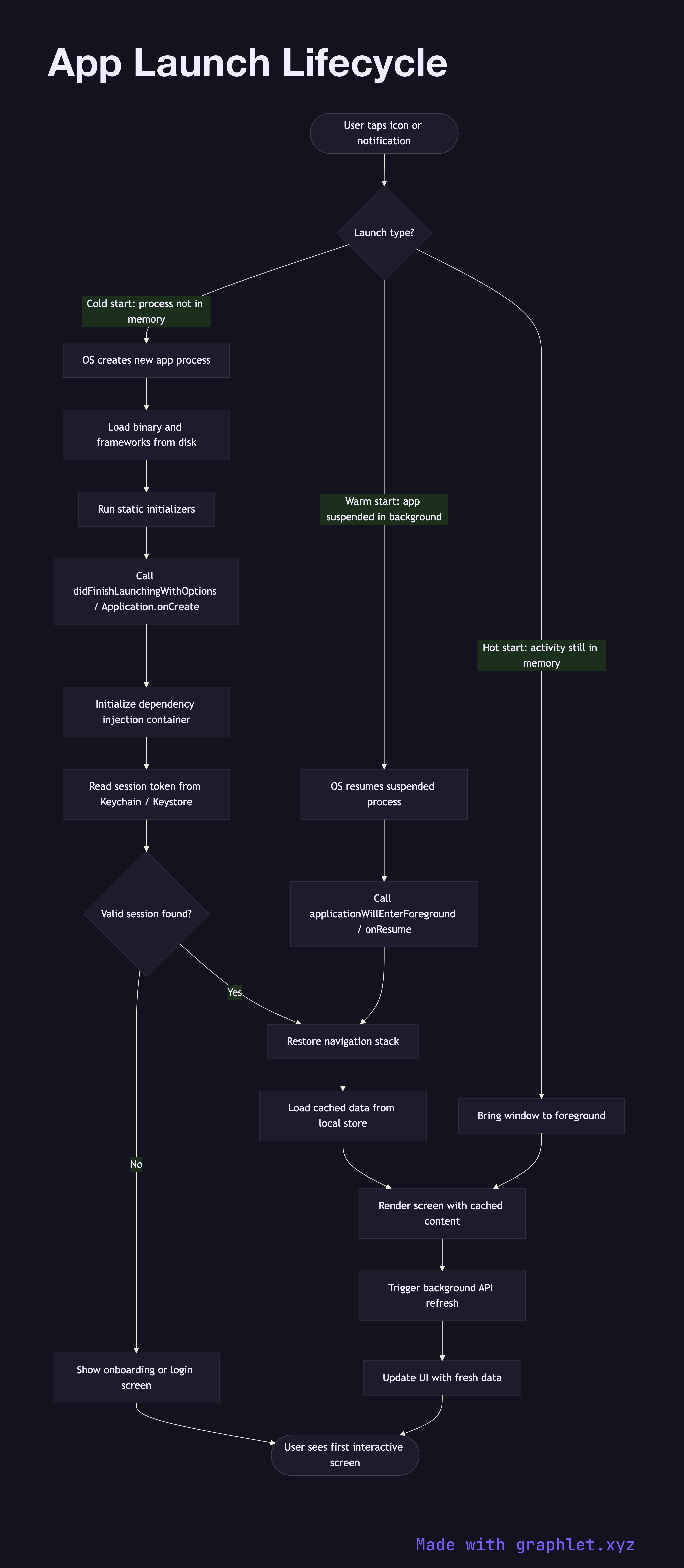
The app launch lifecycle describes the sequence of steps the operating system and application code execute from the moment a user taps an app icon — or a notification wakes the process — through to the first interactive screen being rendered on display.
Launch type significantly affects the sequence. A cold start occurs when the app process does not exist in memory: the OS must allocate a new process, load the binary and linked frameworks from disk into memory, and run static initializers before application code begins executing. On iOS this is application(_:didFinishLaunchingWithOptions:); on Android it is Application.onCreate() followed by the launcher Activity.onCreate(). Cold starts are the most expensive and are where slow initialization code has the most user-visible impact — each millisecond spent blocking the main thread here directly delays the first frame.
A warm start occurs when the app process is already in memory (suspended in the background) and is resumed. The OS simply moves it to the foreground; no process creation or binary loading is needed. A hot start is an even lighter variation where the activity or view controller is still in memory and only needs to be brought to the front.
After the entry-point callback fires, the app initializes its dependency injection container, restores any persisted session (reading from the Keychain/Keystore), sets up the navigation stack, and decides which screen to show: onboarding for new installs, the login screen if no session exists, or the main content screen for authenticated returning users. If a cached data set is available, it is loaded immediately so the screen renders with stale-but-fast content while a background refresh runs.
For what happens when the app is launched from a notification or link, see Deep Link Routing and Push Notification Flow. For auth session restoration, see Mobile App Authentication.