diagram.mmd — sequence
Mobile Payment Flow sequence diagram

A mobile payment flow describes the sequence of steps that take a user from tapping a "Buy" button to receiving a confirmed payment, routing through the device's native payment sheet, a payment processor, and the app's backend order system.
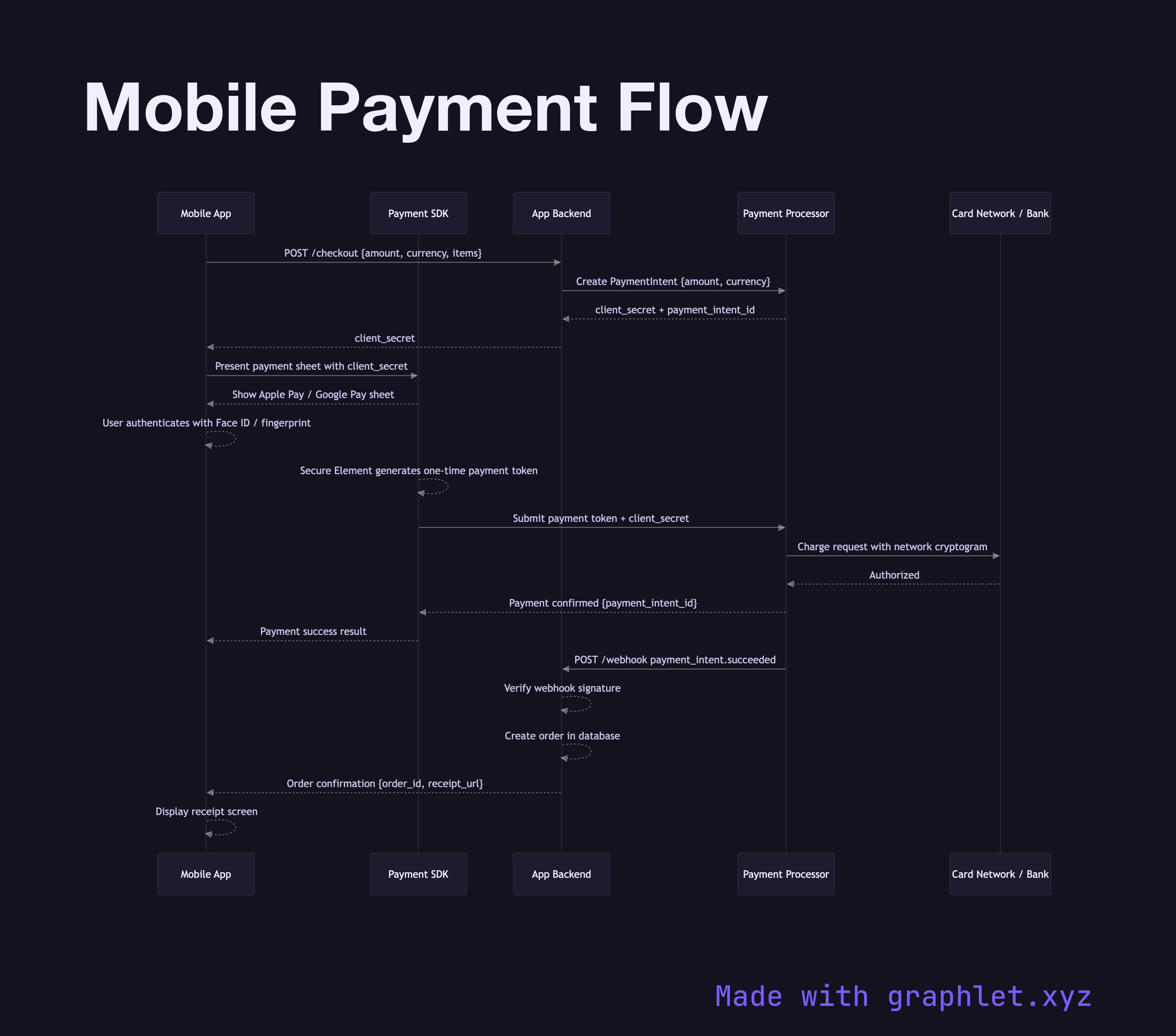
Native mobile payment methods — Apple Pay on iOS and Google Pay on Android — use tokenization to avoid transmitting raw card numbers over the network. When the user initiates a payment, the app requests a payment intent from its backend server, which calls the payment processor (e.g., Stripe) to create a PaymentIntent with the charge amount and currency. The processor returns a client secret that authorizes one specific payment operation.

The app passes this client secret to the payment processor's mobile SDK, which displays the native payment sheet — the familiar Face ID / fingerprint-authenticated Apple Pay or Google Pay dialog. The user authenticates with biometrics. The device's Secure Element generates a one-time payment token using the user's stored card credentials and the network cryptogram, then sends this token to the payment processor directly. The processor decrypts the token using Apple's or Google's certificate, charges the underlying card, and returns a payment result.

The processor notifies your backend via a webhook (or the app polls for the result using the client secret). The backend verifies the payment status, creates the order in the database, and returns an order confirmation to the app. The app displays the receipt.

Critically, the raw card number never touches your app or your server — the tokenization happens entirely within the device's trusted execution environment and the processor's systems. This significantly reduces PCI-DSS scope for the merchant.

For authentication patterns that protect payment endpoints, see Mobile App Authentication. For webhook-based confirmation, see the backend webhook delivery pattern.

Free online editor
Edit this diagram in Graphlet
Fork, modify, and export to SVG or PNG. No sign-up required.
Open in Graphlet →

Frequently asked questions

A mobile payment flow is the sequence of steps — from a user tapping "Buy" to an order being confirmed — that coordinates the app, the device's native payment sheet, a payment processor, and the merchant's backend to authorise and settle a transaction without transmitting raw card numbers.
When the user authenticates with biometrics, the device's Secure Element generates a one-time payment token using the stored card credentials and a network cryptogram. This token is sent directly to the payment processor, which decrypts it using Apple's or Google's certificate and charges the underlying card. The merchant's app and server never see the raw card number.
Use native payment sheets whenever you want to reduce checkout friction and PCI-DSS scope. They eliminate the need for the user to type card details, leverage biometric authentication for security, and require no card data to pass through your app or server — significantly simplifying compliance obligations.
Polling for payment status from the app instead of relying on server-side webhook confirmation is unreliable — the app can be killed or backgrounded before receiving the result. Failing to handle the `PaymentIntent` in a server-side idempotency-safe way risks double-charging on network retries, and not verifying webhook signatures allows fraudulent payment confirmations.
Both use device-bound tokenisation via a Secure Element and biometric authentication, but they use different certificate authorities and token formats. Apple Pay tokens are decrypted using Apple's PKCS #7 certificate chain; Google Pay tokens use a JSON payload encrypted with Google's public key. From the merchant's perspective both integrate through the same payment processor SDK, abstracting these differences away.
mermaid
sequenceDiagram participant App as Mobile App participant SDK as Payment SDK participant Backend as App Backend participant Processor as Payment Processor participant Bank as Card Network / Bank App->>Backend: POST /checkout {amount, currency, items} Backend->>Processor: Create PaymentIntent {amount, currency} Processor-->>Backend: client_secret + payment_intent_id Backend-->>App: client_secret App->>SDK: Present payment sheet with client_secret SDK-->>App: Show Apple Pay / Google Pay sheet App-->>App: User authenticates with Face ID / fingerprint SDK-->>SDK: Secure Element generates one-time payment token SDK->>Processor: Submit payment token + client_secret Processor->>Bank: Charge request with network cryptogram Bank-->>Processor: Authorized Processor-->>SDK: Payment confirmed {payment_intent_id} SDK-->>App: Payment success result Processor->>Backend: POST /webhook payment_intent.succeeded Backend-->>Backend: Verify webhook signature Backend-->>Backend: Create order in database Backend-->>App: Order confirmation {order_id, receipt_url} App-->>App: Display receipt screen
Copied to clipboard