Payment Retry Logic
Payment retry logic governs how a billing system responds to a failed charge — specifically, whether and when to attempt the same charge again. Naive retry strategies waste gateway resources and can trigger fraud flags or cause card issuers to permanently block a merchant. Effective retry logic classifies decline codes and applies targeted remediation.
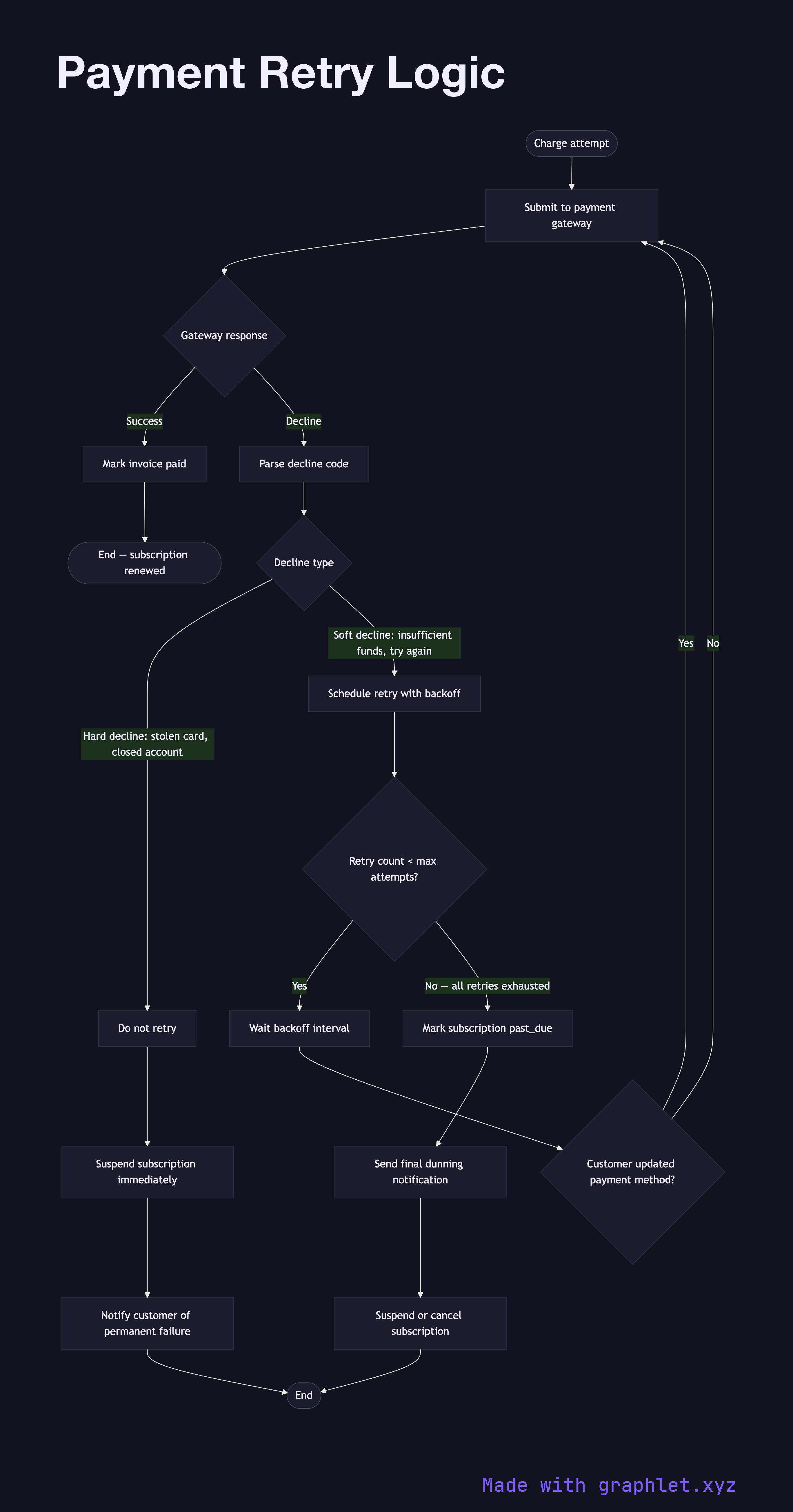
Payment retry logic governs how a billing system responds to a failed charge — specifically, whether and when to attempt the same charge again. Naive retry strategies waste gateway resources and can trigger fraud flags or cause card issuers to permanently block a merchant. Effective retry logic classifies decline codes and applies targeted remediation.
The foundation of retry logic is decline code classification. Card networks return standardized reason codes with each decline, and these codes fall into two broad categories:
- Hard declines: permanent failures that should not be retried. Examples include do-not-honor for a blocked card, invalid card number, card reported stolen, or account closed. Retrying hard declines will always fail and may worsen the merchant's fraud reputation with the issuer. - Soft declines: transient failures that may succeed on retry. Examples include insufficient funds, card temporarily blocked, issuer unavailable, and try again later. These represent temporary conditions that could resolve within hours or days.
For soft declines, the system schedules retries using an exponential backoff schedule — for example, retry after 1 day, 3 days, and 7 days. Each retry attempt should use the same idempotency key pattern to avoid double-charges on network timeouts. Some gateways (notably Stripe with Smart Retries) use ML to identify the optimal retry timing based on historical success rates for similar decline codes.
When a retry succeeds, the invoice is marked paid and the dunning sequence terminates. When all retries are exhausted, the subscription is suspended and the customer is notified to update their payment method. If the customer updates their method during the retry window, an immediate retry should be triggered rather than waiting for the next scheduled attempt. For the broader dunning workflow see Subscription Billing Workflow. The general retry pattern for HTTP calls is covered in Request Retry Logic.