CORS Request Flow
Cross-Origin Resource Sharing (CORS) is a browser security mechanism that controls which cross-origin HTTP requests a web page is allowed to make. It enforces the same-origin policy by default and requires servers to explicitly opt in to cross-origin access via specific response headers.
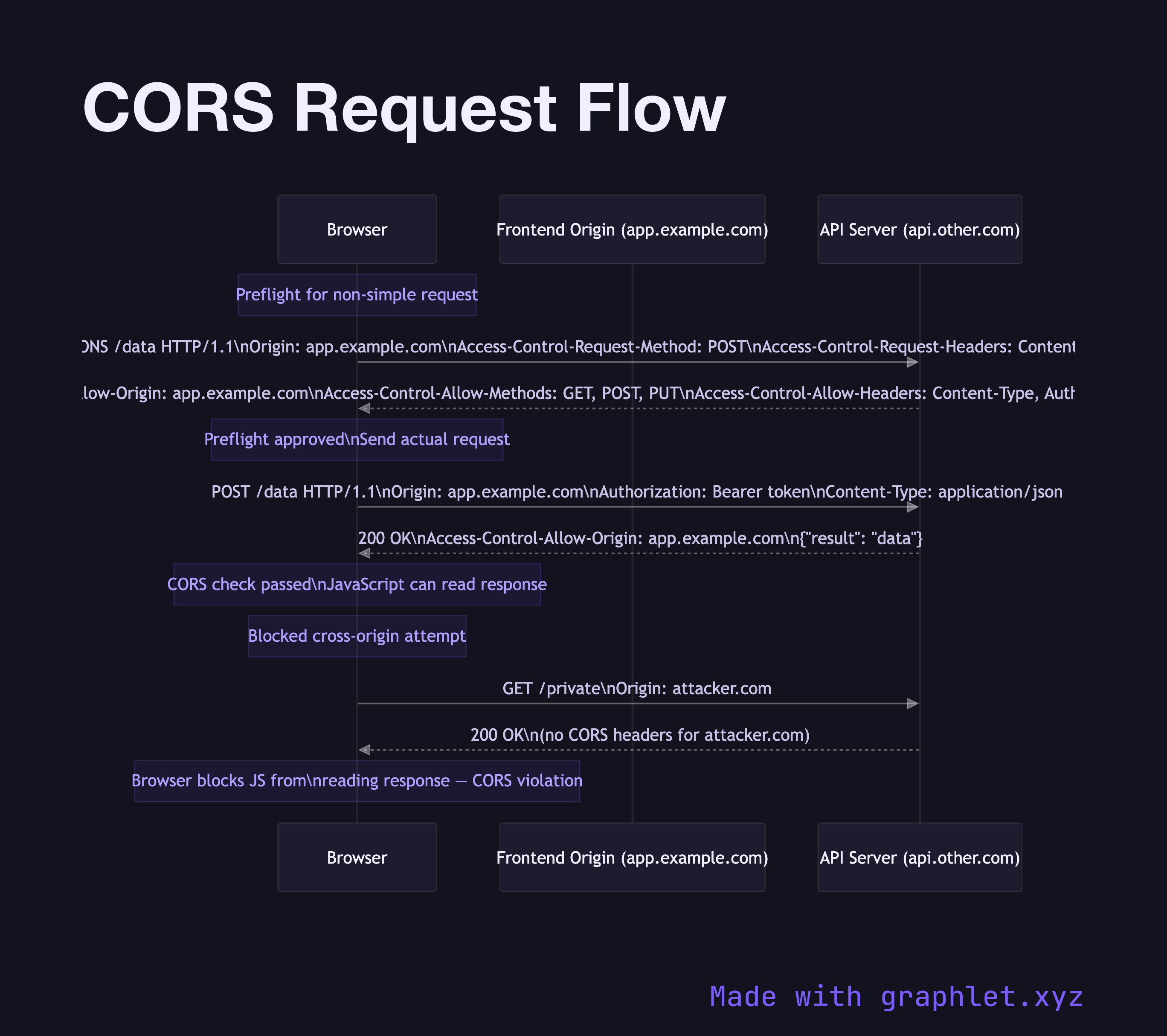
Cross-Origin Resource Sharing (CORS) is a browser security mechanism that controls which cross-origin HTTP requests a web page is allowed to make. It enforces the same-origin policy by default and requires servers to explicitly opt in to cross-origin access via specific response headers.
The same-origin policy prevents a script on app.example.com from fetching data from api.other.com by default. CORS provides a controlled way for servers to relax this restriction. The mechanism exists entirely in the browser — the server still receives and processes the request, but the browser blocks JavaScript from reading the response unless the server sends the correct CORS headers.
For simple requests (GET or POST with certain content types), the browser sends the request directly and checks the Access-Control-Allow-Origin header in the response. If the response header allows the requesting origin, JavaScript can read the response. If not, the browser blocks access.
For non-simple (preflighted) requests — those using methods like PUT, DELETE, PATCH, or custom headers — the browser automatically sends an OPTIONS preflight request first. The preflight asks the server to confirm it accepts the actual method and headers from that origin. The server responds with Access-Control-Allow-Origin, Access-Control-Allow-Methods, and Access-Control-Allow-Headers. If approved, the browser sends the actual request.
CORS headers to configure correctly on your server: Access-Control-Allow-Origin (specific origin or * for public APIs), Access-Control-Allow-Methods, Access-Control-Allow-Headers, Access-Control-Allow-Credentials (must be true for cookie-based auth, and requires a specific origin, not *), and Access-Control-Max-Age (caches the preflight result to avoid repeated OPTIONS calls).
CORS is often confused with CSRF protection — see CSRF Protection Flow for how they differ and interact.