Session Based Authentication
Session-based authentication is the traditional server-side model where the server maintains the state of a logged-in user. Rather than issuing a self-contained token that carries all claims, the server stores session data and gives the client an opaque session ID — typically delivered in a Set-Cookie response header.
Session-based authentication is the traditional server-side model where the server maintains the state of a logged-in user. Rather than issuing a self-contained token that carries all claims, the server stores session data and gives the client an opaque session ID — typically delivered in a Set-Cookie response header.
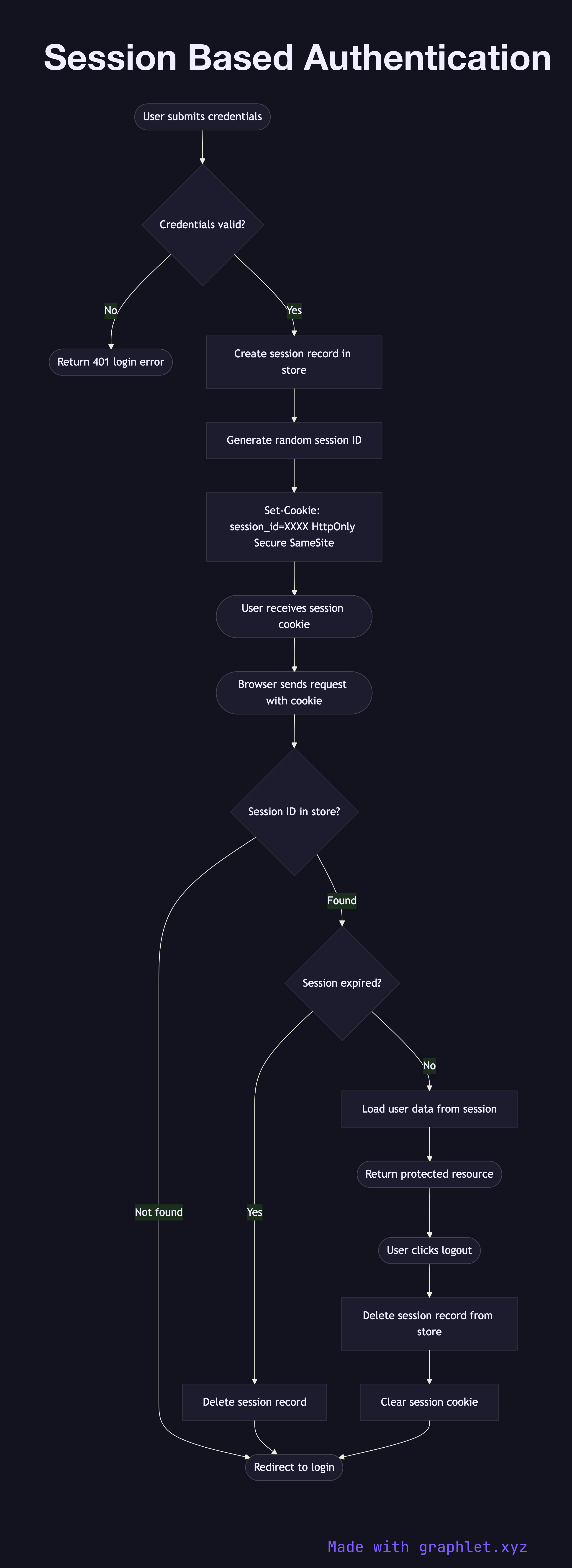
When a user submits their credentials, the server validates them against the user store. On success, it creates a session record — containing the user ID, creation time, expiry, and any relevant metadata — and persists it to a session store, which may be an in-memory store like Redis, a relational database, or a distributed cache. The server generates a random, cryptographically unpredictable session ID and sends it to the browser as a cookie (ideally with the HttpOnly, Secure, and SameSite=Strict flags set).
On every subsequent request, the browser automatically includes the session cookie. The server looks up the session ID in the store, validates that the session exists and hasn't expired, retrieves the associated user data, and proceeds with the request. If the session is not found (expired, deleted, or the ID is invalid), the server responds with a redirect to the login page.
The key advantage over JWT Authentication Flow is immediate revocability: to log out a user or invalidate a compromised session, the server simply deletes the session record. There is no need to wait for a token to expire. The trade-off is stateful infrastructure: every server in a horizontally scaled cluster must be able to reach the shared session store, which introduces a network dependency and a potential single point of failure if the session store goes down.
Session-based auth pairs naturally with CSRF Protection Flow since form submissions rely on cookie-based sessions. For secure cookie configuration, see Secure Cookie Flow.