Secure Cookie Flow
A secure cookie is an HTTP cookie configured with specific attributes that prevent it from being accessed by client-side JavaScript, transmitted over unencrypted connections, or sent in cross-origin requests — reducing the risk of session hijacking and cross-site attacks.
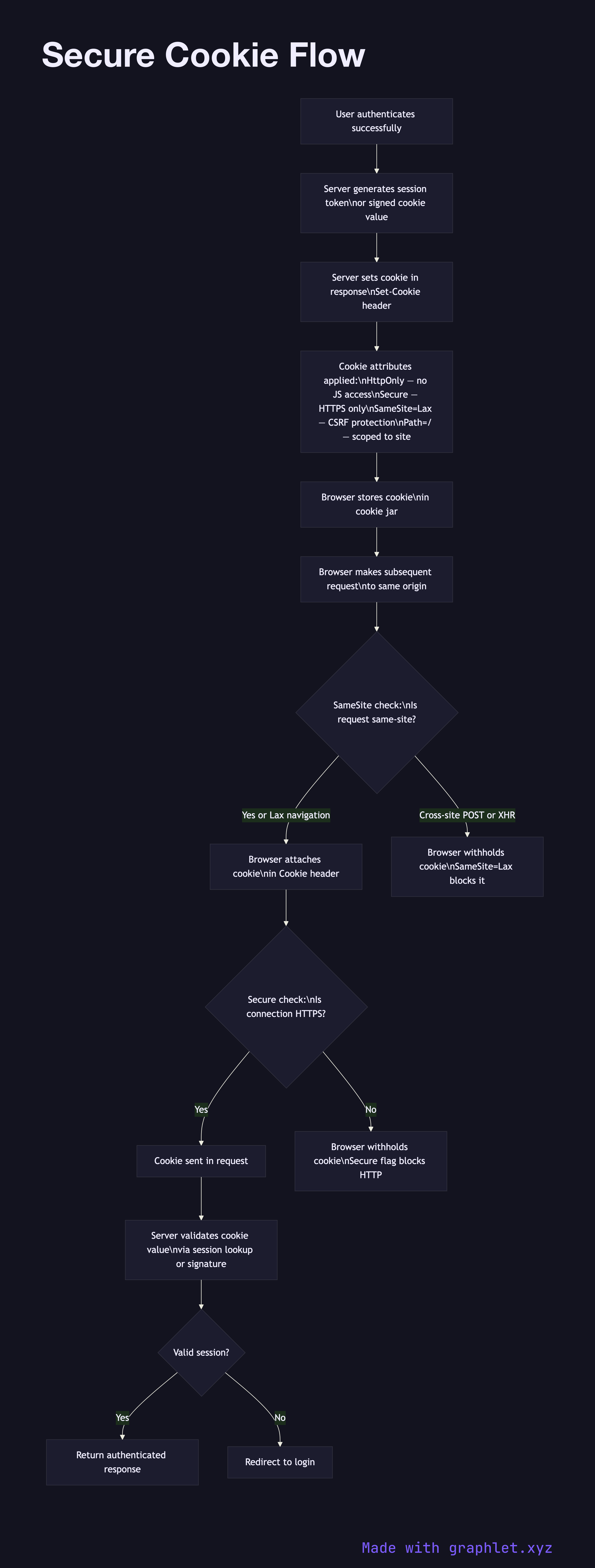
A secure cookie is an HTTP cookie configured with specific attributes that prevent it from being accessed by client-side JavaScript, transmitted over unencrypted connections, or sent in cross-origin requests — reducing the risk of session hijacking and cross-site attacks.
The four critical cookie security attributes are HttpOnly, Secure, SameSite, and Path/Domain scoping. Setting all of them correctly is the minimum baseline for any cookie holding session data or authentication tokens.
HttpOnly prevents JavaScript from reading the cookie via document.cookie. This eliminates the most common XSS attack vector: even if an attacker injects malicious script into your page, they cannot steal the session cookie. The cookie is still sent in HTTP requests automatically by the browser — it just cannot be read programmatically.
Secure instructs the browser to only transmit the cookie over HTTPS connections. On HTTP, the browser silently withholds the cookie. This prevents the cookie from being transmitted in plaintext if a user accidentally visits an HTTP URL.
SameSite controls whether the browser sends the cookie in cross-site requests. SameSite=Strict blocks the cookie on all cross-site requests, including navigations. SameSite=Lax (the default in modern browsers) allows the cookie on top-level navigations (clicking a link) but blocks it on subresource loads and XHR/fetch requests from other origins. SameSite=None allows cross-site sending but requires Secure. Lax or Strict provides strong CSRF protection without requiring a separate CSRF token for most flows.
Domain and Path scope the cookie to specific subdomains and URL paths, minimizing exposure. For authentication cookies, restricting to the exact domain and / path (or a more specific path) is appropriate.
See CSRF Protection Flow for how SameSite interacts with anti-CSRF tokens, and Secure Session Storage for the server-side session management that cookies reference.