Background Job Processing
Background job processing is the pattern of deferring work that is too slow, too resource-intensive, or too failure-prone for synchronous request handling into an asynchronous queue, where dedicated worker processes pick up and execute jobs independently of the request/response cycle.
Background job processing is the pattern of deferring work that is too slow, too resource-intensive, or too failure-prone for synchronous request handling into an asynchronous queue, where dedicated worker processes pick up and execute jobs independently of the request/response cycle.
What the diagram shows
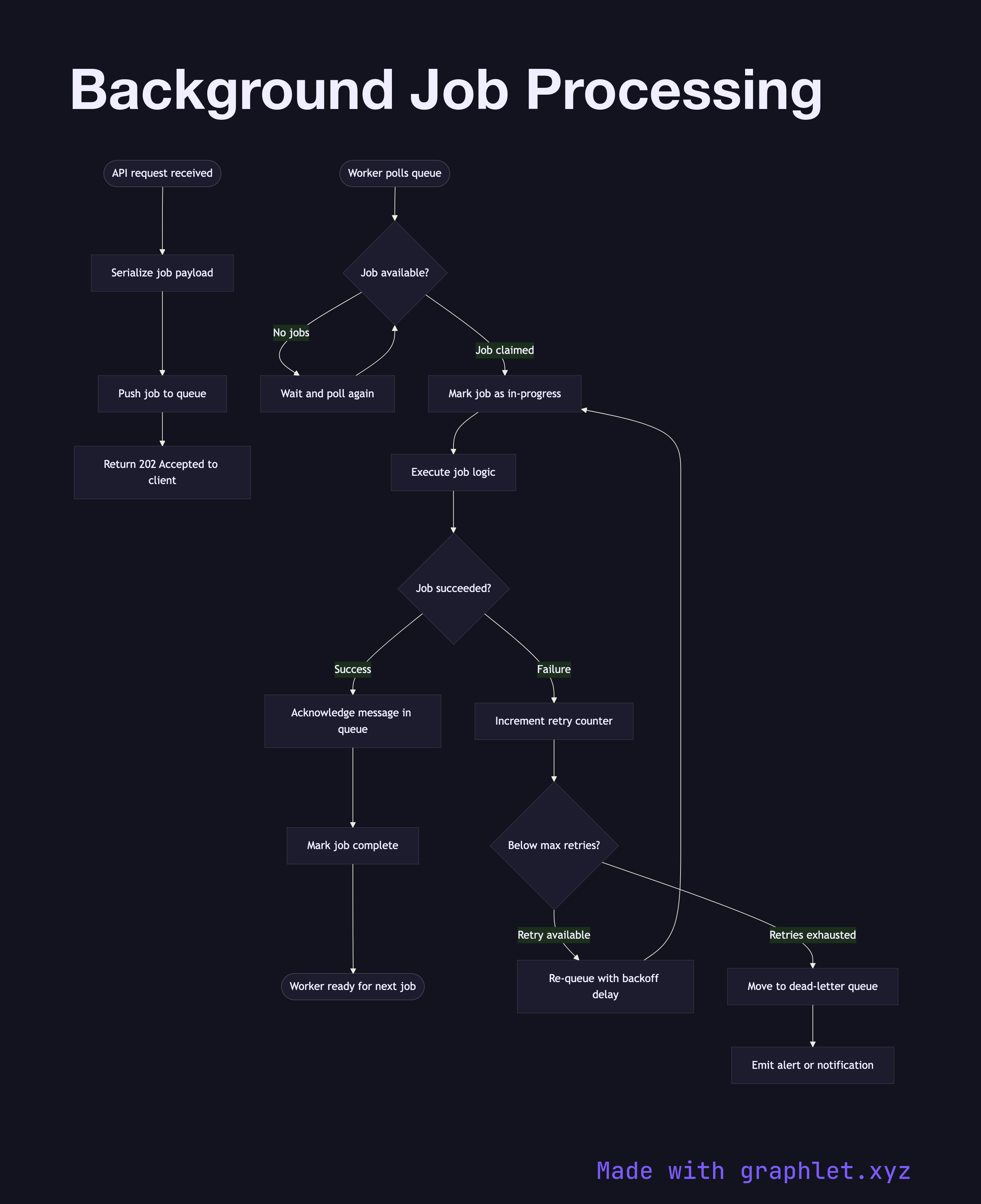
This flowchart covers the complete lifecycle of a background job:
1. Enqueue: the application server receives a request (e.g., "send welcome email") and instead of executing it synchronously, it serializes a job payload and pushes it onto a job queue (Redis, SQS, RabbitMQ). 2. Acknowledge: the queue acknowledges receipt and the HTTP request can return immediately to the client with a 202 Accepted. 3. Worker picks up job: a worker process polls the queue (or is pushed a job via subscription) and claims the job, marking it as in-progress. 4. Execute job: the worker runs the business logic — sending the email, resizing the image, generating the report. 5. Success: the worker marks the job as complete and acknowledges the queue message. 6. Failure with retry: if the job throws an error, the worker increments the retry counter. If below the max retry limit, the job is re-queued with a backoff delay. 7. Dead letter: jobs that exhaust their retry budget are moved to a dead-letter queue (DLQ) for manual inspection or alerting.
Why this matters
Offloading slow operations to background jobs dramatically improves API response times and user experience. It also provides natural resilience — if a third-party email provider is down, jobs accumulate in the queue and drain automatically once the provider recovers, rather than returning errors to users.
For the queue mechanics, see Worker Queue Processing. For time-based job scheduling, explore Cron Job Scheduler. Dead-letter handling is covered in detail in Messaging Dead Letter Queue.