Cron Job Scheduler
A cron job scheduler is a time-based task execution system that evaluates job schedules on a tick interval, acquires distributed locks to prevent duplicate execution across multiple instances, runs the scheduled task, and records the outcome.
A cron job scheduler is a time-based task execution system that evaluates job schedules on a tick interval, acquires distributed locks to prevent duplicate execution across multiple instances, runs the scheduled task, and records the outcome.
What the diagram shows
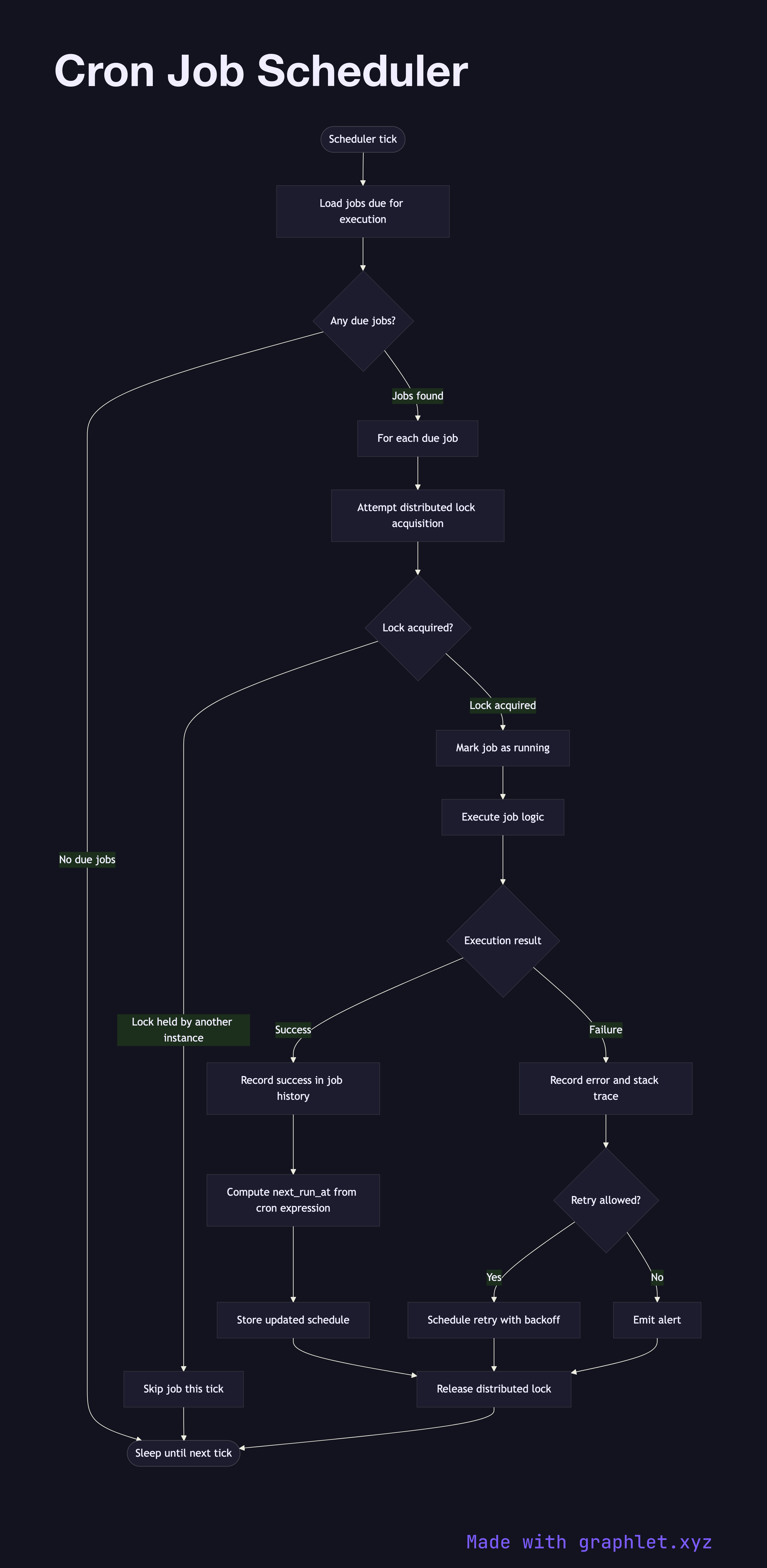
This flowchart models a production-grade cron scheduler running in a horizontally-scaled environment where multiple instances of the scheduler process may be running simultaneously:
1. Tick: the scheduler wakes on a configurable interval (e.g., every minute). 2. Load due jobs: it queries the job store for jobs whose next_run_at timestamp is in the past. 3. Acquire distributed lock: for each due job, the scheduler attempts to acquire a lock in a shared store (Redis SET NX, Postgres advisory lock). This ensures only one scheduler instance executes the job even when multiple replicas are running. 4. Lock contention: if the lock is already held by another instance, this instance skips the job — the other instance is executing it. 5. Execute job: the winning instance runs the job logic, which may enqueue a background job, call an API, run a database cleanup, or generate a report. 6. Record outcome: success or failure is recorded in the job history table with timestamps and duration. 7. Update next run: on success, the scheduler computes and stores next_run_at based on the cron expression. 8. Release lock: the lock is released, allowing the next scheduled run to be claimed.
Why this matters
The distributed lock step is critical. Without it, every replica executes every job — leading to duplicate emails sent, duplicate billing runs, or duplicate data imports. Tools like Sidekiq-Cron, Celery Beat, and AWS EventBridge handle this coordination, but understanding the underlying pattern helps when rolling your own or debugging duplicate executions.
For one-off async jobs (as opposed to scheduled), see Background Job Processing. For the workers that execute the enqueued jobs, see Worker Queue Processing.