diagram.mmd — flowchart
Feature Flag Evaluation flowchart diagram

Feature flag evaluation is the runtime decision process that determines whether a given user or request should see a new feature, a variant in an A/B test, or the default behavior — based on targeting rules, percentage rollouts, and kill switches stored in a centralized flag configuration service.
What the diagram shows

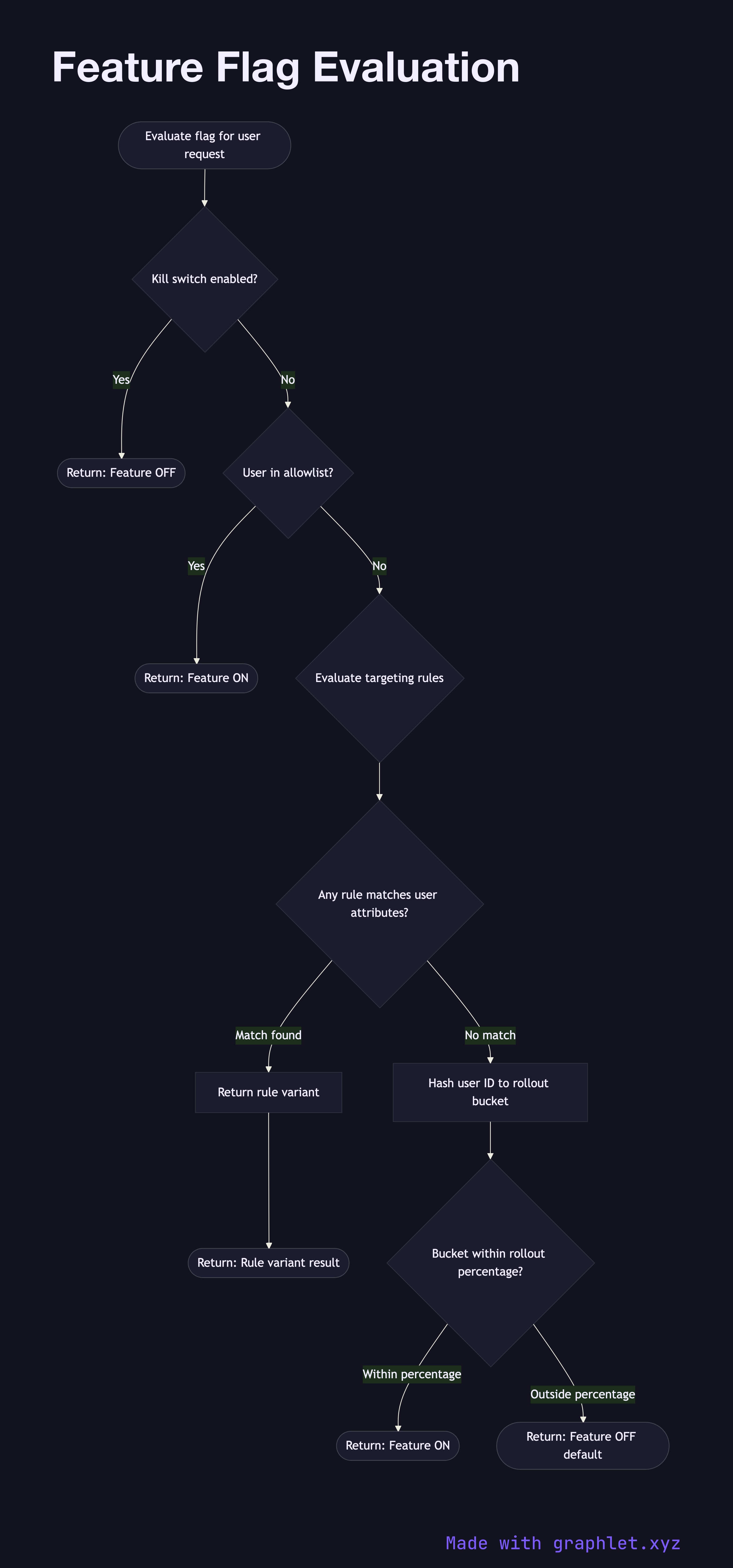
This flowchart traces the evaluation of a single feature flag for an incoming request:

1. Check kill switch: if the flag has been globally disabled (the "kill switch" is on), the feature is off for everyone regardless of other rules. This enables instant rollback without a deployment. 2. Check allowlist: specific user IDs, account IDs, or internal employees can be explicitly included in the flag's allowlist — useful for internal testing and canary users. 3. Evaluate targeting rules: the flag SDK evaluates configured rules against user attributes (e.g., country == "US", plan == "enterprise"). If a rule matches, the rule's variant is returned. 4. Percentage rollout: if no rule matched, the user's ID is hashed and mapped to a consistent bucket. If the bucket falls within the rollout percentage, the feature is enabled. 5. Return default: users outside the rollout receive the default (off) variant.

Why this matters

Feature flags decouple code deployment from feature release. A team can ship code to production with a flag guarding the new feature, then gradually roll it out — monitoring error rates at each percentage — and instantly kill the flag if something goes wrong. This is the foundation of continuous delivery without big-bang launches.

Flags integrate naturally at the API Gateway Request Flow layer for request-level routing, or inside the application server for fine-grained feature control. The kill-switch behavior mirrors the fail-fast logic of the Circuit Breaker Pattern.

Free online editor
Edit this diagram in Graphlet
Fork, modify, and export to SVG or PNG. No sign-up required.
Open in Graphlet →

Frequently asked questions

Feature flag evaluation is the runtime decision process that determines whether a given user or request should see a new feature, a variant in an A/B test, or the default behavior. The evaluation engine checks a sequence of rules — kill switch, allowlist, targeting rules, and percentage rollout — stored in a centralized flag configuration service and returns the appropriate variant without a code deployment.
The SDK evaluates flags in a fixed priority order. First it checks the kill switch — if the flag is globally disabled, everyone gets the default regardless of other rules. Next it checks if the user is on an explicit allowlist. Then it evaluates targeting rules against user attributes (country, plan tier, etc.). Finally, if no rule matched, it hashes the user ID into a consistent bucket and checks if that bucket falls within the configured rollout percentage.
Use feature flags to separate code deployment from feature release — ship code to production guarded by a flag, then roll it out gradually while monitoring error rates. They are also essential for instant rollback without a deployment, for targeted beta testing with specific users, and for A/B testing where the flag controls which variant a user receives.
A frequent mistake is accumulating stale flags in the codebase — flags that were fully rolled out but never removed, creating dead code paths that confuse future developers. Another issue is not making flag evaluation side-effect-free: flag checks should be fast reads, never writes. Teams also sometimes use flags as permanent configuration rather than temporary rollout controls, which is better served by a proper configuration management system.
mermaid
flowchart TD A([Evaluate flag for user request]) --> B{Kill switch enabled?} B -- Yes --> C([Return: Feature OFF]) B -- No --> D{User in allowlist?} D -- Yes --> E([Return: Feature ON]) D -- No --> F{Evaluate targeting rules} F --> G{Any rule matches user attributes?} G -- Match found --> H[Return rule variant] H --> I([Return: Rule variant result]) G -- No match --> J[Hash user ID to rollout bucket] J --> K{Bucket within rollout percentage?} K -- Within percentage --> L([Return: Feature ON]) K -- Outside percentage --> M([Return: Feature OFF default])
Copied to clipboard