Auto Scaling Workflow
Auto scaling is the cloud mechanism that automatically adjusts the number of compute instances in a group in response to real-time metrics, ensuring applications maintain performance under variable load while minimizing idle resource costs.
Auto scaling is the cloud mechanism that automatically adjusts the number of compute instances in a group in response to real-time metrics, ensuring applications maintain performance under variable load while minimizing idle resource costs.
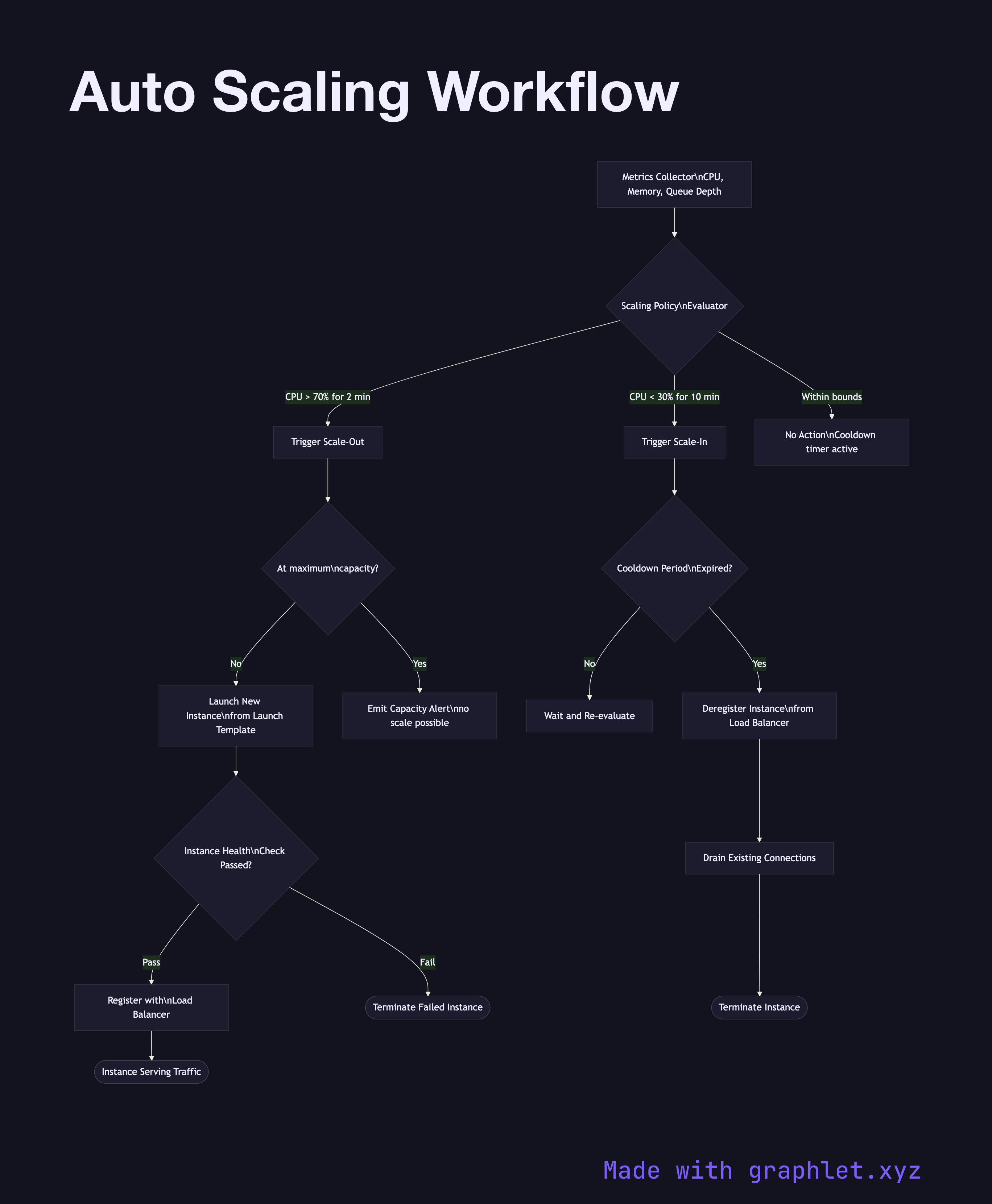
Auto scaling groups (ASGs) in AWS, Managed Instance Groups in GCP, or Scale Sets in Azure all follow the same feedback-loop pattern. A metrics collector continuously gathers signals — CPU utilization, memory, request queue depth, custom application metrics — and feeds them to a scaling policy evaluator. When a metric breaches a configured threshold, a scaling action is triggered.
Scale-out (add instances): When load spikes, new instances are launched from a golden AMI or launch template, pass a health check, and register with the load balancer before receiving traffic. This typically takes 2–5 minutes depending on startup scripts.
Scale-in (remove instances): When load drops and the cooldown period expires, the auto scaler selects instances to terminate (usually oldest-first or by zone balancing). The instance is first deregistered from the load balancer, existing connections are drained, and only then is the instance terminated.
Cooldown periods prevent thrashing — a mandatory wait between scaling events ensures the system stabilizes before evaluating further actions. Scheduled scaling complements reactive scaling by pre-warming capacity before known traffic patterns (e.g., 9 AM market opens, nightly batch jobs).
The minimum, desired, and maximum instance counts bound the auto scaler's behavior. See Cloud Load Balancing for how new instances receive traffic, Cloud Monitoring Pipeline for the metrics infrastructure that feeds scaling decisions, and Kubernetes Scheduler for pod-level scheduling in container clusters.