diagram.mmd — flowchart
Kubernetes Scheduler flowchart diagram

The Kubernetes scheduler is the control plane component responsible for assigning newly created pods to nodes — selecting the best node based on resource availability, constraints, affinity rules, and custom scoring policies.
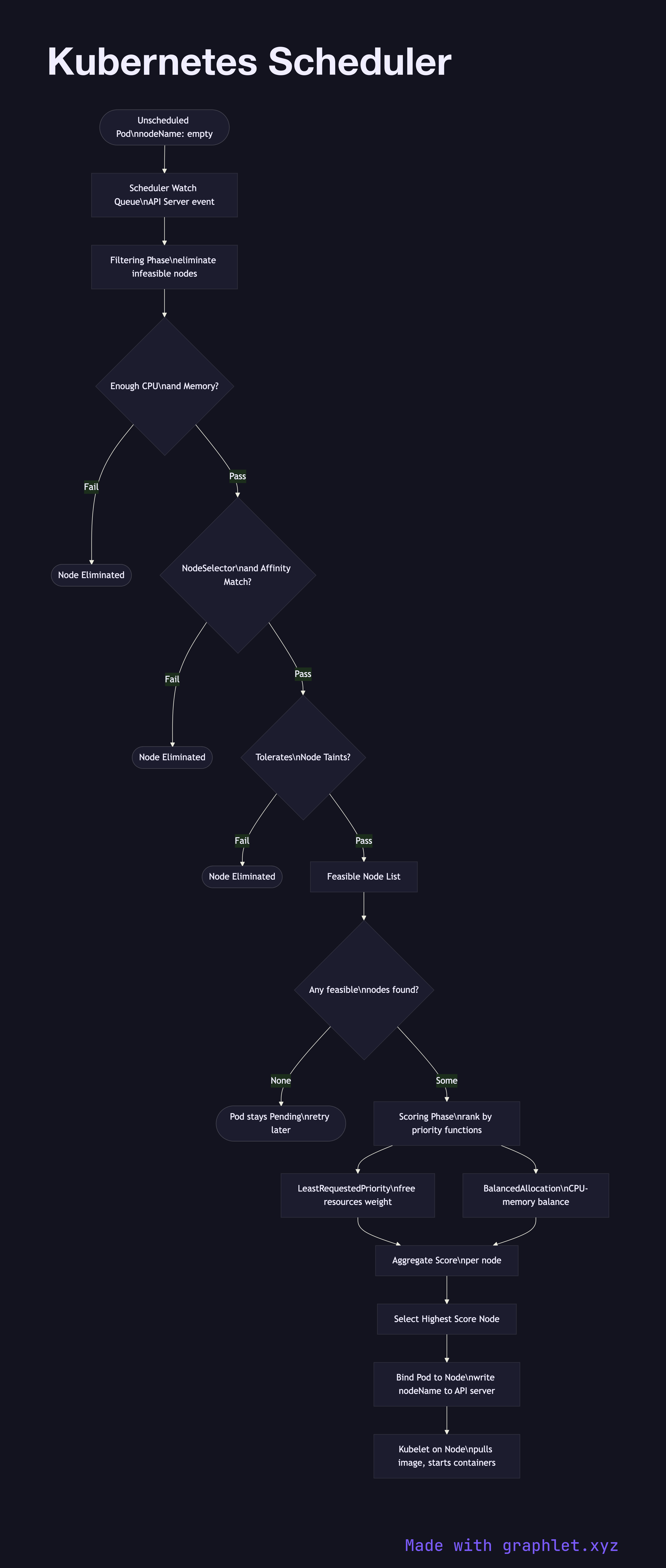
When a pod is created without a nodeName field, it enters the Pending state with no node assignment. The scheduler watches for unscheduled pods via the API server and processes them through a two-phase pipeline:

Phase 1 — Filtering eliminates nodes that cannot run the pod. Hard constraints evaluated include: - Resource fit: Does the node have enough unallocated CPU and memory for the pod's requests? - NodeSelector / nodeAffinity: Does the node carry the required labels? - Taints and tolerations: Does the pod tolerate any taints on the node? - PodAffinity / PodAntiAffinity: Should this pod be co-located with or kept away from other pods? - Volume constraints: Can the node access required PersistentVolumes?

Nodes failing any filter are eliminated. If no nodes pass, the pod remains Pending until cluster capacity changes (e.g., auto-scaling adds a node).

Phase 2 — Scoring ranks the filtered candidates. Default scoring functions include: LeastRequestedPriority (prefer nodes with more free resources), BalancedResourceAllocation (avoid CPU/memory skew), NodeAffinityPriority (weight preferred affinities). The node with the highest aggregate score wins.

The scheduler then binds the pod to the winning node by writing the nodeName into the pod spec via the API server. The kubelet on that node picks up the binding and starts pulling images and creating containers.

See Kubernetes Pod Lifecycle for what happens after binding, and Auto Scaling Workflow for how new nodes become available when the scheduler finds no feasible candidates.

Free online editor
Edit this diagram in Graphlet
Fork, modify, and export to SVG or PNG. No sign-up required.
Open in Graphlet →

Frequently asked questions

The Kubernetes scheduler is the control plane component responsible for assigning newly created pods to nodes. It selects the best node based on resource availability, hard constraints (node selectors, taints, affinity rules), and soft preferences (scoring functions like LeastRequestedPriority) in a two-phase filter-then-score pipeline.
When a pod is created without a `nodeName`, the scheduler processes it through filtering (eliminating nodes that violate hard constraints) and then scoring (ranking remaining nodes by preference). The node with the highest aggregate score is selected and the scheduler writes the `nodeName` into the pod spec. The kubelet on that node then starts pulling images and creating containers.
Use node affinity when you want pods to prefer or require nodes with specific labels — for example, GPU nodes or nodes in a specific zone. Use taints and tolerations when you want to repel pods from nodes by default unless explicitly allowed — for example, reserving dedicated nodes for critical system workloads that should not be co-located with user applications.
Setting CPU and memory requests too low causes the scheduler to over-pack nodes, leading to resource contention and OOM kills at runtime. Setting requests too high wastes cluster capacity. Overly strict pod anti-affinity rules can prevent pods from scheduling when the cluster runs low on nodes. Missing cluster autoscaler integration means unschedulable pods stay Pending indefinitely rather than triggering node scale-out.
Deployments are for stateless workloads — pods are interchangeable and the scheduler places them freely across nodes. StatefulSets maintain stable pod identities and ordered deployment/scaling, and each pod mounts its own PersistentVolumeClaim. The scheduler must place each StatefulSet pod on a node that can access its specific PV, which restricts placement compared to Deployments where any node satisfying resource constraints is valid.
mermaid
flowchart TD NewPod([Unscheduled Pod\nnodeName: empty]) --> WatchQueue[Scheduler Watch Queue\nAPI Server event] WatchQueue --> Filter[Filtering Phase\neliminate infeasible nodes] Filter --> ResourceFit{Enough CPU\nand Memory?} ResourceFit -->|Fail| Eliminate1([Node Eliminated]) ResourceFit -->|Pass| NodeSelector{NodeSelector\nand Affinity Match?} NodeSelector -->|Fail| Eliminate2([Node Eliminated]) NodeSelector -->|Pass| Taint{Tolerates\nNode Taints?} Taint -->|Fail| Eliminate3([Node Eliminated]) Taint -->|Pass| FeasibleNodes[Feasible Node List] FeasibleNodes --> NoNodes{Any feasible\nnodes found?} NoNodes -->|None| Pending([Pod stays Pending\nretry later]) NoNodes -->|Some| Scoring[Scoring Phase\nrank by priority functions] Scoring --> LeastRequested[LeastRequestedPriority\nfree resources weight] Scoring --> Balanced[BalancedAllocation\nCPU-memory balance] LeastRequested --> Aggregate[Aggregate Score\nper node] Balanced --> Aggregate Aggregate --> BestNode[Select Highest Score Node] BestNode --> Bind[Bind Pod to Node\nwrite nodeName to API server] Bind --> Kubelet[Kubelet on Node\npulls image, starts containers]
Copied to clipboard