Cloud Load Balancing
Cloud load balancing is the distribution of incoming network traffic across multiple backend targets — such as virtual machines, containers, or serverless functions — to ensure high availability, horizontal scalability, and fault tolerance.
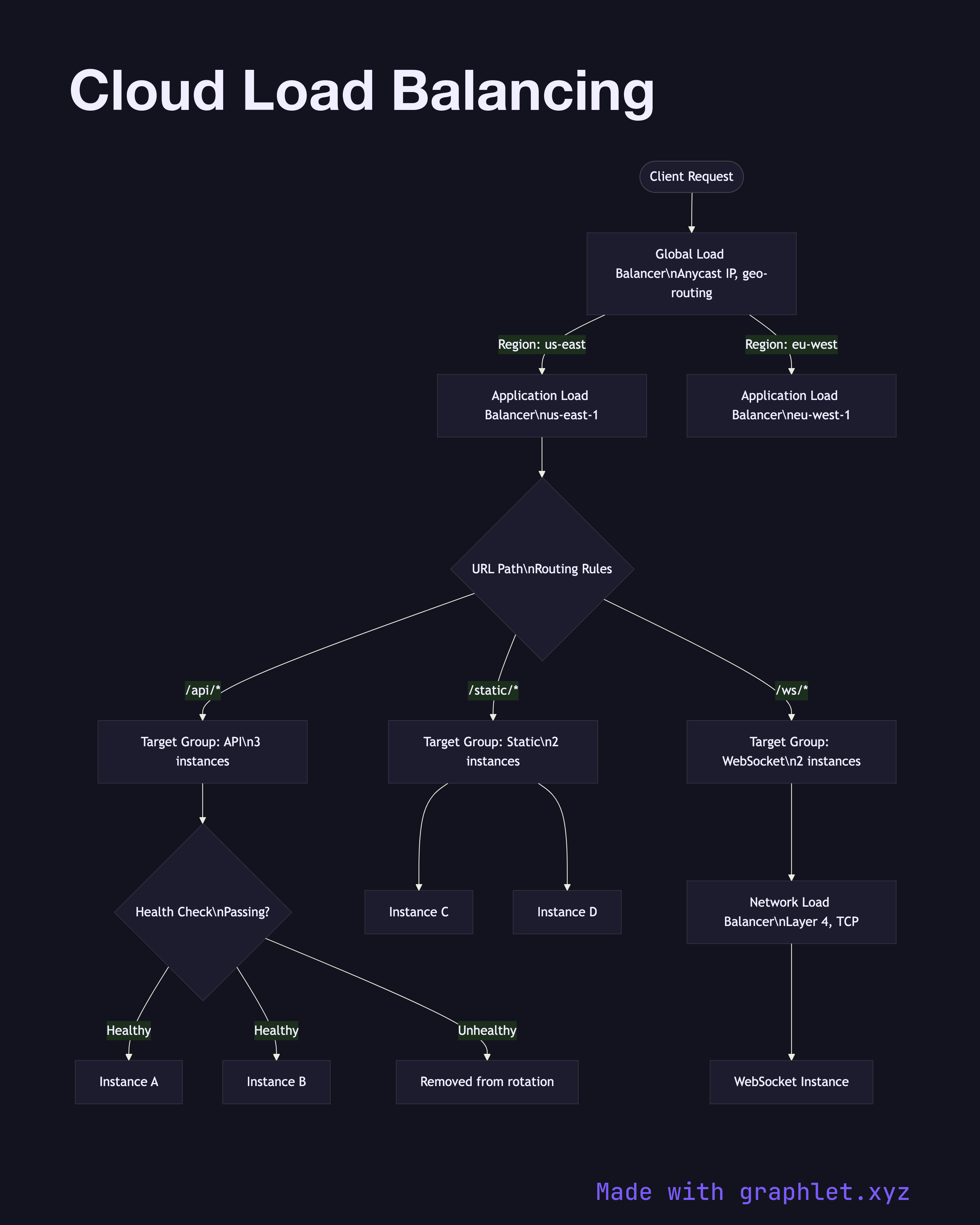
Cloud load balancing is the distribution of incoming network traffic across multiple backend targets — such as virtual machines, containers, or serverless functions — to ensure high availability, horizontal scalability, and fault tolerance.
Modern cloud providers offer multiple load balancer tiers that operate at different layers of the network stack:
Global load balancer (Layer 7): Routes traffic across regions based on latency, geo-proximity, or weighted routing policies. Terminates TLS at the edge and provides a single global anycast IP. Examples: AWS Global Accelerator, GCP Global HTTP(S) LB.
Application Load Balancer / ALB (Layer 7): Operates within a region, routing HTTP/HTTPS requests based on URL path, hostname, headers, or query parameters. Integrates directly with auto scaling groups, ECS tasks, Lambda functions, and Kubernetes ingress. Supports sticky sessions via cookies.
Network Load Balancer / NLB (Layer 4): Handles TCP/UDP at ultra-low latency with millions of requests per second. Used for non-HTTP workloads, gaming servers, or when preserving source IP is required.
Health checks are fundamental to all load balancers. Each backend target is polled at a configured interval (e.g., every 10 seconds). Targets failing consecutive checks (e.g., 2 of 3) are removed from the rotation; recovered targets are re-added after passing successive checks.
See Auto Scaling Workflow for how instances join and leave the load balancer's target group, Kubernetes Ingress Routing for in-cluster traffic distribution, and Cloud Monitoring Pipeline for observing load balancer metrics.