Cloud Monitoring Pipeline
A cloud monitoring pipeline is the infrastructure that continuously collects metrics from compute, network, and application resources, aggregates them into a time-series store, and drives dashboards, alerts, and automated responses like auto-scaling.
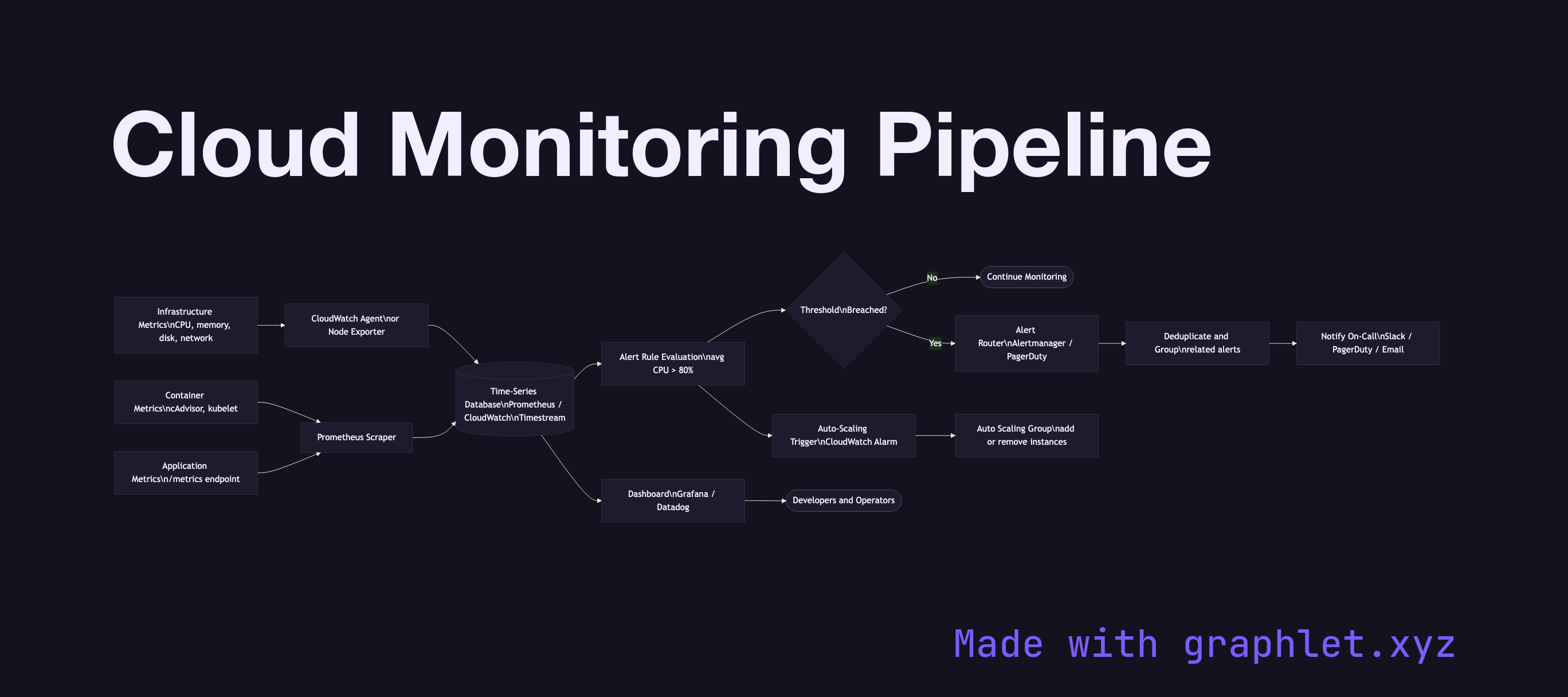
A cloud monitoring pipeline is the infrastructure that continuously collects metrics from compute, network, and application resources, aggregates them into a time-series store, and drives dashboards, alerts, and automated responses like auto-scaling.
Metrics originate at every layer of the stack. Infrastructure metrics — CPU utilization, memory, disk I/O, network throughput — are collected by the cloud provider's hypervisor and agent. Container metrics (pod CPU, memory limits vs. requests, pod restarts) come from cAdvisor embedded in the kubelet. Application metrics are emitted by the service itself using a metrics library (Prometheus client, StatsD, OpenTelemetry SDK) and expose a /metrics endpoint or push to a collector.
Collection agents (Prometheus, CloudWatch Agent, Datadog Agent, OpenTelemetry Collector) scrape or receive metrics and forward them to a time-series database (Prometheus TSDB, Amazon Timestream, Google Cloud Monitoring, InfluxDB). Metrics are labeled with dimensions — service, environment, region — enabling slicing and aggregation.
Dashboards (Grafana, CloudWatch dashboards, Datadog) visualize trends and spot anomalies. Alert rules evaluate metric expressions at intervals (e.g., avg(cpu_usage[5m]) > 80). When thresholds breach, alerts fire to an alerting router (Alertmanager, PagerDuty) which deduplicates, groups, and routes notifications to the on-call team.
Critically, the monitoring pipeline also feeds auto-scaling decisions — CloudWatch alarms or custom metrics trigger scaling policies directly. See Auto Scaling Workflow for the downstream effect, and Cloud Logging Pipeline for the parallel observability stream for log data.