Kubernetes Ingress Routing
Kubernetes Ingress is an API object that manages external HTTP and HTTPS access to services within a cluster, providing host-based and path-based routing, TLS termination, and name-based virtual hosting — all configured through Kubernetes manifests.
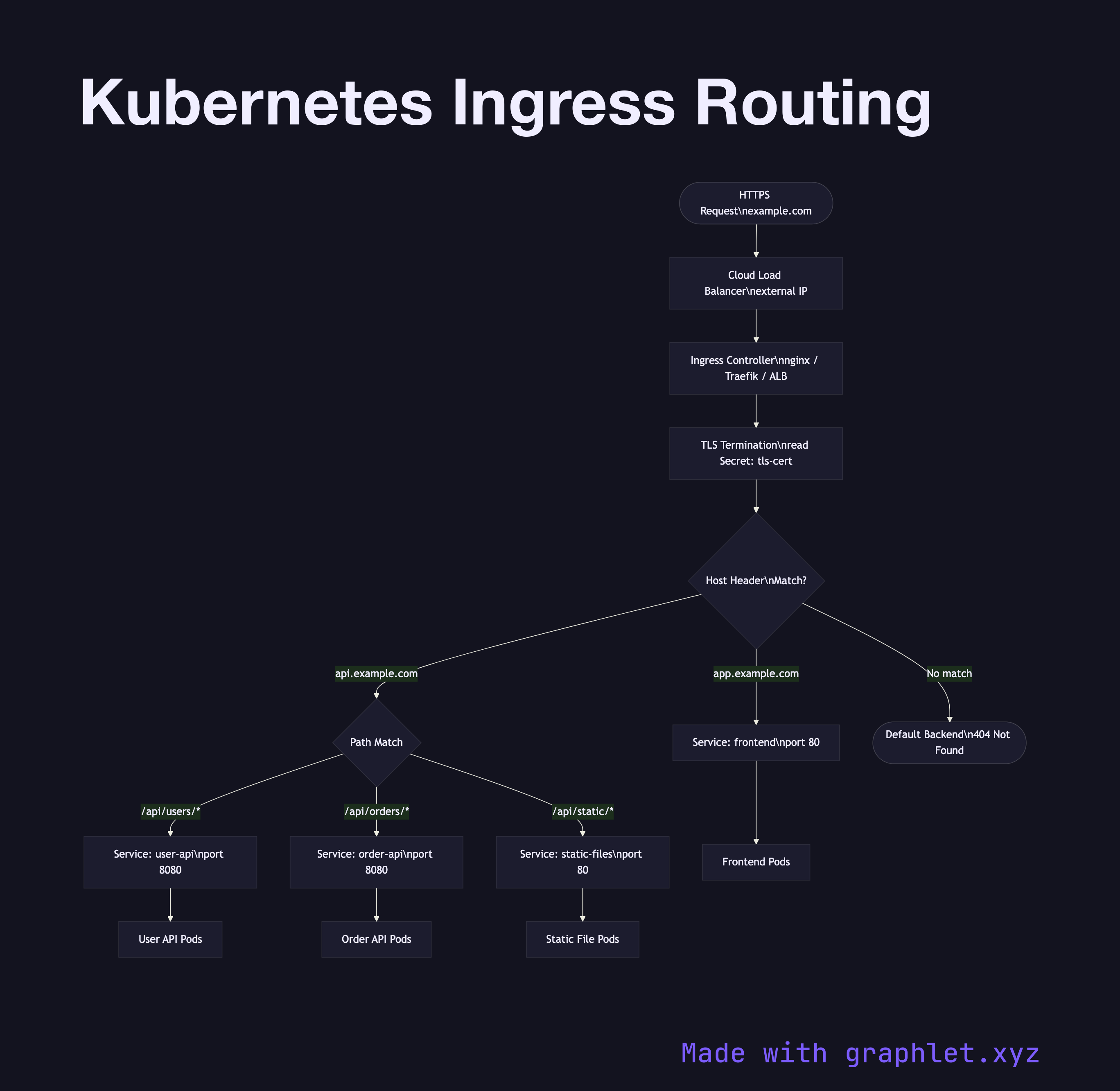
Kubernetes Ingress is an API object that manages external HTTP and HTTPS access to services within a cluster, providing host-based and path-based routing, TLS termination, and name-based virtual hosting — all configured through Kubernetes manifests.
Without Ingress, exposing multiple HTTP services externally requires one LoadBalancer Service per service, each provisioning a separate cloud load balancer and IP address — expensive and operationally burdensome. Ingress consolidates this into a single cloud load balancer fronting an Ingress controller (nginx, Traefik, HAProxy, or a cloud-native controller like AWS ALB Ingress Controller) running inside the cluster.
An Ingress resource defines routing rules:
- Host-based routing: api.example.com → api-service:80, app.example.com → frontend-service:80 - Path-based routing: example.com/api/* → api-service, example.com/static/* → static-service - TLS termination: The Ingress controller reads a Kubernetes TLS Secret (containing certificate and private key) and terminates HTTPS at the controller, forwarding plain HTTP to backend services internally.
The Ingress controller watches the Kubernetes API for Ingress resource changes and dynamically reconfigures its proxy (e.g., regenerating nginx.conf) without downtime. Traffic flows: client → cloud LB → Ingress controller pod → cluster Service → application pods.
Annotations on the Ingress object configure controller-specific behavior: rate limiting, authentication, CORS headers, WebSocket support, and custom error pages. For lower-level TCP/UDP routing within the cluster, see Kubernetes Service Routing. For request flow from the CDN to the load balancer, see CDN Edge Caching.