diagram.mmd — flowchart
Infrastructure as Code Pipeline flowchart diagram

Infrastructure as Code (IaC) is the practice of defining cloud resources — networks, compute instances, databases, IAM roles — in version-controlled configuration files, then applying those definitions through an automated pipeline rather than through manual console clicks.
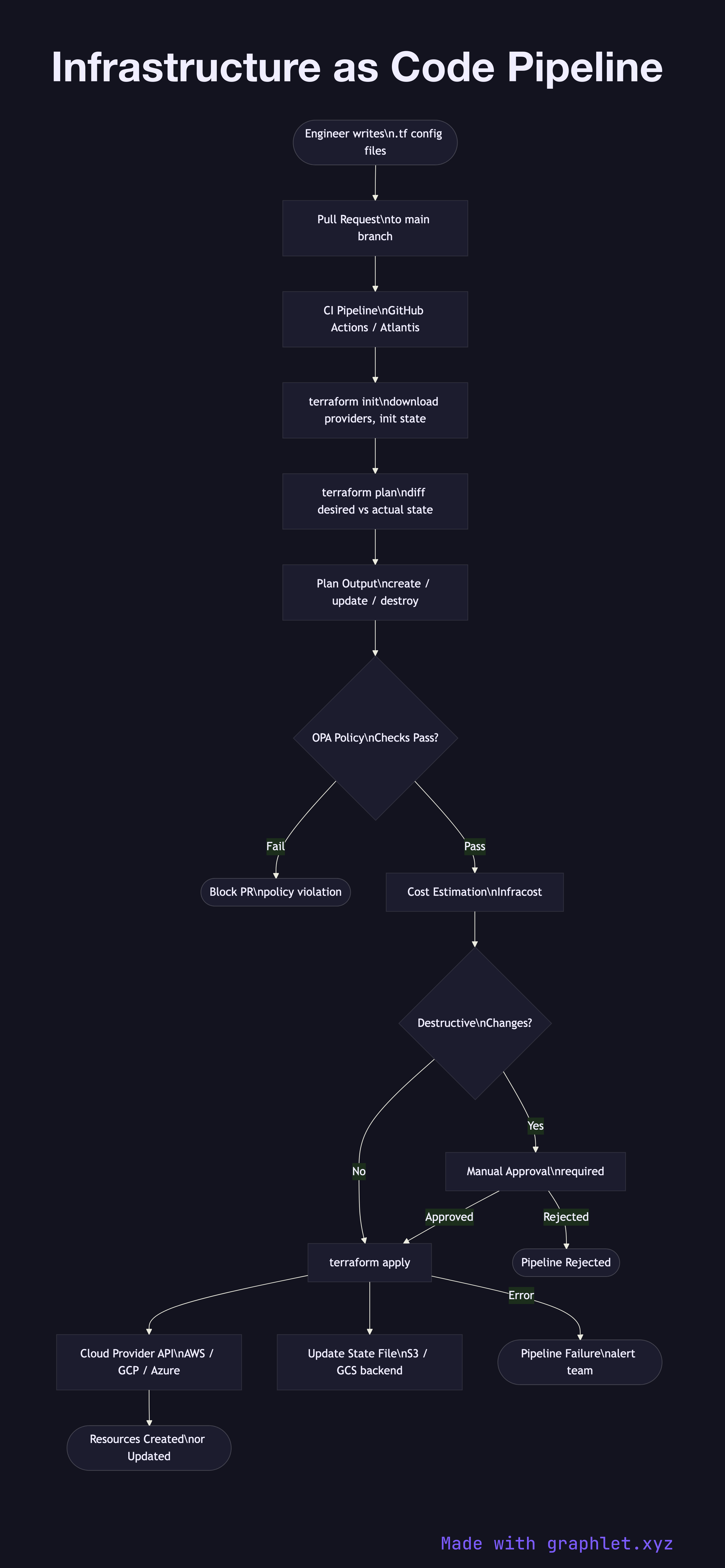
Terraform is the dominant IaC tool, using a declarative HCL (HashiCorp Configuration Language) syntax. Pulumi, AWS CDK, and Crossplane are alternatives. All follow the same core workflow: write → plan → review → apply.

Source control trigger: Engineers write or modify .tf files in a Git repository. A pull request triggers the IaC pipeline in CI.

Terraform init: Downloads required provider plugins and initializes the remote state backend (S3, GCS, or Terraform Cloud).

Terraform plan: Compares the desired state in code against the actual state recorded in the state file and the live cloud API. Produces a human-readable diff: resources to create, update, or destroy.

Policy checks: Before apply, plan output is evaluated by policy-as-code tools — OPA (Open Policy Agent) with Conftest, or HashiCorp Sentinel — enforcing rules like "no public S3 buckets", "all EC2 instances must use approved AMIs", or "production changes require a cost estimate under $500/month".

Approval gate: Destructive changes (resource deletion, IAM policy modifications) require explicit human approval via the pull request or a dedicated approval step.

Terraform apply: Executes the plan, calling cloud provider APIs to create, update, or delete resources. The state file is updated atomically. Apply failures are surfaced as pipeline failures triggering rollback analysis.

See Cloud IAM Permission Model for provisioning IAM resources via IaC, and Cloud Secret Management for handling secrets referenced in Terraform configurations.

Free online editor
Edit this diagram in Graphlet
Fork, modify, and export to SVG or PNG. No sign-up required.
Open in Graphlet →

Frequently asked questions

Infrastructure as Code (IaC) is the practice of defining cloud resources — networks, compute instances, databases, IAM roles — in version-controlled configuration files and applying those definitions through an automated pipeline. It replaces manual console clicks with reproducible, auditable, and testable infrastructure changes.
`terraform plan` compares the desired state declared in `.tf` files against the current state recorded in the state file and the live cloud API, producing a human-readable diff of resources to create, update, or destroy. `terraform apply` executes the plan by calling cloud provider APIs and atomically updates the state file. Only running plan before apply lets teams review and approve changes before infrastructure is modified.
Use Terraform when you need a cloud-agnostic solution with the largest ecosystem of providers and modules, and your team is comfortable with HCL. Use Pulumi when your team prefers writing infrastructure in a general-purpose language (TypeScript, Python, Go) for better abstraction and testing. Use AWS CDK when you are AWS-only and want the full expressiveness of a programming language with native CloudFormation integration.
Storing the state file locally instead of in a remote backend causes state conflicts when multiple engineers run Terraform simultaneously. Not running policy checks (OPA, Sentinel) before apply allows non-compliant resources to be deployed. Missing approval gates on destructive changes enables accidental deletions in production. Importing manually created resources retroactively rather than managing everything in code creates drift that is difficult to reconcile.
Terraform state drift occurs when the actual cloud infrastructure diverges from what is recorded in the state file — for example, a resource deleted manually in the console. Configuration drift is the broader concept of any infrastructure deviating from its desired state, regardless of how the deviation occurred. `terraform plan` detects both and shows the delta that `apply` would correct.
mermaid
flowchart TD Engineer([Engineer writes\n.tf config files]) --> PR[Pull Request\nto main branch] PR --> CI[CI Pipeline\nGitHub Actions / Atlantis] CI --> Init[terraform init\ndownload providers, init state] Init --> Plan[terraform plan\ndiff desired vs actual state] Plan --> PlanOutput[Plan Output\ncreate / update / destroy] PlanOutput --> PolicyCheck{OPA Policy\nChecks Pass?} PolicyCheck -->|Fail| BlockPR([Block PR\npolicy violation]) PolicyCheck -->|Pass| CostEstimate[Cost Estimation\nInfracost] CostEstimate --> Destructive{Destructive\nChanges?} Destructive -->|Yes| ApprovalGate[Manual Approval\nrequired] Destructive -->|No| Apply[terraform apply] ApprovalGate -->|Approved| Apply ApprovalGate -->|Rejected| Reject([Pipeline Rejected]) Apply --> CloudAPI[Cloud Provider API\nAWS / GCP / Azure] CloudAPI --> Resources([Resources Created\nor Updated]) Apply --> StateUpdate[Update State File\nS3 / GCS backend] Apply -->|Error| PipelineFail([Pipeline Failure\nalert team])
Copied to clipboard