Infrastructure Provisioning
Infrastructure provisioning is the automated process of declaring, planning, and applying the cloud resources — networks, compute, storage, and services — required to run an application, using Infrastructure as Code (IaC) tools like Terraform, Pulumi, or AWS CloudFormation.
Infrastructure provisioning is the automated process of declaring, planning, and applying the cloud resources — networks, compute, storage, and services — required to run an application, using Infrastructure as Code (IaC) tools like Terraform, Pulumi, or AWS CloudFormation.
How provisioning works
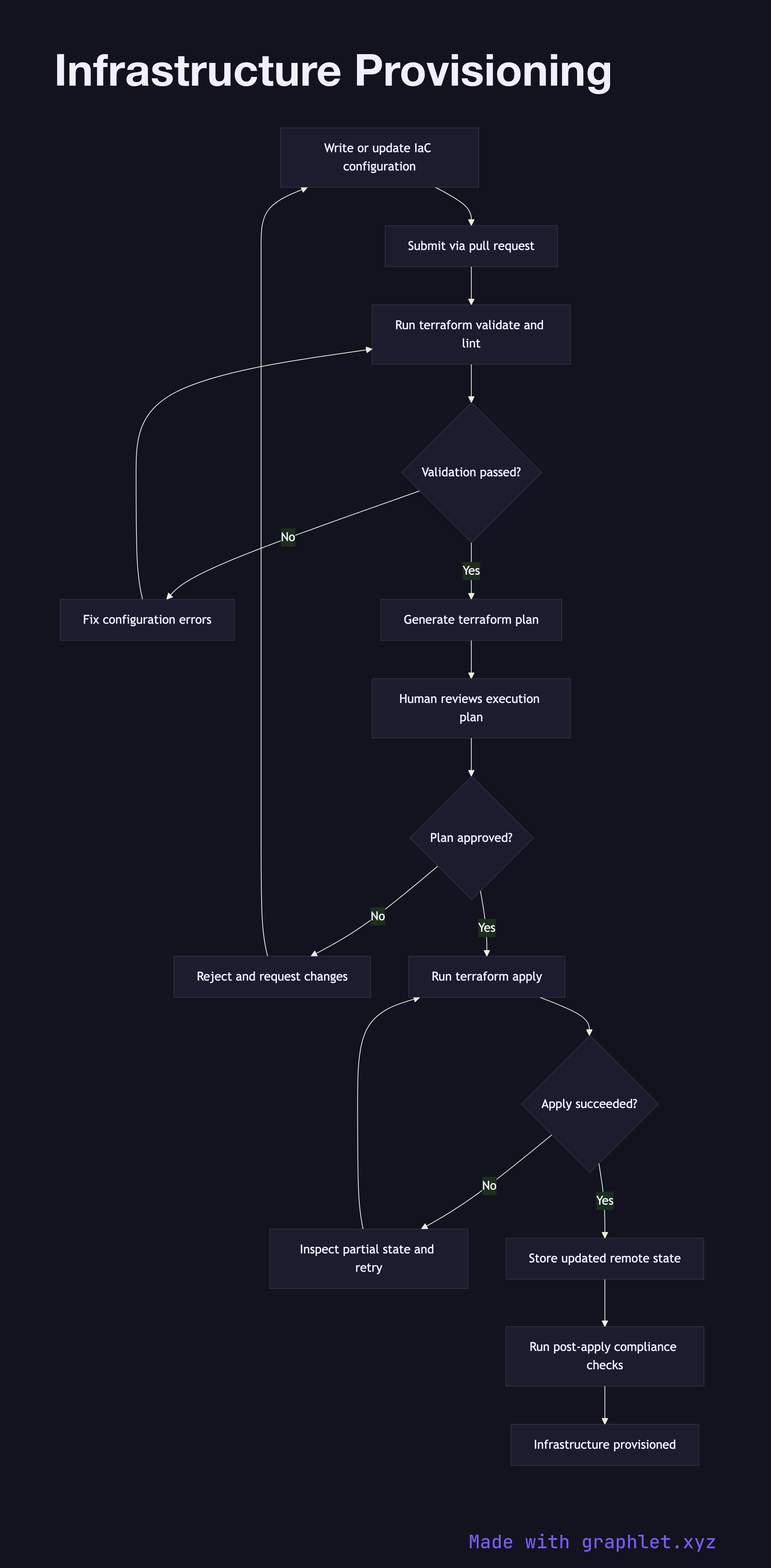
The process starts with an engineer writing or updating IaC configuration files that declare the desired state of the infrastructure: VPCs, subnets, security groups, compute instances, managed databases, DNS records, and so on. These files are version-controlled alongside application code, so every infrastructure change is reviewed through a Pull Request Workflow.
When a change is merged, the CI system runs terraform validate and tflint (or equivalent) to catch syntax errors and policy violations before any cloud resources are touched. Next, the pipeline generates an execution plan — terraform plan — and posts the plan as a comment on the pull request or approval ticket. This diff shows exactly which resources will be created, modified, or destroyed.
A human reviewer inspects the plan, paying particular attention to any resource deletions or replacements that could cause downtime. After approval (see Deployment Approval Flow), the pipeline runs terraform apply, which communicates with cloud provider APIs to provision or update resources. State is stored remotely (e.g., in S3 with DynamoDB locking) to prevent concurrent modifications.
Post-apply, the pipeline runs automated compliance checks against the live environment and stores the updated state. If the apply fails partway through, the IaC tool's state machine records partial completion, allowing the pipeline to retry safely from a known position. The Infrastructure Drift Detection diagram shows how configuration drift is identified between planned and actual states.