diagram.mmd — state
Kubernetes Pod Lifecycle state diagram

The Kubernetes pod lifecycle describes the set of states a pod passes through from the moment it is created until it terminates — including the conditions and events that cause transitions between states.
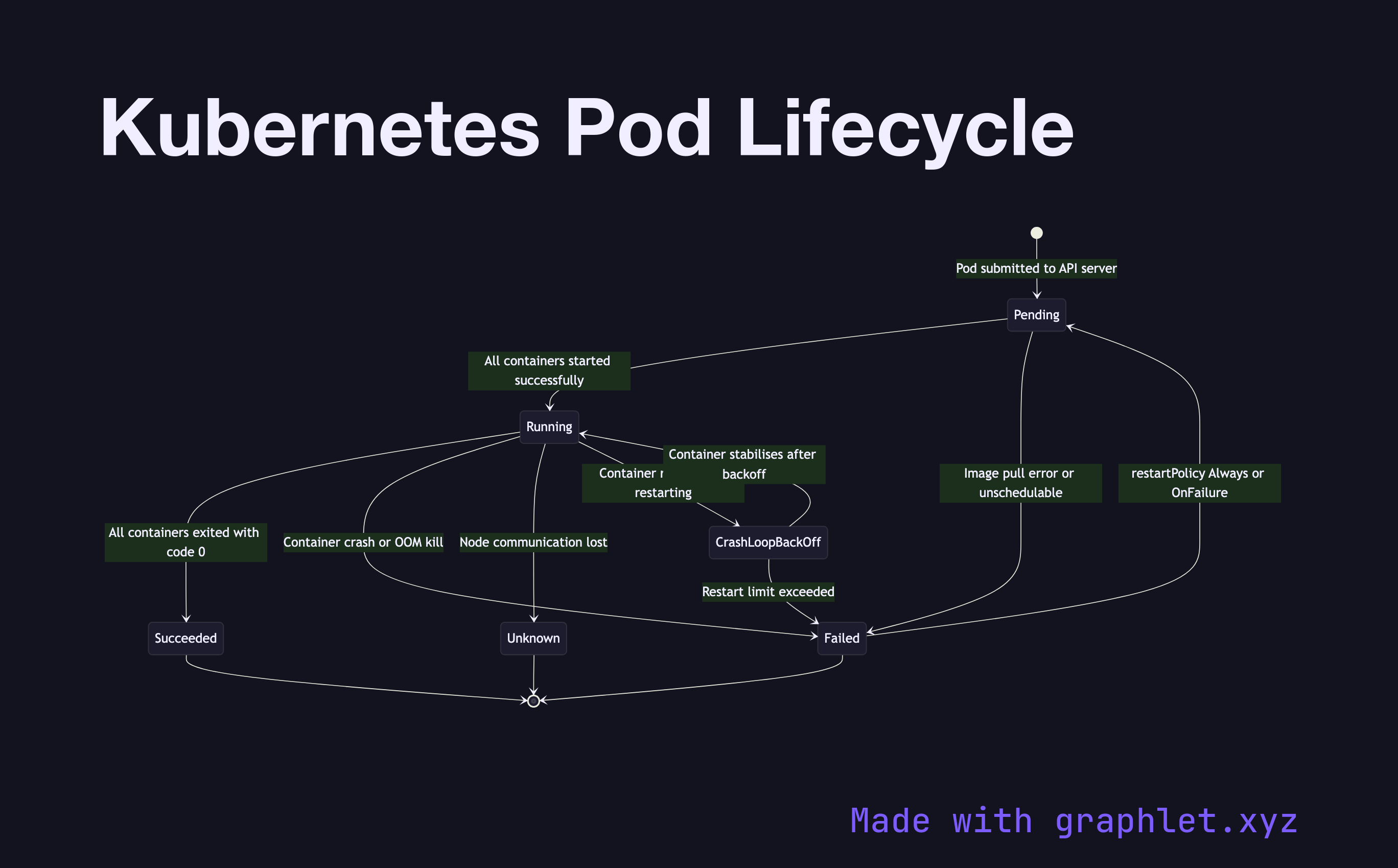
When a pod is submitted to the API server, it enters the Pending state. In this state, the scheduler has not yet assigned the pod to a node, or the node has accepted the pod but containers haven't started — usually because images are being pulled. Pending can be prolonged by resource constraints (no node has enough CPU/memory), missing PersistentVolumeClaims, or unresolvable node selectors.

Once all containers in the pod have started successfully, the pod enters Running. Running means at least one container is still executing. From Running, three outcomes are possible:

- Succeeded: All containers exited with code 0 (success). This is the terminal state for batch jobs. - Failed: At least one container exited with a non-zero code, or was OOM-killed by the kernel. Depending on the restartPolicy, Kubernetes may restart containers with exponential backoff (CrashLoopBackOff). - Unknown: The control plane lost communication with the node hosting the pod, typically due to a node crash or network partition.

The CrashLoopBackOff condition (visible in kubectl get pods) is not a top-level phase but an indication that a container in a Running pod is repeatedly crashing. The backoff timer resets after 5 minutes of successful running.

Understanding pod phases is essential when debugging deployments and interpreting Container Deployment Pipeline rollout behavior. See Kubernetes Scheduler for how pods move from Pending to assigned, and Kubernetes Service Routing for how Running pods receive traffic.

Free online editor
Edit this diagram in Graphlet
Fork, modify, and export to SVG or PNG. No sign-up required.
Open in Graphlet →

Frequently asked questions

A pod passes through five phases: Pending (created but not yet scheduled or containers not yet started), Running (at least one container is executing), Succeeded (all containers exited with code 0), Failed (at least one container exited non-zero or was OOM-killed), and Unknown (control plane lost contact with the node). CrashLoopBackOff is a condition within Running indicating a container is repeatedly crashing with exponential backoff.
CrashLoopBackOff occurs when a container starts, crashes immediately, and Kubernetes keeps restarting it with increasing backoff delays. Common causes include application misconfiguration (missing environment variables or secrets), failed database connections at startup, a bug causing an immediate panic, or an incorrect container entrypoint command. Check `kubectl logs <pod> --previous` to see the output from the last crashed container.
A pod stays Pending when no node can satisfy its scheduling constraints. Common reasons include insufficient CPU or memory headroom on all nodes (requiring cluster scale-out), a missing or unbound PersistentVolumeClaim, node selectors or affinity rules that no node matches, or unresolved image pulls due to registry authentication failures.
Checking only current pod status without inspecting events (`kubectl describe pod`) misses the root cause. Not using `--previous` flag with `kubectl logs` means you only see the current (restarted) container's output, not the crash output. Ignoring liveness probe misconfiguration causes healthy pods to be killed prematurely. Setting `restartPolicy: Never` on a batch job without monitoring its completion state silently discards failures.
mermaid
stateDiagram-v2 [*] --> Pending : Pod submitted to API server Pending --> Running : All containers started successfully Pending --> Failed : Image pull error or unschedulable Running --> Succeeded : All containers exited with code 0 Running --> Failed : Container crash or OOM kill Running --> Unknown : Node communication lost Running --> CrashLoopBackOff : Container repeatedly restarting CrashLoopBackOff --> Running : Container stabilises after backoff CrashLoopBackOff --> Failed : Restart limit exceeded Failed --> Pending : restartPolicy Always or OnFailure Succeeded --> [*] Failed --> [*] Unknown --> [*]
Copied to clipboard