Git Workflow
A Git workflow defines the conventions a development team follows for creating branches, committing code, reviewing changes, and integrating work into the main codebase — keeping collaboration structured and history clean.
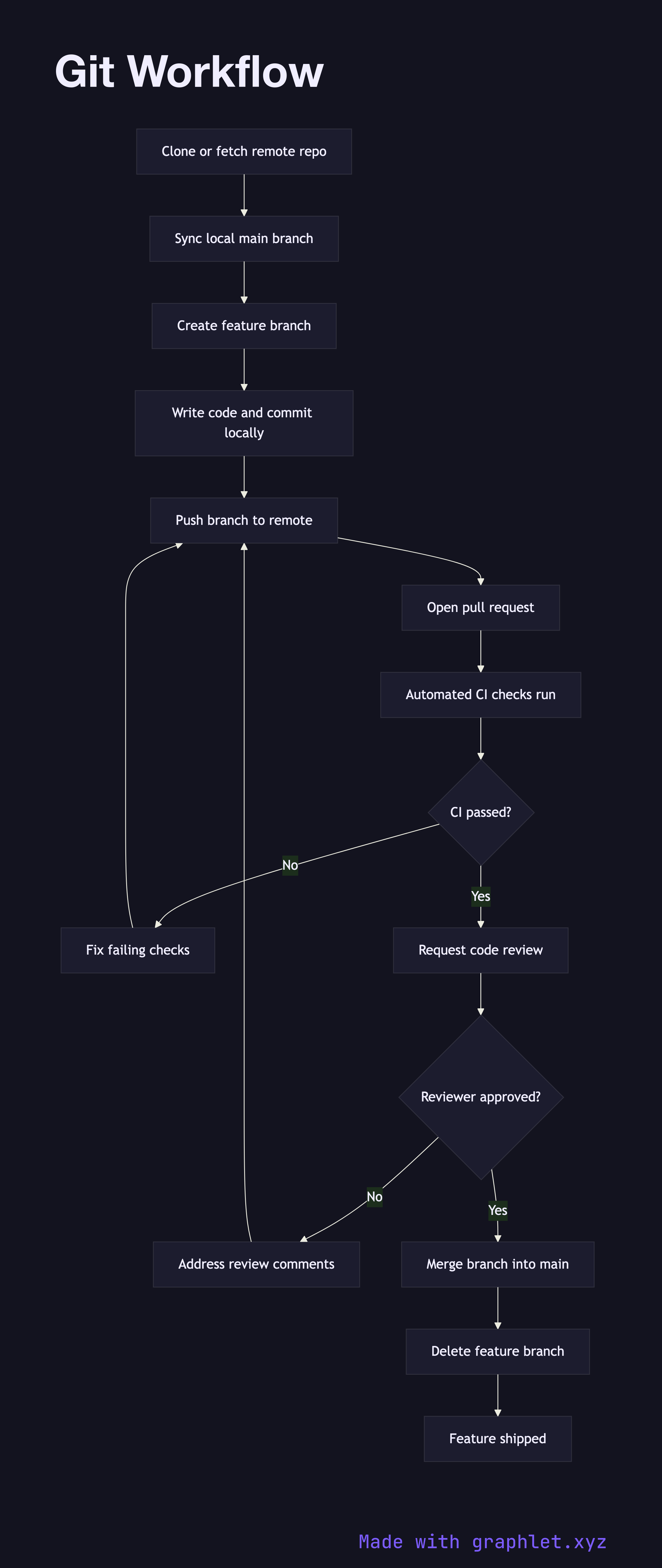
A Git workflow defines the conventions a development team follows for creating branches, committing code, reviewing changes, and integrating work into the main codebase — keeping collaboration structured and history clean.
How the workflow works
The workflow starts when a developer clones or fetches the latest state of the remote repository. Before beginning new work, they sync their local main branch to incorporate any changes merged by teammates since their last pull.
From the updated main, the developer creates a feature branch with a descriptive name tied to the issue or feature being implemented. All new commits happen on this branch, isolated from the shared mainline. This isolation means in-progress work never destabilizes the codebase for other developers.
Once the feature is ready, the developer pushes the branch to the remote repository and opens a pull request (see Pull Request Workflow). Automated CI checks run against the branch, and one or more reviewers inspect the diff, leave comments, and request changes. The developer addresses feedback with additional commits until the reviewer approves.
With approval and green CI status, the branch is merged into main — typically via a squash or rebase merge to keep the history linear. After merging, the feature branch is deleted from both remote and local environments to keep the branch namespace tidy. The Git Branch Strategy diagram shows how long-lived branches like develop, release, and hotfix fit into this pattern.