CI Pipeline
A CI (Continuous Integration) pipeline is an automated sequence of steps that validates every code change committed to a shared repository — catching bugs early before they reach production.
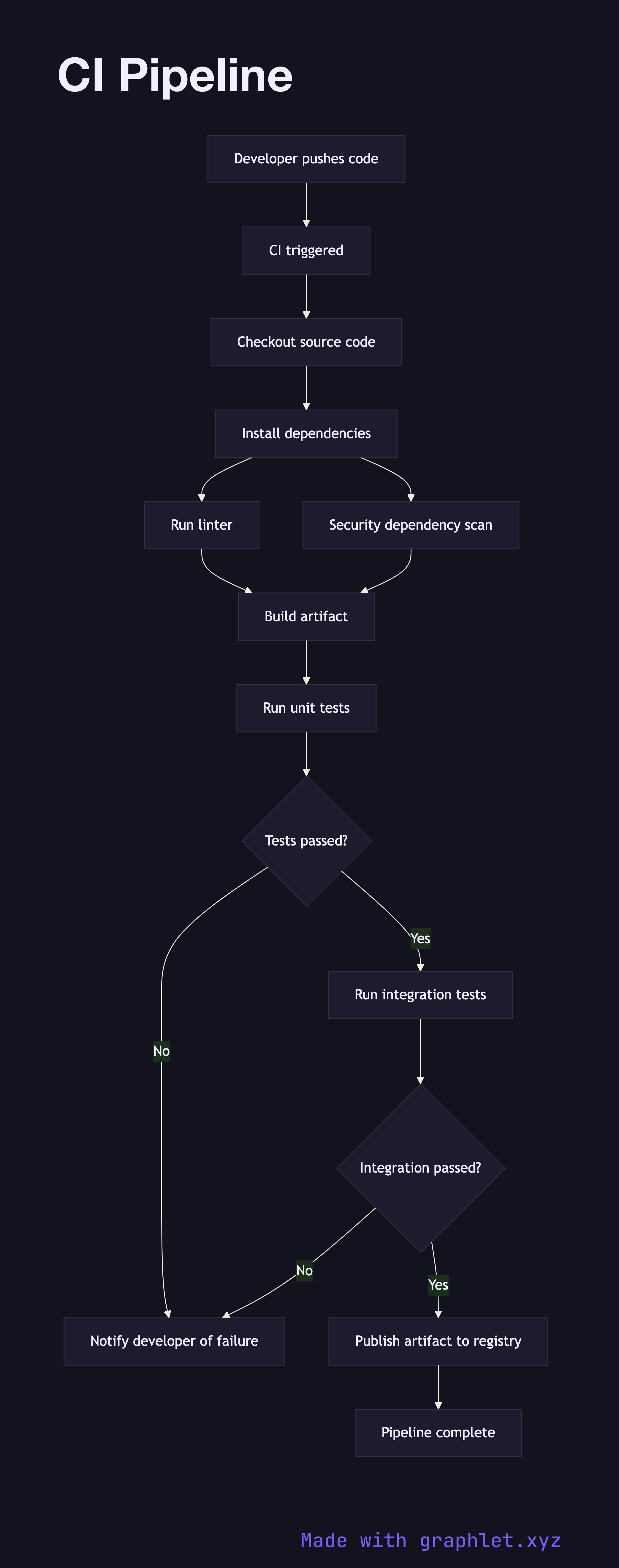
A CI (Continuous Integration) pipeline is an automated sequence of steps that validates every code change committed to a shared repository — catching bugs early before they reach production.
How the pipeline works
When a developer pushes a commit or opens a pull request, the CI system is triggered automatically. The pipeline begins by checking out the latest source code from the repository and installing the project's dependencies. This ensures the build environment is clean and reproducible on every run.
Next, static analysis tools run in parallel or sequence: a linter enforces code style and catches obvious errors, and a security scanner identifies known vulnerable dependencies. These fast-failing steps provide developers with rapid feedback without waiting for a full build.
Once the code passes static checks, the pipeline compiles or bundles the application into an artifact. Unit tests run against this build, validating individual functions and modules in isolation. If any test fails, the pipeline halts and sends a failure notification directly to the author — via Slack, email, or a PR status check — so the issue is caught while context is fresh.
Assuming unit tests pass, integration tests run next. These exercise the application against real or in-memory dependencies (databases, queues, external APIs) to validate that components work together correctly. A final decision gate evaluates the outcome: if all checks pass, the build artifact is published to an artifact registry for downstream use by the CD Pipeline; if anything fails, the developer is notified with a link to the failing step.
Why CI matters
Without CI, integration bugs accumulate between developers working in parallel. CI pipelines enforce a consistent quality gate on every change, making it safe to merge frequently and reducing the cost of fixing defects. Combined with a Build Pipeline and Pull Request Workflow, CI forms the foundation of reliable software delivery.