Pull Request Workflow
A pull request (PR) workflow is the structured process by which a developer proposes code changes, triggers automated validation, and obtains peer review before merging into the shared codebase.
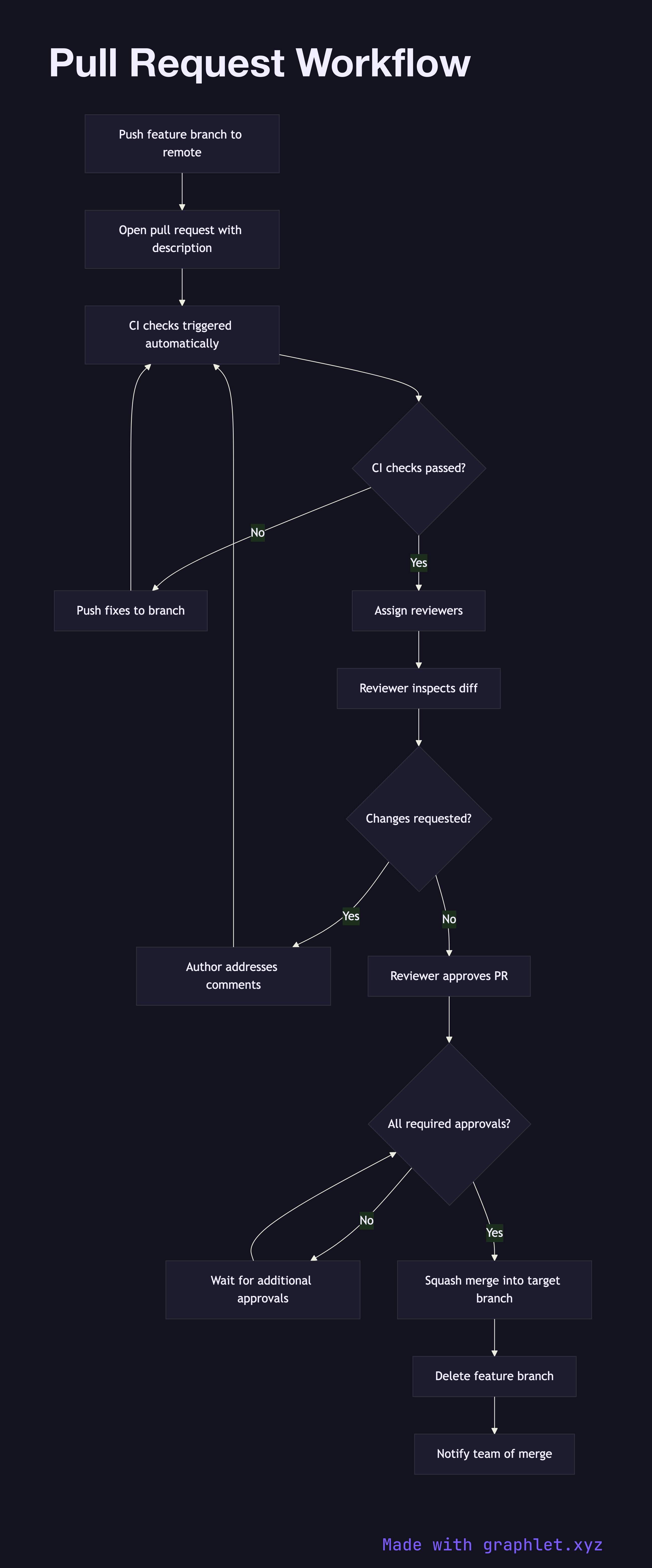
A pull request (PR) workflow is the structured process by which a developer proposes code changes, triggers automated validation, and obtains peer review before merging into the shared codebase.
How the workflow works
The workflow begins when a developer pushes a feature branch to the remote repository and opens a pull request against the target branch (usually main or develop). Opening the PR fills in a template: a description of what changed, why the change was made, and a link to the related issue or ticket. This context is essential for reviewers to evaluate the change efficiently.
Immediately on PR creation, the CI system runs the full automated check suite — linting, unit tests, integration tests, and any required security scans (see CI Pipeline). The PR is blocked from merging until all required checks pass. This gate prevents broken code from entering the review queue, saving reviewer time.
With green CI, one or more required reviewers are assigned. Reviewers examine the diff, run the code locally if needed, and leave line-level comments. The author iterates: pushing additional commits to address feedback, which triggers another CI run. This loop continues until the reviewer is satisfied and approves.
Some teams require a second reviewer or a specific role (tech lead, security engineer) to approve changes touching sensitive paths. Once all required approvals are collected and CI is green, the PR can be merged. Most teams use squash merge to produce a single clean commit on the target branch, followed by branch deletion.
The resulting merge commit is the foundation for the CD Pipeline to pick up and deliver to production.