Browser Caching Strategy
Browser caching strategy refers to the set of HTTP headers and browser behaviors that determine whether a resource is served from a local cache or re-fetched from the network — directly controlling load times and bandwidth usage.
Browser caching strategy refers to the set of HTTP headers and browser behaviors that determine whether a resource is served from a local cache or re-fetched from the network — directly controlling load times and bandwidth usage.
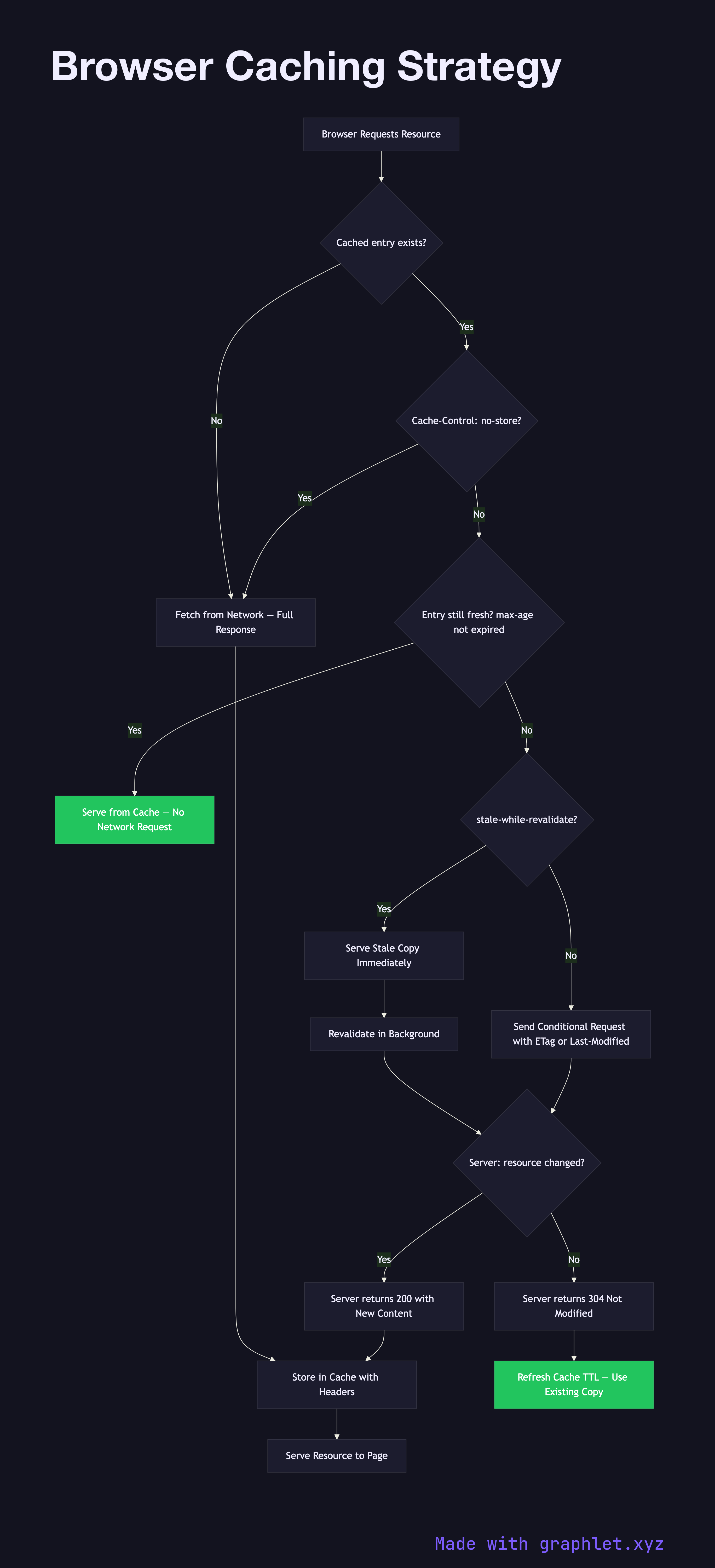
When the browser requests a resource (a JS bundle, CSS file, image, API response), it first checks its HTTP cache. If a cached entry exists, the browser evaluates its freshness using the Cache-Control header set by the server. The max-age directive specifies how many seconds the cached copy is considered fresh; during this window, the browser serves the resource entirely from cache with no network request. This is why hashed asset filenames (like main.a3f7c9.js) are used with long max-age values — the hash changes when content changes, busting the cache.
Once max-age expires, the cached copy is stale. The browser sends a conditional request to the server using either the If-None-Match header (comparing against the ETag value stored with the cached response) or the If-Modified-Since header. If the server determines the resource hasn't changed, it responds with 304 Not Modified and no body — the browser uses the existing cached copy, updating its freshness timer. If the resource has changed, the server responds with 200 OK and the new content.
Cache-Control: no-cache is often misunderstood — it does not prevent caching; it requires the browser to revalidate with the server on every request (similar to a stale-then-check flow). Cache-Control: no-store actually prevents caching entirely and is appropriate for sensitive data like authentication tokens.
The stale-while-revalidate directive allows the browser to serve a stale cached copy immediately while fetching a fresh version in the background — a useful tradeoff for resources where slight staleness is acceptable but speed is important. For service-worker-controlled caching strategies that give developers finer control, see Service Worker Lifecycle and Offline First App Flow. See also Web Performance Optimization for how caching fits into a broader performance budget.