diagram.mmd — state
Service Worker Lifecycle state diagram

The service worker lifecycle is the sequence of states a service worker script passes through from initial registration to becoming the active controller of a web page's network requests.
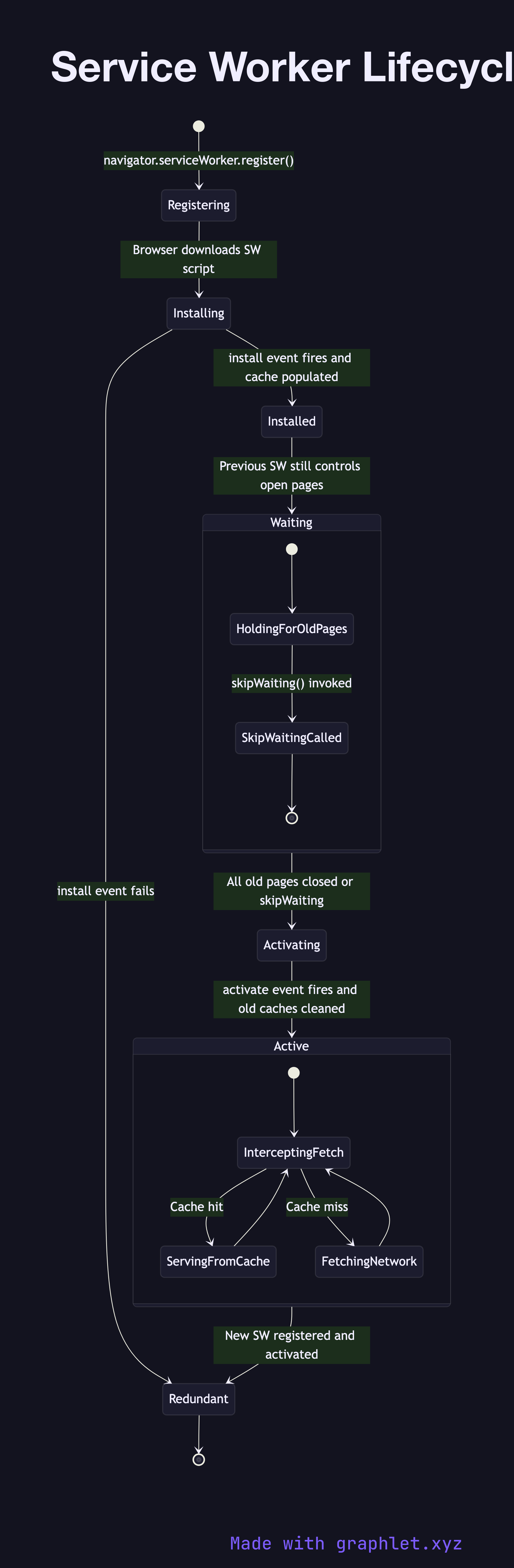
A service worker is a JavaScript file that runs in a separate worker thread with no DOM access and acts as a network proxy between the browser and the server. Its primary uses are enabling offline functionality, caching assets for instant repeat loads, and push notifications. The lifecycle is deliberately cautious — a new service worker does not immediately replace the previous one to avoid breaking pages currently open in the browser.

The lifecycle begins with registration via navigator.serviceWorker.register('/sw.js'). The browser downloads the script and moves it to the installing state, where the install event fires. This is the critical caching step: the install handler typically calls caches.open() and pre-caches the app shell (HTML, CSS, JS files) using the Cache Storage API. If any file in the pre-cache list fails to download, installation fails and the service worker returns to redundant state.

After a successful install, the service worker enters the waiting (installed) state. It stays here as long as any open page in the browser is still controlled by the *previous* service worker. The new version takes over only when all such pages are closed or when skipWaiting() is called explicitly. This prevents mismatched asset versions between the old service worker's cached responses and the new page's expectations.

Once no other service worker controls any open page, the new worker activates. The activate event is the correct place to clean up old caches from the previous version. After activation, the service worker enters the active state and intercepts all fetch events from controlled pages. See Offline First App Flow for how an active service worker handles cache-vs-network decisions per request.

Free online editor
Edit this diagram in Graphlet
Fork, modify, and export to SVG or PNG. No sign-up required.
Open in Graphlet →

Frequently asked questions

The service worker lifecycle is the sequence of states a service worker script passes through after registration: downloading and installing (where it pre-caches assets), waiting (held back until existing controlled pages close), activating (where it cleans up old caches), and finally active (intercepting all fetch events from controlled pages).
During the `install` event, the service worker calls `caches.open()` and pre-caches the app shell. If any file fails to download, the entire installation fails and the worker reverts to redundant. After all controlled pages from the previous version are closed (or `skipWaiting()` is called), the worker transitions to `activating`, cleans up stale caches in the `activate` handler, then becomes the active controller.
`skipWaiting()` forces the new service worker to activate immediately without waiting for existing pages to close. Use it when you are confident the new version is fully backward-compatible with any open pages. Avoid it if the new service worker's cached assets are incompatible with a currently open page, as this can cause mismatched versions between the page's JavaScript and the service worker's cached responses.
Forgetting to clean up old caches in the `activate` event causes stale assets from previous versions to persist indefinitely. Not handling installation failures gracefully leaves users on a broken service worker. Using `skipWaiting` without understanding its implications can cause version mismatches. Registering the service worker at a scope narrower than the app's routes means some pages are not intercepted.
HTTP browser caching (`Cache-Control`, `ETag`) is controlled by response headers set by the server and managed automatically by the browser. Service worker caching is programmatic — developers write JavaScript to decide exactly which requests to intercept, which cache to store responses in, and which strategy (cache-first, network-first, etc.) to apply per resource. Service workers provide far more control but require explicit code to implement and maintain.
mermaid
stateDiagram-v2 [*] --> Registering : navigator.serviceWorker.register() Registering --> Installing : Browser downloads SW script Installing --> Installed : install event fires and cache populated Installing --> Redundant : install event fails Installed --> Waiting : Previous SW still controls open pages state Waiting { [*] --> HoldingForOldPages HoldingForOldPages --> SkipWaitingCalled : skipWaiting() invoked SkipWaitingCalled --> [*] } Waiting --> Activating : All old pages closed or skipWaiting Activating --> Active : activate event fires and old caches cleaned state Active { [*] --> InterceptingFetch InterceptingFetch --> ServingFromCache : Cache hit InterceptingFetch --> FetchingNetwork : Cache miss FetchingNetwork --> InterceptingFetch ServingFromCache --> InterceptingFetch } Active --> Redundant : New SW registered and activated Redundant --> [*]
Copied to clipboard